Compare commits
204 Commits
hackathon/
...
v10.4.3
| Author | SHA1 | Date | |
|---|---|---|---|

|
6e6fbf6a34 | ||
|
|
4d4cc11452 | ||
|
|
b49ed3d4c4 | ||
|
|
cbbd6b1f7f | ||

|
654db2500a | ||

|
46ed4f787f | ||
|
|
d05e50ee42 | ||

|
2fcd898227 | ||
|
|
1e0db5c631 | ||

|
803f7dd285 | ||
|
|
5435a8983b | ||
|
|
cc9b0fc049 | ||
|
|
98b2b9fc32 | ||
|
|
c4ab8b95d3 | ||
|
|
e2eae9bbff | ||
|
|
523131f0e4 | ||

|
18b2d1e63e | ||

|
5dfc92cdec | ||

|
edde0fa815 | ||
|
|
8e9b524b55 | ||
|
|
367051d038 | ||
|
|
3075d2d9a6 | ||
|
|
88930e7dee | ||
|
|
de23625b5d | ||

|
74c506771c | ||
|
|
28ce8360ab | ||
|
|
361bffd0fd | ||
|
|
892da04fd1 | ||

|
d35aec7beb | ||
|
|
e9c8f1186d | ||
|
|
849e1ef338 | ||
|
|
5685650754 | ||
|
|
cf070edc6c | ||
|
|
f5b545bf28 | ||
|
|
4b6b5a92ed | ||
|
|
58b3dd2fe7 | ||

|
7922b180fa | ||
|
|
879edcbc32 | ||
|
|
0ed766d9a1 | ||

|
26048baa0b | ||
|
|
6da802c275 | ||
|
|
2602409a3b | ||
|
|
f00fa30661 | ||
|
|
aefbefe524 | ||
|
|
d316bde11d | ||
|
|
8d43195b13 | ||
|
|
ffe9a5a0ae | ||
|
|
6d0b46f7d8 | ||
|
|
648b4a445e | ||
|
|
2619d47e9a | ||
|
|
da8b84dc28 | ||
|
|
2c66783f98 | ||
|
|
2530844825 | ||
|
|
6663747180 | ||
|
|
f4e1c28d9d | ||
|
|
3dc3cecc40 | ||
|
|
557b1f4ab9 | ||

|
e409b3c1d7 | ||
|
|
7499870cdd | ||
|
|
a7ce497ec2 | ||
|
|
7ebbf46399 | ||
|
|
7b49041a46 | ||

|
f5b230d995 | ||
|
|
701c851be7 | ||
|
|
d922afa346 | ||
|
|
dbac966482 | ||
|
|
22809dea50 | ||
|
|
7ceb112f37 | ||
|
|
f97672fc23 | ||
|
|
87f391e6b3 | ||
|
|
acb8d033ed | ||
|
|
5591796ba8 | ||
|
|
2c9344abfc | ||
|
|
46f63365c8 | ||
|
|
f7070df4d3 | ||
|
|
125ec4bdbb | ||
|
|
8358e3db22 | ||
|
|
1eab6e50c6 | ||

|
71bee5716b | ||
|
|
af94019e2a | ||

|
6b124e2031 | ||
|
|
8da97103ad | ||
|
|
d5e252f8e0 | ||
|
|
78e07dc609 | ||

|
726f38967c | ||
|
|
1565cc3ebd | ||
|
|
df08b7960a | ||
|
|
30100b2a46 | ||
|
|
0f779159c5 | ||

|
fe626877c7 | ||
|
|
5430b1412f | ||
|
|
eaf0dbe50d | ||
|
|
c5e9aa0b59 | ||
|
|
fef4ca3def | ||
|
|
e743c4a88d | ||
|
|
b1e4fc13aa | ||
|
|
d26a1454c8 | ||
|
|
b560729873 | ||
|
|
41d516639d | ||
|
|
3328ac8206 | ||
|
|
e1fc1e9a13 | ||
|
|
6a8944a76e | ||
|
|
01395e3291 | ||
|
|
6c09bfa2a0 | ||
|
|
a678a464be | ||
|
|
f04c5d39f5 | ||
|
|
75f5cee757 | ||
|
|
554cca4604 | ||
|
|
95604c1355 | ||
|
|
1aea2dd159 | ||
|
|
e9ea783846 | ||
|
|
00477e356b | ||
|
|
d94d597d84 | ||
|
|
04f6c66e91 | ||

|
d3ce857c0e | ||
|
|
d486fa87ab | ||
|
|
c17383d40b | ||
|
|
80ac64c540 | ||
|
|
d8c0674865 | ||

|
1e4235c106 | ||
|
|
591cb82b90 | ||
|
|
de5b771270 | ||
|
|
2fb6deb115 | ||
|
|
035e271bbf | ||

|
e258f2e4e1 | ||
|
|
7db05f5d38 | ||
|
|
0f1651658b | ||
|
|
17ab162a11 | ||
|
|
4b0a5f022f | ||
|
|
b946bcad5b | ||
|
|
54d6cb7e96 | ||
|
|
1cca6538b7 | ||
|
|
3f596e8e8c | ||
|
|
335aa31bde | ||
|
|
f4a9aa1171 | ||
|
|
1d73820ac7 | ||
|
|
45e78b36bf | ||
|
|
af6316a8f6 | ||
|
|
27107326d5 | ||
|
|
e865301665 | ||
|
|
0b50a9bfe3 | ||
|
|
1d582410ab | ||
|
|
0a0e9f70cd | ||
|
|
9bbd9cf4ca | ||
|
|
e430baa819 | ||
|
|
1b43fc90d4 | ||
|
|
ab89de7e85 | ||
|
|
5d46a9ca18 | ||
|
|
32e7839cb8 | ||
|
|
7f48c3168b | ||
|
|
980352f073 | ||
|
|
595d967d60 | ||
|
|
b30b93df2c | ||
|
|
5c2b7e5c62 | ||
|
|
ee475ad250 | ||
|
|
b78ecddf56 | ||
|
|
b48e2102b3 | ||
|
|
303a80cdb5 | ||
|
|
b379816be6 | ||
|
|
391a24025f | ||
|
|
fbd2400e4a | ||
|
|
f5271952d0 | ||
|
|
90b9cefd4b | ||
|
|
2c3f9581cf | ||
|
|
4d40128896 | ||
|
|
23320f3cab | ||

|
9dcf8e650f | ||
|
|
fa8a096438 | ||
|
|
3171158e44 | ||
|
|
906490eeac | ||

|
f2333ae807 | ||
|
|
deec5361b7 | ||

|
1c79d8e0c0 | ||
|
|
dcec8aafb7 | ||
|
|
c0da5fd7a5 | ||
|
|
d308b47e97 | ||
|
|
676fd4c08e | ||
|
|
6263884192 | ||
|
|
14982f1095 | ||
|
|
e31e447c5e | ||
|
|
e74ffd5817 | ||
|
|
cc010b657a | ||

|
a8ef92b04c | ||
|
|
f30ffd85fb | ||
|
|
01d742fd88 | ||
|
|
ceb30ce23c | ||
|
|
ff860eb5d0 | ||
|
|
8290d41f4b | ||
|
|
09663d856d | ||
|
|
58d6e0b3d2 | ||
|
|
dadc81b0e9 | ||
|
|
deb12d4e94 | ||
|
|
a0c2fb1b8c | ||
|
|
fed9e2f361 | ||
|
|
e229eef365 | ||
|
|
272ca9a46b | ||
|
|
13e7099cc3 | ||
|
|
e3d8fca42a | ||
|
|
fedf3e2e6e | ||
|
|
2fbc070fd1 | ||
|
|
6e7ba7c593 | ||
|
|
f6ab4e1323 | ||
|
|
8e9fb37451 | ||
|
|
e52118c7d1 |
@@ -4570,11 +4570,10 @@ exports[`better eslint`] = {
|
||||
[0, 0, 0, "Unexpected any. Specify a different type.", "0"],
|
||||
[0, 0, 0, "Unexpected any. Specify a different type.", "1"],
|
||||
[0, 0, 0, "Unexpected any. Specify a different type.", "2"],
|
||||
[0, 0, 0, "Do not use any type assertions.", "3"],
|
||||
[0, 0, 0, "Unexpected any. Specify a different type.", "3"],
|
||||
[0, 0, 0, "Unexpected any. Specify a different type.", "4"],
|
||||
[0, 0, 0, "Unexpected any. Specify a different type.", "5"],
|
||||
[0, 0, 0, "Unexpected any. Specify a different type.", "6"],
|
||||
[0, 0, 0, "Do not use any type assertions.", "7"]
|
||||
[0, 0, 0, "Do not use any type assertions.", "6"]
|
||||
],
|
||||
"public/app/features/visualization/data-hover/DataHoverRows.tsx:5381": [
|
||||
[0, 0, 0, "Styles should be written using objects.", "0"]
|
||||
|
||||
272
.drone.yml
272
.drone.yml
File diff suppressed because it is too large
Load Diff
4
.github/bot.md
vendored
4
.github/bot.md
vendored
@@ -9,8 +9,8 @@ Comment commands:
|
||||
|
||||
Label commands:
|
||||
|
||||
* Add label `bot/question` the the bot will close with standard question message and add label `type/question`
|
||||
* Add label `bot/duplicate` the the bot will close with standard duplicate message and add label `type/duplicate`
|
||||
* Add label `bot/question` the bot will close with standard question message and add label `type/question`
|
||||
* Add label `bot/duplicate` the bot will close with standard duplicate message and add label `type/duplicate`
|
||||
* Add label `bot/needs more info` for bot to request more info (or use comment command mentioned above)
|
||||
* Add label `bot/close feature request` for bot to close a feature request with standard message and adds label `not implemented`
|
||||
* Add label `bot/no new info` for bot to close an issue where we asked for more info but has not received any updates in at least 14 days.
|
||||
|
||||
2
.github/workflows/alerting-swagger-gen.yml
vendored
2
.github/workflows/alerting-swagger-gen.yml
vendored
@@ -16,7 +16,7 @@ jobs:
|
||||
- name: Set go version
|
||||
uses: actions/setup-go@v4
|
||||
with:
|
||||
go-version: '1.21.6'
|
||||
go-version: '1.21.10'
|
||||
- name: Build swagger
|
||||
run: |
|
||||
make -C pkg/services/ngalert/api/tooling post.json api.json
|
||||
|
||||
2
.github/workflows/codeql-analysis.yml
vendored
2
.github/workflows/codeql-analysis.yml
vendored
@@ -47,7 +47,7 @@ jobs:
|
||||
name: Set go version
|
||||
uses: actions/setup-go@v4
|
||||
with:
|
||||
go-version: '1.21.6'
|
||||
go-version: '1.21.10'
|
||||
|
||||
# Initializes the CodeQL tools for scanning.
|
||||
- name: Initialize CodeQL
|
||||
|
||||
2
.github/workflows/doc-validator.yml
vendored
2
.github/workflows/doc-validator.yml
vendored
@@ -7,7 +7,7 @@ jobs:
|
||||
doc-validator:
|
||||
runs-on: "ubuntu-latest"
|
||||
container:
|
||||
image: "grafana/doc-validator:v4.0.0"
|
||||
image: "grafana/doc-validator:v5.0.0"
|
||||
steps:
|
||||
- name: "Checkout code"
|
||||
uses: "actions/checkout@v4"
|
||||
|
||||
2
.github/workflows/pr-codeql-analysis-go.yml
vendored
2
.github/workflows/pr-codeql-analysis-go.yml
vendored
@@ -35,7 +35,7 @@ jobs:
|
||||
- name: Set go version
|
||||
uses: actions/setup-go@v4
|
||||
with:
|
||||
go-version: '1.21.6'
|
||||
go-version: '1.21.10'
|
||||
|
||||
# Initializes the CodeQL tools for scanning.
|
||||
- name: Initialize CodeQL
|
||||
|
||||
2
.github/workflows/publish-kinds-next.yml
vendored
2
.github/workflows/publish-kinds-next.yml
vendored
@@ -36,7 +36,7 @@ jobs:
|
||||
- name: "Setup Go"
|
||||
uses: "actions/setup-go@v4"
|
||||
with:
|
||||
go-version: '1.21.6'
|
||||
go-version: '1.21.10'
|
||||
|
||||
- name: "Verify kinds"
|
||||
run: go run .github/workflows/scripts/kinds/verify-kinds.go
|
||||
|
||||
2
.github/workflows/publish-kinds-release.yml
vendored
2
.github/workflows/publish-kinds-release.yml
vendored
@@ -39,7 +39,7 @@ jobs:
|
||||
- name: "Setup Go"
|
||||
uses: "actions/setup-go@v4"
|
||||
with:
|
||||
go-version: '1.21.6'
|
||||
go-version: '1.21.10'
|
||||
|
||||
- name: "Verify kinds"
|
||||
run: go run .github/workflows/scripts/kinds/verify-kinds.go
|
||||
|
||||
2
.github/workflows/verify-kinds.yml
vendored
2
.github/workflows/verify-kinds.yml
vendored
@@ -18,7 +18,7 @@ jobs:
|
||||
- name: "Setup Go"
|
||||
uses: "actions/setup-go@v4"
|
||||
with:
|
||||
go-version: '1.21.6'
|
||||
go-version: '1.21.10'
|
||||
|
||||
- name: "Verify kinds"
|
||||
run: go run .github/workflows/scripts/kinds/verify-kinds.go
|
||||
|
||||
525
CHANGELOG.md
525
CHANGELOG.md
@@ -1,3 +1,528 @@
|
||||
<!-- 11.0.0-preview START -->
|
||||
|
||||
# 11.0.0-preview
|
||||
|
||||
### Features and enhancements
|
||||
|
||||
- **Alerting:** Editor role can access all provisioning API. [#85022](https://github.com/grafana/grafana/issues/85022), [@yuri-tceretian](https://github.com/yuri-tceretian)
|
||||
- **CloudWatch:** Add additional AWS/SageMaker metrics. [#85009](https://github.com/grafana/grafana/issues/85009), [@tristanburgess](https://github.com/tristanburgess)
|
||||
- **SQLStore:** Enable migration locking by default. [#84983](https://github.com/grafana/grafana/issues/84983), [@papagian](https://github.com/papagian)
|
||||
- **Auth:** Remove `oauth_skip_org_role_update_sync` as an option. [#84972](https://github.com/grafana/grafana/issues/84972), [@eleijonmarck](https://github.com/eleijonmarck)
|
||||
- **Canvas:** Add "infinite" pan / zoom functionality. [#84968](https://github.com/grafana/grafana/issues/84968), [@nmarrs](https://github.com/nmarrs)
|
||||
- **InteractiveTable:** Add expand all to column. [#84966](https://github.com/grafana/grafana/issues/84966), [@abannachGrafana](https://github.com/abannachGrafana)
|
||||
- **Snapshots:** Viewers can not create a Snapshot. [#84952](https://github.com/grafana/grafana/issues/84952), [@evictorero](https://github.com/evictorero)
|
||||
- **GenAI:** Autogenerate title and description for panels and dashboards. [#84933](https://github.com/grafana/grafana/issues/84933), [@ivanortegaalba](https://github.com/ivanortegaalba)
|
||||
- **Canvas:** Add corner radius option. [#84873](https://github.com/grafana/grafana/issues/84873), [@drew08t](https://github.com/drew08t)
|
||||
- **Alerting:** Enable simplified routing FF by default. [#84856](https://github.com/grafana/grafana/issues/84856), [@JacobsonMT](https://github.com/JacobsonMT)
|
||||
- **Auth:** Enable case insensitive logins/emails by default. [#84840](https://github.com/grafana/grafana/issues/84840), [@eleijonmarck](https://github.com/eleijonmarck)
|
||||
- **RBAC:** Enable annotation permission update by default. [#84787](https://github.com/grafana/grafana/issues/84787), [@IevaVasiljeva](https://github.com/IevaVasiljeva)
|
||||
- **Azure:** Support multi-resource namespace (NetApp Volumes). [#84779](https://github.com/grafana/grafana/issues/84779), [@aangelisc](https://github.com/aangelisc)
|
||||
- **Prometheus:** Default support labels value endpoint with match param when prom type and version not set. [#84778](https://github.com/grafana/grafana/issues/84778), [@bohandley](https://github.com/bohandley)
|
||||
- **MSSQL:** Add Windows AD/Kerberos auth. [#84742](https://github.com/grafana/grafana/issues/84742), [@asimpson](https://github.com/asimpson)
|
||||
- **Chore:** Disable angular support by default. [#84738](https://github.com/grafana/grafana/issues/84738), [@tolzhabayev](https://github.com/tolzhabayev)
|
||||
- **Elasticsearch:** Remove xpack button and make includeFrozen not dependant on it. [#84734](https://github.com/grafana/grafana/issues/84734), [@ivanahuckova](https://github.com/ivanahuckova)
|
||||
- **Plugins:** Enable feature toggle `pluginsDynamicAngularDetectionPatterns` by default. [#84723](https://github.com/grafana/grafana/issues/84723), [@xnyo](https://github.com/xnyo)
|
||||
- **Plugins:** Enable managedPluginsInstall by default. [#84721](https://github.com/grafana/grafana/issues/84721), [@oshirohugo](https://github.com/oshirohugo)
|
||||
- **Alerting:** Stop persisting silences and nflog to disk. [#84706](https://github.com/grafana/grafana/issues/84706), [@JacobsonMT](https://github.com/JacobsonMT)
|
||||
- **Histogram:** Add support for stacking mode. [#84693](https://github.com/grafana/grafana/issues/84693), [@adela-almasan](https://github.com/adela-almasan)
|
||||
- **Datasource:** Change query filtering. [#84656](https://github.com/grafana/grafana/issues/84656), [@sunker](https://github.com/sunker)
|
||||
- **Feature toggles:** Remove redshiftAsyncQueryDataSupport and athenaAsyncQueryDataSupport feature toggles. [#84653](https://github.com/grafana/grafana/issues/84653), [@idastambuk](https://github.com/idastambuk)
|
||||
- **Teams:** Display teams page to team reader if they also have the access to list team permissions. [#84650](https://github.com/grafana/grafana/issues/84650), [@IevaVasiljeva](https://github.com/IevaVasiljeva)
|
||||
- **Plugins:** Enable feature toggle `enablePluginsTracingByDefault` by default. [#84645](https://github.com/grafana/grafana/issues/84645), [@xnyo](https://github.com/xnyo)
|
||||
- **NestedFolders:** Enable nested folders by default. [#84631](https://github.com/grafana/grafana/issues/84631), [@zserge](https://github.com/zserge)
|
||||
- **Canvas:** Add direction options for connections. [#84620](https://github.com/grafana/grafana/issues/84620), [@drew08t](https://github.com/drew08t)
|
||||
- **CloudWatch:** Static labels should use label name. [#84611](https://github.com/grafana/grafana/issues/84611), [@iwysiu](https://github.com/iwysiu)
|
||||
- **Tempo:** Deprecate old search. [#84498](https://github.com/grafana/grafana/issues/84498), [@joey-grafana](https://github.com/joey-grafana)
|
||||
- **Canvas:** Support dashed connection lines. [#84496](https://github.com/grafana/grafana/issues/84496), [@Develer](https://github.com/Develer)
|
||||
- **I18n:** Add Brazilian Portuguese. [#84461](https://github.com/grafana/grafana/issues/84461), [@joshhunt](https://github.com/joshhunt)
|
||||
- **I18n:** Expose current UI language in @grafana/runtime config. [#84457](https://github.com/grafana/grafana/issues/84457), [@joshhunt](https://github.com/joshhunt)
|
||||
- **Canvas:** Add snapping to vertex edit. [#84417](https://github.com/grafana/grafana/issues/84417), [@drew08t](https://github.com/drew08t)
|
||||
- **CloudWatch Logs:** Remove toggle for cloudWatchLogsMonacoEditor. [#84414](https://github.com/grafana/grafana/issues/84414), [@iwysiu](https://github.com/iwysiu)
|
||||
- **Prometheus:** Use frontend package in Prometheus DS with a feature toggle. [#84397](https://github.com/grafana/grafana/issues/84397), [@bohandley](https://github.com/bohandley)
|
||||
- **Alerting:** Show error message when error is thrown after clicking create alert f…. [#84367](https://github.com/grafana/grafana/issues/84367), [@soniaAguilarPeiron](https://github.com/soniaAguilarPeiron)
|
||||
- **Tempo:** Remove Loki tab. [#84346](https://github.com/grafana/grafana/issues/84346), [@joey-grafana](https://github.com/joey-grafana)
|
||||
- **Storage:** Add support for listing resource history. [#84331](https://github.com/grafana/grafana/issues/84331), [@DanCech](https://github.com/DanCech)
|
||||
- **Cloudwatch:** Remove cloudWatchWildCardDimensionValues feature toggle. [#84329](https://github.com/grafana/grafana/issues/84329), [@iwysiu](https://github.com/iwysiu)
|
||||
- **Plugin Extensions:** Add prop types to component extensions. [#84295](https://github.com/grafana/grafana/issues/84295), [@leventebalogh](https://github.com/leventebalogh)
|
||||
- **Canvas:** New basic elements. [#84205](https://github.com/grafana/grafana/issues/84205), [@Develer](https://github.com/Develer)
|
||||
- **Tempo:** Update TraceQLStreaming feature toggle stage. [#84203](https://github.com/grafana/grafana/issues/84203), [@joey-grafana](https://github.com/joey-grafana)
|
||||
- **Canvas:** Add universal data link support. [#84142](https://github.com/grafana/grafana/issues/84142), [@nmarrs](https://github.com/nmarrs)
|
||||
- **Chore:** Remove repetitive words. [#84132](https://github.com/grafana/grafana/issues/84132), [@carrychair](https://github.com/carrychair)
|
||||
- **Documentation:** Updated yaml for influxdb data sources. [#84119](https://github.com/grafana/grafana/issues/84119), [@ldomesjo](https://github.com/ldomesjo)
|
||||
- **Queries:** Improve debug logging of metrics queries. [#84048](https://github.com/grafana/grafana/issues/84048), [@mmandrus](https://github.com/mmandrus)
|
||||
- **Storage:** Support listing deleted entities. [#84043](https://github.com/grafana/grafana/issues/84043), [@DanCech](https://github.com/DanCech)
|
||||
- **Explore:** Remove deprecated `query` option from `splitOpen`. [#83973](https://github.com/grafana/grafana/issues/83973), [@Elfo404](https://github.com/Elfo404)
|
||||
- **Chore:** Remove deprecated ExploreQueryFieldProps. [#83972](https://github.com/grafana/grafana/issues/83972), [@Elfo404](https://github.com/Elfo404)
|
||||
- **Chore:** Remove deprecated exploreId from QueryEditorProps. [#83971](https://github.com/grafana/grafana/issues/83971), [@Elfo404](https://github.com/Elfo404)
|
||||
- **Alerting:** Disallow invalid rule namespace UIDs in provisioning API. [#83938](https://github.com/grafana/grafana/issues/83938), [@rwwiv](https://github.com/rwwiv)
|
||||
- **Auth:** Set the default org after User login. [#83918](https://github.com/grafana/grafana/issues/83918), [@mgyongyosi](https://github.com/mgyongyosi)
|
||||
- **Canvas:** Add datalink support to rectangle and ellipse elements. [#83870](https://github.com/grafana/grafana/issues/83870), [@nmarrs](https://github.com/nmarrs)
|
||||
- **NodeGraph:** Edge color and stroke-dasharray support. [#83855](https://github.com/grafana/grafana/issues/83855), [@morrro01](https://github.com/morrro01)
|
||||
- **InfluxDB:** Add configuration option for enabling insecure gRPC connections. [#83834](https://github.com/grafana/grafana/issues/83834), [@jmickey](https://github.com/jmickey)
|
||||
- **Plugins:** Fetch instance provisioned plugins in cloud, to check full installation. [#83784](https://github.com/grafana/grafana/issues/83784), [@oshirohugo](https://github.com/oshirohugo)
|
||||
- **Alerting:** Implement correct RBAC checks for creating new notification templates. [#83767](https://github.com/grafana/grafana/issues/83767), [@gillesdemey](https://github.com/gillesdemey)
|
||||
- **Library panels:** Ensure all filters are visible on mobile . [#83759](https://github.com/grafana/grafana/issues/83759), [@ashharrison90](https://github.com/ashharrison90)
|
||||
- **AuthProxy:** Allow disabling Auth Proxy cache. [#83755](https://github.com/grafana/grafana/issues/83755), [@Jguer](https://github.com/Jguer)
|
||||
- **Switch:** Remove "transparent" prop. [#83705](https://github.com/grafana/grafana/issues/83705), [@Clarity-89](https://github.com/Clarity-89)
|
||||
- **Alerting:** Allow inserting before or after existing policy. [#83704](https://github.com/grafana/grafana/issues/83704), [@gillesdemey](https://github.com/gillesdemey)
|
||||
- **Chore:** Taint ArrayVector with `never` to further discourage. [#83681](https://github.com/grafana/grafana/issues/83681), [@joshhunt](https://github.com/joshhunt)
|
||||
- **Alerting:** Remove legacy alerting. [#83671](https://github.com/grafana/grafana/issues/83671), [@gillesdemey](https://github.com/gillesdemey)
|
||||
- **Canvas:** Add vertex control to connections. [#83653](https://github.com/grafana/grafana/issues/83653), [@drew08t](https://github.com/drew08t)
|
||||
- **Alerting:** Disable legacy alerting for ever. [#83651](https://github.com/grafana/grafana/issues/83651), [@yuri-tceretian](https://github.com/yuri-tceretian)
|
||||
- **Table:** Preserve filtered value state. [#83631](https://github.com/grafana/grafana/issues/83631), [@codeincarnate](https://github.com/codeincarnate)
|
||||
- **Canvas:** Add ability to edit selected connections in the inline editor. [#83625](https://github.com/grafana/grafana/issues/83625), [@nmarrs](https://github.com/nmarrs)
|
||||
- **Auth:** Add all settings to Azure AD SSO config UI. [#83618](https://github.com/grafana/grafana/issues/83618), [@mgyongyosi](https://github.com/mgyongyosi)
|
||||
- **Cfg:** Add a setting to configure if the local file system is available. [#83616](https://github.com/grafana/grafana/issues/83616), [@mgyongyosi](https://github.com/mgyongyosi)
|
||||
- **Server:** Reload TLS certs without a server restart. [#83589](https://github.com/grafana/grafana/issues/83589), [@chalapat](https://github.com/chalapat)
|
||||
- **Accessibility:** Improve landmark markup. [#83576](https://github.com/grafana/grafana/issues/83576), [@tskarhed](https://github.com/tskarhed)
|
||||
- **Snapshots:** Change default expiration. [#83550](https://github.com/grafana/grafana/issues/83550), [@evictorero](https://github.com/evictorero)
|
||||
- **Transformations:** Add substring matcher to the 'Filter by Value' transformation. [#83548](https://github.com/grafana/grafana/issues/83548), [@timlevett](https://github.com/timlevett)
|
||||
- **Folders:** Allow listing folders with write permission. [#83527](https://github.com/grafana/grafana/issues/83527), [@papagian](https://github.com/papagian)
|
||||
- **Chore:** Remove React 17 peer deps. [#83524](https://github.com/grafana/grafana/issues/83524), [@ashharrison90](https://github.com/ashharrison90)
|
||||
- **Alerting:** Support deleting rule groups in the provisioning API. [#83514](https://github.com/grafana/grafana/issues/83514), [@joeblubaugh](https://github.com/joeblubaugh)
|
||||
- **Cloudwatch:** Bump grafana/aws-sdk-go to 0.24.0. [#83480](https://github.com/grafana/grafana/issues/83480), [@idastambuk](https://github.com/idastambuk)
|
||||
- **Alerting:** Stop persisting user-defined templates to disk. [#83456](https://github.com/grafana/grafana/issues/83456), [@JacobsonMT](https://github.com/JacobsonMT)
|
||||
- **Transformer:** Config from Query: set threshold colours. [#83366](https://github.com/grafana/grafana/issues/83366), [@LarsStegman](https://github.com/LarsStegman)
|
||||
- **CloudWatch:** Refactor "getDimensionValuesForWildcards". [#83335](https://github.com/grafana/grafana/issues/83335), [@iwysiu](https://github.com/iwysiu)
|
||||
- **CloudWatch:** Fetch externalId from settings instead of env. [#83332](https://github.com/grafana/grafana/issues/83332), [@iwysiu](https://github.com/iwysiu)
|
||||
- **Tracing:** Add node graph panel suggestion. [#83311](https://github.com/grafana/grafana/issues/83311), [@joey-grafana](https://github.com/joey-grafana)
|
||||
- **Canvas:** Add ability to rotate elements. [#83295](https://github.com/grafana/grafana/issues/83295), [@nmarrs](https://github.com/nmarrs)
|
||||
- **Tempo:** Add support for ad-hoc filters. [#83290](https://github.com/grafana/grafana/issues/83290), [@joey-grafana](https://github.com/joey-grafana)
|
||||
- **DataTrails:** Sticky controls. [#83286](https://github.com/grafana/grafana/issues/83286), [@torkelo](https://github.com/torkelo)
|
||||
- **CloudWatch:** Move SessionCache onto the instance. [#83278](https://github.com/grafana/grafana/issues/83278), [@iwysiu](https://github.com/iwysiu)
|
||||
- **Alerting:** Deprecate max_annotations_to_keep and max_annotation_age in [alerting] configuration section. [#83266](https://github.com/grafana/grafana/issues/83266), [@yuri-tceretian](https://github.com/yuri-tceretian)
|
||||
- **Annotation query:** Render query result in alert box. [#83230](https://github.com/grafana/grafana/issues/83230), [@sunker](https://github.com/sunker)
|
||||
- **Chore:** Query oauth info from a new instance. [#83229](https://github.com/grafana/grafana/issues/83229), [@linoman](https://github.com/linoman)
|
||||
- **CloudWatch:** Add Firehose kms-related metrics. [#83192](https://github.com/grafana/grafana/issues/83192), [@thepalbi](https://github.com/thepalbi)
|
||||
- **Chore:** Add go workspace. [#83191](https://github.com/grafana/grafana/issues/83191), [@toddtreece](https://github.com/toddtreece)
|
||||
- **Accessibility:** Improve HelpModal markup. [#83171](https://github.com/grafana/grafana/issues/83171), [@tskarhed](https://github.com/tskarhed)
|
||||
- **Chore:** Delete Input Datasource. [#83163](https://github.com/grafana/grafana/issues/83163), [@jackw](https://github.com/jackw)
|
||||
- **Traces:** Add traces panel suggestion. [#83089](https://github.com/grafana/grafana/issues/83089), [@joey-grafana](https://github.com/joey-grafana)
|
||||
- **CloudWatch:** Update AWS/EC2 metrics. [#83039](https://github.com/grafana/grafana/issues/83039), [@jangaraj](https://github.com/jangaraj)
|
||||
- **CloudWatch:** Update AWS/Lambda metrics. [#83038](https://github.com/grafana/grafana/issues/83038), [@jangaraj](https://github.com/jangaraj)
|
||||
- **CloudWatch:** Update AWS/ES metrics. [#83037](https://github.com/grafana/grafana/issues/83037), [@jangaraj](https://github.com/jangaraj)
|
||||
- **CloudWatch:** Update AWS/AutoScaling metrics. [#83036](https://github.com/grafana/grafana/issues/83036), [@jangaraj](https://github.com/jangaraj)
|
||||
- **CloudWatch:** Update AWS/Kafka metrics. [#83035](https://github.com/grafana/grafana/issues/83035), [@jangaraj](https://github.com/jangaraj)
|
||||
- **Page:** Use browser native scrollbars for the main page content. [#82919](https://github.com/grafana/grafana/issues/82919), [@joshhunt](https://github.com/joshhunt)
|
||||
- **Parca:** Apply template variables for labelSelector in query. [#82910](https://github.com/grafana/grafana/issues/82910), [@lzakharov](https://github.com/lzakharov)
|
||||
- **Grafana/UI:** Replace Splitter with useSplitter hook and refactor PanelEdit snapping logic to useSnappingSplitter hook . [#82895](https://github.com/grafana/grafana/issues/82895), [@torkelo](https://github.com/torkelo)
|
||||
- **Cloudwatch:** Add linting to restrict imports from core. [#82538](https://github.com/grafana/grafana/issues/82538), [@idastambuk](https://github.com/idastambuk)
|
||||
- **Grafana/icons:** Add icons package. [#82314](https://github.com/grafana/grafana/issues/82314), [@Clarity-89](https://github.com/Clarity-89)
|
||||
- **Storage:** Watch support. [#82282](https://github.com/grafana/grafana/issues/82282), [@DanCech](https://github.com/DanCech)
|
||||
- **Image Rendering:** Add settings for default width, height and scale. [#82040](https://github.com/grafana/grafana/issues/82040), [@khushijain21](https://github.com/khushijain21)
|
||||
- **AzureMonitor:** User authentication support. [#81918](https://github.com/grafana/grafana/issues/81918), [@aangelisc](https://github.com/aangelisc)
|
||||
- **Plugins:** Disable uninstall while cloud uninstall is not completed. [#81907](https://github.com/grafana/grafana/issues/81907), [@oshirohugo](https://github.com/oshirohugo)
|
||||
- **Plugins:** Disable update button when cloud install is not completed. [#81716](https://github.com/grafana/grafana/issues/81716), [@oshirohugo](https://github.com/oshirohugo)
|
||||
- **Expressions:** Sql expressions with Duckdb. [#81666](https://github.com/grafana/grafana/issues/81666), [@scottlepp](https://github.com/scottlepp)
|
||||
- **BarChart:** TooltipPlugin2. [#80920](https://github.com/grafana/grafana/issues/80920), [@leeoniya](https://github.com/leeoniya)
|
||||
- **Grafana:** Replace magic number with a constant variable in response status. [#80132](https://github.com/grafana/grafana/issues/80132), [@rlaisqls](https://github.com/rlaisqls)
|
||||
- **Alerting:** Update rule access control to explicitly check for permissions "alert.rules:read" and "folders:read". [#78289](https://github.com/grafana/grafana/issues/78289), [@yuri-tceretian](https://github.com/yuri-tceretian)
|
||||
- **Alerting:** Update provisioning API to support regular permissions. [#77007](https://github.com/grafana/grafana/issues/77007), [@yuri-tceretian](https://github.com/yuri-tceretian)
|
||||
- **Whitelabelling:** Override version in UI from config. (Enterprise)
|
||||
- **Alerting:** Remove legacy alerting. (Enterprise)
|
||||
- **Reporting:** Delete Deprecated Endpoint for Single Dashboard. (Enterprise)
|
||||
- **Plugins:** Add endpoint to get provisioned plugins from an instance. (Enterprise)
|
||||
- **Reporting:** Delete Deprecated Endpoint for Scheduling. (Enterprise)
|
||||
- **Reporting:** Delete Deprecated Endpoint for Email. (Enterprise)
|
||||
|
||||
### Bug fixes
|
||||
|
||||
- **RBAC:** Fix access checks for interactions with RBAC roles in hosted Grafana. [#85520](https://github.com/grafana/grafana/issues/85520), [@IevaVasiljeva](https://github.com/IevaVasiljeva)
|
||||
- **Keybindings:** Replace mod+h as help shortcut with ? . [#85449](https://github.com/grafana/grafana/issues/85449), [@tskarhed](https://github.com/tskarhed)
|
||||
- **RBAC:** Fix slow user permission search query on MySQL. [#85410](https://github.com/grafana/grafana/issues/85410), [@gamab](https://github.com/gamab)
|
||||
- **BrowseDashboards:** Add subpath to URLs on Browse Dashboards page. [#85354](https://github.com/grafana/grafana/issues/85354), [@butkovv](https://github.com/butkovv)
|
||||
- **Dashboards:** Fix issue where long ad-hoc values broke UI. [#85290](https://github.com/grafana/grafana/issues/85290), [@kaydelaney](https://github.com/kaydelaney)
|
||||
- **NodeGraph:** Fix possible metadata mismatch between nodes in graph. [#85261](https://github.com/grafana/grafana/issues/85261), [@aocenas](https://github.com/aocenas)
|
||||
- **Alerting:** Fix receiver inheritance when provisioning a notification policy. [#85193](https://github.com/grafana/grafana/issues/85193), [@julienduchesne](https://github.com/julienduchesne)
|
||||
- **AuthProxy:** Fix missing session for ldap auth proxy users. [#85136](https://github.com/grafana/grafana/issues/85136), [@Jguer](https://github.com/Jguer)
|
||||
- **RBAC:** Fix slow user permission search query on MySQL. [#85058](https://github.com/grafana/grafana/issues/85058), [@gamab](https://github.com/gamab)
|
||||
- **CloudMonitoring:** Only run query if filters are complete. [#85004](https://github.com/grafana/grafana/issues/85004), [@aangelisc](https://github.com/aangelisc)
|
||||
- **BrowseDashboards:** Add subpath to URLs on Browse Dashboards page. [#84992](https://github.com/grafana/grafana/issues/84992), [@butkovv](https://github.com/butkovv)
|
||||
- **Datasources:** Fix expressions that reference hidden queries. [#84977](https://github.com/grafana/grafana/issues/84977), [@sunker](https://github.com/sunker)
|
||||
- **Canvas:** Fix crash when trying to add wind turbine element. [#84962](https://github.com/grafana/grafana/issues/84962), [@nmarrs](https://github.com/nmarrs)
|
||||
- **InfluxDB:** Fix alias interpolation when it has $\_\_interval or multiple tags. [#84940](https://github.com/grafana/grafana/issues/84940), [@itsmylife](https://github.com/itsmylife)
|
||||
- **Alerting:** Stop returning autogen routes for non-admin on api/v2/status. [#84864](https://github.com/grafana/grafana/issues/84864), [@JacobsonMT](https://github.com/JacobsonMT)
|
||||
- **Alerting:** Fix broken panelId links. [#84839](https://github.com/grafana/grafana/issues/84839), [@gillesdemey](https://github.com/gillesdemey)
|
||||
- **Alerting:** External AM fix parsing basic auth with escape characters. [#84681](https://github.com/grafana/grafana/issues/84681), [@JacobsonMT](https://github.com/JacobsonMT)
|
||||
- **Alerting:** Support PromQL-style matchers. [#84672](https://github.com/grafana/grafana/issues/84672), [@gillesdemey](https://github.com/gillesdemey)
|
||||
- **FolderPicker:** Add permission filter to nested folder picker. [#84644](https://github.com/grafana/grafana/issues/84644), [@joshhunt](https://github.com/joshhunt)
|
||||
- **RolePicker:** Don't try to fetch roles for new form. [#84630](https://github.com/grafana/grafana/issues/84630), [@kalleep](https://github.com/kalleep)
|
||||
- **Pyroscope:** Fix template variable support. [#84477](https://github.com/grafana/grafana/issues/84477), [@aocenas](https://github.com/aocenas)
|
||||
- **Scenes:** Fix public dashboard email sharing section. [#84467](https://github.com/grafana/grafana/issues/84467), [@juanicabanas](https://github.com/juanicabanas)
|
||||
- **Alerting:** Fix AlertsFolderView not showing rules when using nested folders. [#84465](https://github.com/grafana/grafana/issues/84465), [@soniaAguilarPeiron](https://github.com/soniaAguilarPeiron)
|
||||
- **Jaeger:** Fix flaky test. [#84441](https://github.com/grafana/grafana/issues/84441), [@fabrizio-grafana](https://github.com/fabrizio-grafana)
|
||||
- **Scenes:** Fix issue with discarding unsaved changes modal in new dashboards. [#84369](https://github.com/grafana/grafana/issues/84369), [@kaydelaney](https://github.com/kaydelaney)
|
||||
- **PostgreSQL:** Display correct initial value for tls mode. [#84356](https://github.com/grafana/grafana/issues/84356), [@gabor](https://github.com/gabor)
|
||||
- **Cloudwatch:** Fix issue with Grafana Assume Role. [#84315](https://github.com/grafana/grafana/issues/84315), [@sarahzinger](https://github.com/sarahzinger)
|
||||
- **Playlists:** Fix kiosk mode not activating when starting a playlist. [#84262](https://github.com/grafana/grafana/issues/84262), [@joshhunt](https://github.com/joshhunt)
|
||||
- **Google Cloud Monitor:** Fix `res` being accessed after it becomes `nil` in `promql_query.go`. [#84223](https://github.com/grafana/grafana/issues/84223), [@adamyeats](https://github.com/adamyeats)
|
||||
- **Elasticsearch:** Fix using of individual query time ranges when querying. [#84201](https://github.com/grafana/grafana/issues/84201), [@ivanahuckova](https://github.com/ivanahuckova)
|
||||
- **InfluxDB:** Fix for wrong query generated with template variable and non regex operator on frontend mode. [#84175](https://github.com/grafana/grafana/issues/84175), [@wasim-nihal](https://github.com/wasim-nihal)
|
||||
- **Prometheus:** Remove < and > from Query Builder Label Matcher operations. [#83981](https://github.com/grafana/grafana/issues/83981), [@kylebrandt](https://github.com/kylebrandt)
|
||||
- **Worker:** Use CorsWorker to avoid CORS issues. [#83976](https://github.com/grafana/grafana/issues/83976), [@ivanortegaalba](https://github.com/ivanortegaalba)
|
||||
- **Tempo:** Fix by operator to support multiple arguments. [#83947](https://github.com/grafana/grafana/issues/83947), [@fabrizio-grafana](https://github.com/fabrizio-grafana)
|
||||
- **Plugins Catalog:** Fix plugin details page initial flickering. [#83896](https://github.com/grafana/grafana/issues/83896), [@leventebalogh](https://github.com/leventebalogh)
|
||||
- **Loki:** Interpolate variables in live queries. [#83831](https://github.com/grafana/grafana/issues/83831), [@ivanahuckova](https://github.com/ivanahuckova)
|
||||
- **Table Panel:** Fix condition for showing footer options. [#83801](https://github.com/grafana/grafana/issues/83801), [@codeincarnate](https://github.com/codeincarnate)
|
||||
- **Alerting:** Fix bug in screenshot service using incorrect limit. [#83786](https://github.com/grafana/grafana/issues/83786), [@grobinson-grafana](https://github.com/grobinson-grafana)
|
||||
- **Alerting:** Fix editing Grafana folder via alert rule editor. [#83771](https://github.com/grafana/grafana/issues/83771), [@gillesdemey](https://github.com/gillesdemey)
|
||||
- **Cloudwatch:** Fix new ConfigEditor to add the custom namespace field . [#83762](https://github.com/grafana/grafana/issues/83762), [@idastambuk](https://github.com/idastambuk)
|
||||
- **LDAP:** Fix LDAP users authenticated via auth proxy not being able to use LDAP active sync. [#83715](https://github.com/grafana/grafana/issues/83715), [@Jguer](https://github.com/Jguer)
|
||||
- **Elasticsearch:** Fix adhoc filters not applied in frontend mode. [#83592](https://github.com/grafana/grafana/issues/83592), [@svennergr](https://github.com/svennergr)
|
||||
- **RBAC:** Fix delete team permissions on team delete. [#83442](https://github.com/grafana/grafana/issues/83442), [@gamab](https://github.com/gamab)
|
||||
- **Dashboards:** Fixes issue where panels would not refresh if time range updated while in panel view mode. [#83418](https://github.com/grafana/grafana/issues/83418), [@kaydelaney](https://github.com/kaydelaney)
|
||||
- **AzureMonitor:** Fix mishandled resources vs workspaces. [#83184](https://github.com/grafana/grafana/issues/83184), [@adamyeats](https://github.com/adamyeats)
|
||||
- **Sql:** Fix an issue with connection limits not updating when jsonData is updated. [#83175](https://github.com/grafana/grafana/issues/83175), [@jarben](https://github.com/jarben)
|
||||
- **Alerting:** Use time_intervals instead of the deprecated mute_time_intervals in a…. [#83147](https://github.com/grafana/grafana/issues/83147), [@soniaAguilarPeiron](https://github.com/soniaAguilarPeiron)
|
||||
- **DataFrame:** Improve typing of arrayToDataFrame helper and fix null/undefined handling. [#83104](https://github.com/grafana/grafana/issues/83104), [@aocenas](https://github.com/aocenas)
|
||||
- **Cloudwatch:** Fix filter button issue in VariableEditor. [#83082](https://github.com/grafana/grafana/issues/83082), [@wilguo](https://github.com/wilguo)
|
||||
- **Alerting:** Fix panic in provisioning filter contacts by unknown name. [#83070](https://github.com/grafana/grafana/issues/83070), [@JacobsonMT](https://github.com/JacobsonMT)
|
||||
- **Search:** Include collapsed panels in search v2. [#83047](https://github.com/grafana/grafana/issues/83047), [@suntala](https://github.com/suntala)
|
||||
- **Plugins:** Fix loading modules that only export a default. [#82299](https://github.com/grafana/grafana/issues/82299), [@sd2k](https://github.com/sd2k)
|
||||
- **Table:** Fix units showing in footer after reductions without units. [#82081](https://github.com/grafana/grafana/issues/82081), [@codeincarnate](https://github.com/codeincarnate)
|
||||
- **AuthProxy:** Invalidate previous cached item for user when changes are made to any header. [#81445](https://github.com/grafana/grafana/issues/81445), [@klesh](https://github.com/klesh)
|
||||
- **Unit:** Add SI prefix for empty unit. [#79897](https://github.com/grafana/grafana/issues/79897), [@raymalt](https://github.com/raymalt)
|
||||
- **Variables:** Multi-select DataSource variables are inconsistently displayed in the Data source picker. [#76039](https://github.com/grafana/grafana/issues/76039), [@polibb](https://github.com/polibb)
|
||||
- **SAML:** Better error message for saml private key type errors. (Enterprise)
|
||||
- **Reporting:** Fix monthly schedule text and modify monthly schedule inputs behavior. (Enterprise)
|
||||
|
||||
### Breaking changes
|
||||
|
||||
In 9.3 we released a way to set `case_insensitive_login` to true. This enables, lowercased username, login for users signing up with Grafana, for more information read our [blog post](https://grafana.com/blog/2022/12/12/guide-to-using-the-new-grafana-cli-user-identity-conflict-tool-in-grafana-9.3/).
|
||||
|
||||
If you encounter any issues with users signing up, we recommend everyone to use lowercase in their login, username otherwise refer to the blog post for how to solve any of the users that can be conflicting with their login/username. Issue [#84972](https://github.com/grafana/grafana/issues/84972)
|
||||
|
||||
This is a breaking change for users who use uppercase in their login or emails. The users are by default now using lowercase as part of their login and emails.
|
||||
|
||||
Before this code change, users would be able to still log in as either `aUser@user.com` or `auser@user.com`, users are now only able to login and signup with grafana using lowercasing `auser@user.com`.
|
||||
|
||||
We recommend reviewing the [blog post](https://grafana.com/blog/2022/12/12/guide-to-using-the-new-grafana-cli-user-identity-conflict-tool-in-grafana-9.3/#:~:text=A%20user%20identity%20conflict%20occurs,more%20capitalized%20letters%20%E2%80%9Cgrafana_LOGIN%E2%80%9D.) about using the CLI and why this is important for us to consolidate our security efforts. Issue [#84840](https://github.com/grafana/grafana/issues/84840)
|
||||
|
||||
This is a breaking change for users who have restricted the default access to annotation permissions by removing annotation related actions from the Viewer or Editor basic roles. In such cases we are not able to complete the permission migration automatically, and you will see the following log in your Grafana server logs: `basic role permissions missing annotation permissions, skipping annotation permission migration`. You will also notice that dashboard and folder permissions do not appear in the user interface. Don't worry, all the permissions that you assigned are still there, they are just not being displayed.
|
||||
|
||||
We recommend reviewing what annotation permissions you have revoked from the basic roles (you can reference [our documentation](https://grafana.com/docs/grafana/latest/administration/roles-and-permissions/access-control/rbac-fixed-basic-role-definitions/) to see what permissions are missing). If you are fine granting them back to the basic roles, do that, then run the following data base command: `DELETE FROM migration_log WHERE migration_id="managed dashboard permissions annotation actions migration"` and restart Grafana. This will make sure that the annotation permission migration gets run again, and this time it should succeed.
|
||||
|
||||
If you are not willing to grant the annotation permissions back to the basic roles, please disable `annotationPermissionUpdate` feature toggle (add `annotationPermissionUpdate = false` to `[feature_toggles]` in Grafana's configuration file) and reach out to Grafana's support team. When we can learn more about your use case, we will work with you to find a solution. Issue [#84787](https://github.com/grafana/grafana/issues/84787)
|
||||
|
||||
Angular support is turned `off` by default starting Grafana 11, you can find all the details in a [dedicated documentation page.](https://grafana.com/docs/grafana/latest/developers/angular_deprecation/)
|
||||
|
||||
Issue [#84738](https://github.com/grafana/grafana/issues/84738)
|
||||
|
||||
The **xpack** checkbox dependency for enabling the **Include Frozen Indices** functionality has been removed, allowing direct control over frozen indices inclusion. Users should review their datasource settings to ensure the "Include Frozen Indices" option is configured as desired, particularly if xpack was previously disabled. This change aims to simplify configuration options and may affect queries if settings are not adjusted accordingly. Issue [#84734](https://github.com/grafana/grafana/issues/84734)
|
||||
|
||||
For data sources that extend `DataSourceWithBackend`, the `filterQuery` method is now called **before** the data source `query` method. If the `filterQuery` method assumes that some kind of query migration happens before this method is called, you now need to do the migration inside this method.
|
||||
|
||||
Users of data source plugins that did not previously remove hidden queries will see a change of behaviour: Before this change, clicking the `Disable query` button had no impact on the query result, but starting from Grafana 11 responses associated with hidden queries will no longer be returned to the panel. Issue [#84656](https://github.com/grafana/grafana/issues/84656)
|
||||
|
||||
SystemJS is no longer exported from `@grafana/runtime`. Plugin developers should instead rely on importing modules / packages using standard TS import syntax and npm/yarn for package installation.
|
||||
|
||||
Issue [#84561](https://github.com/grafana/grafana/issues/84561)
|
||||
|
||||
We've removed the Loki tab from the Tempo data source. You can still access Logs through the Loki data source or can also create a link from Tempo to Loki via our [trace to logs](https://grafana.com/docs/grafana/latest/datasources/tempo/configure-tempo-data-source/#trace-to-logs) feature. Issue [#84346](https://github.com/grafana/grafana/issues/84346)
|
||||
|
||||
The `query` option in `splitOpen` was deprecated in `10.1` and is now being removed. Issue [#83973](https://github.com/grafana/grafana/issues/83973)
|
||||
|
||||
Since https://github.com/grafana/grafana/pull/38942 (Grafana `8.2.0`) the `ExploreQueryFieldProps` type was deprecated and is now removed. Issue [#83972](https://github.com/grafana/grafana/issues/83972)
|
||||
|
||||
Since https://github.com/grafana/grafana/pull/38942 `exploreId` is no longer supplied to query editors in Explore. The property was deprecated in `10.3.0` and is now removed. If your query editor needs to know from which app is being rendered, you can check the `app` prop in `QueryEditorProps`. Issue [#83971](https://github.com/grafana/grafana/issues/83971)
|
||||
|
||||
The Vector interface that was deprecated in Grafana 10 has been further deprecated. Using it will now generate build-time Typescript errors, but remain working at runtime. If you're still using ArrayVector in your code, it should be removed immediately and replaced with plain arrays. Plugins compiled against older versions and depend on calling get/set will continue to work because the Array prototype still has a modified prototype. This will be removed in the future Issue [#83681](https://github.com/grafana/grafana/issues/83681)
|
||||
|
||||
In Grafana 11 the legacy alerting reaches the end-of-life. Users cannot enable it and Grafana will refuse to start if the settings are not updated to run the new Grafana Alerting. Migration from legacy alerting is not available as well. Grafana 10.4.x is the last version that offers the migration.
|
||||
|
||||
- If the setting `[alerting].enable` is set to `true` Grafana will not start and emit the log message with recommendations to change the configuration
|
||||
|
||||
- Setting `[alerting].max_annotation_age` is replaced by `[unified_alerting.state_history.annotations].max_age`
|
||||
- Setting `[alerting].max_annotations_to_keep` is replaced by `[unified_alerting.state_history.annotations].max_annotations_to_keep`
|
||||
|
||||
- setting `[unified_alerting].execute_alerts` does not fall back to the legacy `[alerting].execute_alerts` anymore. Instead, the default value `true` is used.
|
||||
- setting `[unified_alerting].evaluation_timeout` does not fall back to the legacy setting `[alerting].evaluation_timeout_seconds` in the case when it is either invalid or has the default value. Now, if the setting is invalid, it will cause Grafana to exit.
|
||||
- setting `[unified_alerting].min_interval` does not fall back to the legacy setting `[alerting].min_interval_seconds` in the case when it is either invalid or has the default value. Now, if the setting is invalid, it will cause Grafana to exit. Issue [#83651](https://github.com/grafana/grafana/issues/83651)
|
||||
|
||||
We've removed React 17 as a peer dependency from our packages. Anyone using the new versions of these packages should ensure they've upgraded to React 18 following the upgrade steps: https://react.dev/blog/2022/03/08/react-18-upgrade-guide Issue [#83524](https://github.com/grafana/grafana/issues/83524)
|
||||
|
||||
We're adding a validation between the response of the ID token HD parameter and the list of allowed domains as an extra layer of security. In the event that the HD parameter doesn't match the list of allowed domains, we're denying access to Grafana.
|
||||
|
||||
If you set Google OAuth configuration using `api_url,` you might be using the legacy implementation of OAuth, which doesn't have the HD parameter describing the organisation the approved token comes from. This could break your login flow.
|
||||
|
||||
This feature can be turned off through the configuration toggle `validate_hd `. Anyone using the legacy Google OAuth configuration should turn off this validation if the ID Token response doesn't have the HD parameter. Issue [#83229](https://github.com/grafana/grafana/issues/83229)
|
||||
|
||||
The direct input datasource plugin has been removed in Grafana 11. It has been in alpha for 4 years and is superseded by [TestData](https://grafana.com/docs/grafana/latest/datasources/testdata/) that ships with Grafana.
|
||||
|
||||
Issue [#83163](https://github.com/grafana/grafana/issues/83163)
|
||||
|
||||
The alert rule API methods now require more permissions for users to perform changes to rules. To create a new rule or update or delete an existing one, the user must have permission to read from the folder that stores the rules (i.e. permission `folder:read` in the scope of the rule's folder) and permission to read alert rules in that folder (i.e. permission `alert.rules:read`
|
||||
|
||||
The standard roles already have all required permissions, and therefore, neither OSS nor Grafana Enterprise users who use the fixed roles (standard roles provided by Grafana) are affected. **Only Grafana Enterprise users who create custom roles can be affected** Issue [#78289](https://github.com/grafana/grafana/issues/78289)
|
||||
|
||||
The deprecated endpoint for rendering pdf of a single dashboard `GET /render/pdf/:dashboardID` and report model fields `dashboardId`, `dashboardName`, `dashboardUid`, and `templateVars` have been removed. Only new endpoint `GET /api/reports/render/pdfs` accepting `dashboards` list is support moving forward Issue [#6362](https://github.com/grafana/grafana/issues/6362)
|
||||
|
||||
The deprecated old schedule setting with separate fields `hour,` `minute`, `day` have been removed. Only new schedule setting with `startDate` will be supported moving forward Issue [#6329](https://github.com/grafana/grafana/issues/6329)
|
||||
|
||||
The deprecated `email` field to send a report via `/api/reports/email` endpoint have been removed. Only `emails` field will be supported moving forward. Issue [#6328](https://github.com/grafana/grafana/issues/6328)
|
||||
|
||||
### Plugin development fixes & changes
|
||||
|
||||
- **GrafanaUI:** Add new `EmptyState` component. [#84891](https://github.com/grafana/grafana/issues/84891), [@ashharrison90](https://github.com/ashharrison90)
|
||||
- **Grafana/Runtime:** Remove SystemJS export. [#84561](https://github.com/grafana/grafana/issues/84561), [@jackw](https://github.com/jackw)
|
||||
- **Grafana UI:** Add code variant to Text component. [#82318](https://github.com/grafana/grafana/issues/82318), [@tskarhed](https://github.com/tskarhed)
|
||||
|
||||
<!-- 11.0.0-preview END -->
|
||||
<!-- 10.4.2 START -->
|
||||
|
||||
# 10.4.2 (2024-04-10)
|
||||
|
||||
### Bug fixes
|
||||
|
||||
- **Angular deprecation:** Prefer local "angularDetected" value to the remote one. [#85631](https://github.com/grafana/grafana/issues/85631), [@xnyo](https://github.com/xnyo)
|
||||
- **AuthProxy:** Fix missing session for ldap auth proxy users. [#85237](https://github.com/grafana/grafana/issues/85237), [@Jguer](https://github.com/Jguer)
|
||||
- **Alerting:** Fix receiver inheritance when provisioning a notification policy. [#85192](https://github.com/grafana/grafana/issues/85192), [@julienduchesne](https://github.com/julienduchesne)
|
||||
- **CloudMonitoring:** Only run query if filters are complete. [#85016](https://github.com/grafana/grafana/issues/85016), [@aangelisc](https://github.com/aangelisc)
|
||||
|
||||
<!-- 10.4.2 END -->
|
||||
<!-- 10.4.1 START -->
|
||||
|
||||
# 10.4.1 (2024-03-20)
|
||||
|
||||
### Features and enhancements
|
||||
|
||||
- **Alerting:** Add "Keep Last State" backend functionality. [#84406](https://github.com/grafana/grafana/issues/84406), [@rwwiv](https://github.com/rwwiv)
|
||||
- **Postgres:** Allow disabling SNI on SSL-enabled connections. [#84249](https://github.com/grafana/grafana/issues/84249), [@papagian](https://github.com/papagian)
|
||||
- **DataQuery:** Track panel plugin id not type. [#83164](https://github.com/grafana/grafana/issues/83164), [@torkelo](https://github.com/torkelo)
|
||||
|
||||
### Bug fixes
|
||||
|
||||
- **Elasticsearch:** Fix legend for alerting, expressions and previously frontend queries. [#84685](https://github.com/grafana/grafana/issues/84685), [@ivanahuckova](https://github.com/ivanahuckova)
|
||||
- **Alerting:** Fix optional fields requiring validation rule. [#84595](https://github.com/grafana/grafana/issues/84595), [@gillesdemey](https://github.com/gillesdemey)
|
||||
- **ExtSvcAccounts:** FIX prevent service account deletion. [#84511](https://github.com/grafana/grafana/issues/84511), [@gamab](https://github.com/gamab)
|
||||
- **Loki:** Fix null pointer exception in case request returned an error. [#84401](https://github.com/grafana/grafana/issues/84401), [@svennergr](https://github.com/svennergr)
|
||||
- **Dashboard:** Fix issue where out-of-view shared query panels caused blank dependent panels. [#84197](https://github.com/grafana/grafana/issues/84197), [@kaydelaney](https://github.com/kaydelaney)
|
||||
- **Auth:** Only call rotate token if we have a session expiry cookie. [#84181](https://github.com/grafana/grafana/issues/84181), [@kalleep](https://github.com/kalleep)
|
||||
- **Serviceaccounts:** Add ability to add samename SA for different orgs. [#83953](https://github.com/grafana/grafana/issues/83953), [@eleijonmarck](https://github.com/eleijonmarck)
|
||||
- **GenAI:** Update the component only when the response is fully generated. [#83895](https://github.com/grafana/grafana/issues/83895), [@ivanortegaalba](https://github.com/ivanortegaalba)
|
||||
- **Tempo:** Better fallbacks for metrics query. [#83688](https://github.com/grafana/grafana/issues/83688), [@adrapereira](https://github.com/adrapereira)
|
||||
- **Tempo:** Add template variable interpolation for filters. [#83667](https://github.com/grafana/grafana/issues/83667), [@joey-grafana](https://github.com/joey-grafana)
|
||||
- **Alerting:** Fix saving evaluation group. [#83234](https://github.com/grafana/grafana/issues/83234), [@soniaAguilarPeiron](https://github.com/soniaAguilarPeiron)
|
||||
- **QueryVariableEditor:** Select a variable ds does not work. [#83181](https://github.com/grafana/grafana/issues/83181), [@ivanortegaalba](https://github.com/ivanortegaalba)
|
||||
- **Logs Panel:** Add option extra UI functionality for log context. [#83129](https://github.com/grafana/grafana/issues/83129), [@svennergr](https://github.com/svennergr)
|
||||
|
||||
<!-- 10.4.1 END -->
|
||||
<!-- 10.4.0 START -->
|
||||
|
||||
# 10.4.0 (2024-03-06)
|
||||
|
||||
### Features and enhancements
|
||||
|
||||
- **AuthToken:** Remove client token rotation feature toggle. [#82886](https://github.com/grafana/grafana/issues/82886), [@kalleep](https://github.com/kalleep)
|
||||
- **Plugins:** Enable feature toggle angularDeprecationUI by default. [#82880](https://github.com/grafana/grafana/issues/82880), [@xnyo](https://github.com/xnyo)
|
||||
- **Table Component:** Improve text-wrapping behavior of cells. [#82872](https://github.com/grafana/grafana/issues/82872), [@ahuarte47](https://github.com/ahuarte47)
|
||||
- **Alerting:** Dry-run legacy upgrade on startup. [#82835](https://github.com/grafana/grafana/issues/82835), [@JacobsonMT](https://github.com/JacobsonMT)
|
||||
- **Tempo:** Upgrade @grafana/lezer-traceql patch version to use trace metrics syntax. [#82532](https://github.com/grafana/grafana/issues/82532), [@joey-grafana](https://github.com/joey-grafana)
|
||||
- **Logs Panel:** Add CSV to download options. [#82480](https://github.com/grafana/grafana/issues/82480), [@gtk-grafana](https://github.com/gtk-grafana)
|
||||
- **Folders:** Switch order of the columns in folder table indexes so that org_id becomes first. [#82454](https://github.com/grafana/grafana/issues/82454), [@papagian](https://github.com/papagian)
|
||||
- **Logs panel:** Table UI - Guess string field types. [#82397](https://github.com/grafana/grafana/issues/82397), [@gtk-grafana](https://github.com/gtk-grafana)
|
||||
- **Alerting:** Send alerts to APIv2 when using the Alertmanager contact point. [#82373](https://github.com/grafana/grafana/issues/82373), [@grobinson-grafana](https://github.com/grobinson-grafana)
|
||||
- **Alerting:** Emit warning when creating or updating unusually large groups. [#82279](https://github.com/grafana/grafana/issues/82279), [@alexweav](https://github.com/alexweav)
|
||||
- **Keybindings:** Change 'h' to 'mod+h' to open help modal. [#82253](https://github.com/grafana/grafana/issues/82253), [@tskarhed](https://github.com/tskarhed)
|
||||
- **Chore:** Update arrow and prometheus dependencies. [#82215](https://github.com/grafana/grafana/issues/82215), [@ryantxu](https://github.com/ryantxu)
|
||||
- **Alerting:** Enable group-level rule evaluation jittering by default, remove feature toggle. [#82212](https://github.com/grafana/grafana/issues/82212), [@alexweav](https://github.com/alexweav)
|
||||
- **Loki Log Context:** Always show label filters with at least one parsed label. [#82211](https://github.com/grafana/grafana/issues/82211), [@svennergr](https://github.com/svennergr)
|
||||
- **Logs Panel:** Table UI - better default column spacing. [#82205](https://github.com/grafana/grafana/issues/82205), [@gtk-grafana](https://github.com/gtk-grafana)
|
||||
- **RBAC:** Migration to remove the scope from permissions where action is alert.instances:read. [#82202](https://github.com/grafana/grafana/issues/82202), [@IevaVasiljeva](https://github.com/IevaVasiljeva)
|
||||
- **JWT Authentication:** Add support for specifying groups in auth.jwt for teamsync. [#82175](https://github.com/grafana/grafana/issues/82175), [@Jguer](https://github.com/Jguer)
|
||||
- **Alerting:** GA alertingPreviewUpgrade and enable by default. [#82038](https://github.com/grafana/grafana/issues/82038), [@JacobsonMT](https://github.com/JacobsonMT)
|
||||
- **Elasticsearch:** Apply ad-hoc filters to annotation queries. [#82032](https://github.com/grafana/grafana/issues/82032), [@mikelv92](https://github.com/mikelv92)
|
||||
- **Alerting:** Show legacy provisioned alert rules warning. [#81902](https://github.com/grafana/grafana/issues/81902), [@gillesdemey](https://github.com/gillesdemey)
|
||||
- **Tempo:** Support TraceQL metrics queries. [#81886](https://github.com/grafana/grafana/issues/81886), [@adrapereira](https://github.com/adrapereira)
|
||||
- **Tempo:** Support backtick strings. [#81802](https://github.com/grafana/grafana/issues/81802), [@fabrizio-grafana](https://github.com/fabrizio-grafana)
|
||||
- **Dashboards:** Remove `advancedDataSourcePicker` feature toggle. [#81790](https://github.com/grafana/grafana/issues/81790), [@Sergej-Vlasov](https://github.com/Sergej-Vlasov)
|
||||
- **CloudWatch:** Remove references to pkg/infra/metrics. [#81744](https://github.com/grafana/grafana/issues/81744), [@iwysiu](https://github.com/iwysiu)
|
||||
- **Licensing:** Redact license when overriden by env variable. [#81726](https://github.com/grafana/grafana/issues/81726), [@leandro-deveikis](https://github.com/leandro-deveikis)
|
||||
- **Explore:** Disable cursor sync. [#81698](https://github.com/grafana/grafana/issues/81698), [@ifrost](https://github.com/ifrost)
|
||||
- **Tempo:** Add custom headers middleware for grpc client. [#81693](https://github.com/grafana/grafana/issues/81693), [@aocenas](https://github.com/aocenas)
|
||||
- **Chore:** Update test database initialization. [#81673](https://github.com/grafana/grafana/issues/81673), [@DanCech](https://github.com/DanCech)
|
||||
- **Elasticsearch:** Implement CheckHealth method in the backend. [#81671](https://github.com/grafana/grafana/issues/81671), [@mikelv92](https://github.com/mikelv92)
|
||||
- **Tooltips:** Hide dimension configuration when tooltip mode is hidden. [#81627](https://github.com/grafana/grafana/issues/81627), [@codeincarnate](https://github.com/codeincarnate)
|
||||
- **Alerting:** Show warning when cp does not exist and invalidate the form. [#81621](https://github.com/grafana/grafana/issues/81621), [@soniaAguilarPeiron](https://github.com/soniaAguilarPeiron)
|
||||
- **User:** Add uid colum to user table. [#81615](https://github.com/grafana/grafana/issues/81615), [@ryantxu](https://github.com/ryantxu)
|
||||
- **Cloudwatch:** Remove core imports from infra/log. [#81543](https://github.com/grafana/grafana/issues/81543), [@njvrzm](https://github.com/njvrzm)
|
||||
- **Alerting:** Add pagination and improved search for notification policies. [#81535](https://github.com/grafana/grafana/issues/81535), [@soniaAguilarPeiron](https://github.com/soniaAguilarPeiron)
|
||||
- **Alerting:** Move action buttons in the alert list view. [#81341](https://github.com/grafana/grafana/issues/81341), [@soniaAguilarPeiron](https://github.com/soniaAguilarPeiron)
|
||||
- **Grafana/ui:** Add deprecation notices to the legacy layout components. [#81328](https://github.com/grafana/grafana/issues/81328), [@Clarity-89](https://github.com/Clarity-89)
|
||||
- **Cloudwatch:** Deprecate cloudwatchNewRegionsHandler feature toggle and remove core imports from featuremgmt. [#81310](https://github.com/grafana/grafana/issues/81310), [@njvrzm](https://github.com/njvrzm)
|
||||
- **Candlestick:** Add tooltip options. [#81307](https://github.com/grafana/grafana/issues/81307), [@adela-almasan](https://github.com/adela-almasan)
|
||||
- **Folders:** Forbid performing operations on folders via dashboards HTTP API. [#81264](https://github.com/grafana/grafana/issues/81264), [@undef1nd](https://github.com/undef1nd)
|
||||
- **Feature Management:** Move awsDatasourcesNewFormStyling to Public Preview. [#81257](https://github.com/grafana/grafana/issues/81257), [@idastambuk](https://github.com/idastambuk)
|
||||
- **Alerting:** Update API to use folders' full paths. [#81214](https://github.com/grafana/grafana/issues/81214), [@yuri-tceretian](https://github.com/yuri-tceretian)
|
||||
- **Datasources:** Add concurrency number to the settings. [#81212](https://github.com/grafana/grafana/issues/81212), [@itsmylife](https://github.com/itsmylife)
|
||||
- **CloudWatch:** Remove dependencies on grafana/pkg/setting. [#81208](https://github.com/grafana/grafana/issues/81208), [@iwysiu](https://github.com/iwysiu)
|
||||
- **Logs:** Table UI - Allow users to resize field selection section. [#81201](https://github.com/grafana/grafana/issues/81201), [@gtk-grafana](https://github.com/gtk-grafana)
|
||||
- **Dashboards:** Remove emptyDashboardPage feature flag. [#81188](https://github.com/grafana/grafana/issues/81188), [@Sergej-Vlasov](https://github.com/Sergej-Vlasov)
|
||||
- **Cloudwatch:** Import httpClient from grafana-plugin-sdk-go instead of grafana/infra. [#81187](https://github.com/grafana/grafana/issues/81187), [@idastambuk](https://github.com/idastambuk)
|
||||
- **Logs:** Table UI - Enable feature flag by default (GA). [#81185](https://github.com/grafana/grafana/issues/81185), [@gtk-grafana](https://github.com/gtk-grafana)
|
||||
- **Tempo:** Improve tags UX. [#81166](https://github.com/grafana/grafana/issues/81166), [@joey-grafana](https://github.com/joey-grafana)
|
||||
- **Table:** Cell inspector auto-detecting JSON. [#81152](https://github.com/grafana/grafana/issues/81152), [@gtk-grafana](https://github.com/gtk-grafana)
|
||||
- **Grafana/ui:** Add Space component. [#81145](https://github.com/grafana/grafana/issues/81145), [@Clarity-89](https://github.com/Clarity-89)
|
||||
- **Grafana/ui:** Add deprecation notice to the Form component. [#81068](https://github.com/grafana/grafana/issues/81068), [@Clarity-89](https://github.com/Clarity-89)
|
||||
- **Alerting:** Swap order between Annotations and Labels step in the alert rule form. [#81060](https://github.com/grafana/grafana/issues/81060), [@soniaAguilarPeiron](https://github.com/soniaAguilarPeiron)
|
||||
- **Plugins:** Change managedPluginsInstall to public preview. [#81053](https://github.com/grafana/grafana/issues/81053), [@oshirohugo](https://github.com/oshirohugo)
|
||||
- **Tempo:** Add span, trace vars to trace to metrics interpolation. [#81046](https://github.com/grafana/grafana/issues/81046), [@joey-grafana](https://github.com/joey-grafana)
|
||||
- **Tempo:** Support multiple filter expressions for service graph queries. [#81037](https://github.com/grafana/grafana/issues/81037), [@domasx2](https://github.com/domasx2)
|
||||
- **Alerting:** Support for simplified notification settings in rule API. [#81011](https://github.com/grafana/grafana/issues/81011), [@yuri-tceretian](https://github.com/yuri-tceretian)
|
||||
- **Plugins:** Add fuzzy search to plugins catalogue. [#81001](https://github.com/grafana/grafana/issues/81001), [@Ukochka](https://github.com/Ukochka)
|
||||
- **CloudWatch:** Only override contextDialer when using PDC. [#80992](https://github.com/grafana/grafana/issues/80992), [@leandro-deveikis](https://github.com/leandro-deveikis)
|
||||
- **Alerting:** Add a feature flag to periodically save states. [#80987](https://github.com/grafana/grafana/issues/80987), [@JohnnyQQQQ](https://github.com/JohnnyQQQQ)
|
||||
- **RBAC:** Return the underlying error instead of internal server or bad request for managed permission endpoints. [#80974](https://github.com/grafana/grafana/issues/80974), [@IevaVasiljeva](https://github.com/IevaVasiljeva)
|
||||
- **Correlations:** Enable correlations feature toggle by default. [#80881](https://github.com/grafana/grafana/issues/80881), [@ifrost](https://github.com/ifrost)
|
||||
- **Transformations:** Focus search input on drawer open. [#80859](https://github.com/grafana/grafana/issues/80859), [@codeincarnate](https://github.com/codeincarnate)
|
||||
- **Packaging:** Use the GRAFANA_HOME variable in postinst script on Debian. [#80853](https://github.com/grafana/grafana/issues/80853), [@denisse-dev](https://github.com/denisse-dev)
|
||||
- **Visualizations:** Hue gradient mode now applies to the line color . [#80805](https://github.com/grafana/grafana/issues/80805), [@torkelo](https://github.com/torkelo)
|
||||
- **Drawer:** Resizable via draggable edge . [#80796](https://github.com/grafana/grafana/issues/80796), [@torkelo](https://github.com/torkelo)
|
||||
- **Alerting:** Add setting to distribute rule group evaluations over time. [#80766](https://github.com/grafana/grafana/issues/80766), [@alexweav](https://github.com/alexweav)
|
||||
- **Logs Panel:** Permalink (copy shortlink). [#80764](https://github.com/grafana/grafana/issues/80764), [@gtk-grafana](https://github.com/gtk-grafana)
|
||||
- **VizTooltips:** Copy to clipboard functionality. [#80761](https://github.com/grafana/grafana/issues/80761), [@adela-almasan](https://github.com/adela-almasan)
|
||||
- **AuthN:** Support reloading SSO config after the sso settings have changed. [#80734](https://github.com/grafana/grafana/issues/80734), [@mgyongyosi](https://github.com/mgyongyosi)
|
||||
- **Logs Panel:** Add total count to logs volume panel in explore. [#80730](https://github.com/grafana/grafana/issues/80730), [@gtk-grafana](https://github.com/gtk-grafana)
|
||||
- **Caching:** Remove useCachingService feature toggle. [#80695](https://github.com/grafana/grafana/issues/80695), [@mmandrus](https://github.com/mmandrus)
|
||||
- **Table:** Support showing data links inline. . [#80691](https://github.com/grafana/grafana/issues/80691), [@ryantxu](https://github.com/ryantxu)
|
||||
- **Storage:** Add support for sortBy selector. [#80680](https://github.com/grafana/grafana/issues/80680), [@DanCech](https://github.com/DanCech)
|
||||
- **Alerting:** Add metric counting rule groups per org. [#80669](https://github.com/grafana/grafana/issues/80669), [@alexweav](https://github.com/alexweav)
|
||||
- **RBAC:** Cover plugin routes. [#80578](https://github.com/grafana/grafana/issues/80578), [@gamab](https://github.com/gamab)
|
||||
- **Profiling:** Import godeltaprof/http/pprof. [#80509](https://github.com/grafana/grafana/issues/80509), [@korniltsev](https://github.com/korniltsev)
|
||||
- **Tempo:** Add warning message when scope missing in TraceQL. [#80472](https://github.com/grafana/grafana/issues/80472), [@joey-grafana](https://github.com/joey-grafana)
|
||||
- **Cloudwatch:** Move getNextRefIdChar util from app/core/utils to @grafana/data. [#80471](https://github.com/grafana/grafana/issues/80471), [@idastambuk](https://github.com/idastambuk)
|
||||
- **DataFrame:** Add optional unique id definition. [#80428](https://github.com/grafana/grafana/issues/80428), [@aocenas](https://github.com/aocenas)
|
||||
- **Canvas:** Add element snapping and alignment. [#80407](https://github.com/grafana/grafana/issues/80407), [@nmarrs](https://github.com/nmarrs)
|
||||
- **Logs:** Add show context to dashboard panel. [#80403](https://github.com/grafana/grafana/issues/80403), [@svennergr](https://github.com/svennergr)
|
||||
- **Canvas:** Support context menu in panel edit mode. [#80335](https://github.com/grafana/grafana/issues/80335), [@nmarrs](https://github.com/nmarrs)
|
||||
- **VizTooltip:** Add sizing options. [#80306](https://github.com/grafana/grafana/issues/80306), [@Develer](https://github.com/Develer)
|
||||
- **Plugins:** Parse defaultValues correctly for nested options. [#80302](https://github.com/grafana/grafana/issues/80302), [@oshirohugo](https://github.com/oshirohugo)
|
||||
- **Geomap:** Support geojson styling properties. [#80272](https://github.com/grafana/grafana/issues/80272), [@drew08t](https://github.com/drew08t)
|
||||
- **Runtime:** Add property for disabling caching. [#80245](https://github.com/grafana/grafana/issues/80245), [@aangelisc](https://github.com/aangelisc)
|
||||
- **Alerting:** Log scheduler maxAttempts, guard against invalid retry counts, log retry errors. [#80234](https://github.com/grafana/grafana/issues/80234), [@alexweav](https://github.com/alexweav)
|
||||
- **Alerting:** Improve integration with dashboards. [#80201](https://github.com/grafana/grafana/issues/80201), [@konrad147](https://github.com/konrad147)
|
||||
- **Transformations:** Use an explicit join seperator when converting from an array to string field. [#80169](https://github.com/grafana/grafana/issues/80169), [@ryantxu](https://github.com/ryantxu)
|
||||
- **Build:** Update plugin IDs list in build and release process. [#80160](https://github.com/grafana/grafana/issues/80160), [@fabrizio-grafana](https://github.com/fabrizio-grafana)
|
||||
- **NestedFolders:** Support Shared with me folder for showing items you've been granted access to. [#80141](https://github.com/grafana/grafana/issues/80141), [@joshhunt](https://github.com/joshhunt)
|
||||
- **Log Context:** Add highlighted words to log rows. [#80119](https://github.com/grafana/grafana/issues/80119), [@svennergr](https://github.com/svennergr)
|
||||
- **Tempo:** Add `}` when `{` is inserted automatically. [#80113](https://github.com/grafana/grafana/issues/80113), [@harrymaurya05](https://github.com/harrymaurya05)
|
||||
- **Time Range:** Copy-paste Time Range. [#80107](https://github.com/grafana/grafana/issues/80107), [@harisrozajac](https://github.com/harisrozajac)
|
||||
- **PanelContext:** Remove deprecated onSplitOpen. [#80087](https://github.com/grafana/grafana/issues/80087), [@harisrozajac](https://github.com/harisrozajac)
|
||||
- **Docs:** Add HAProxy rewrite information considering `serve_from_sub_path` setting. [#80062](https://github.com/grafana/grafana/issues/80062), [@simPod](https://github.com/simPod)
|
||||
- **Table:** Keep expanded rows persistent when data changes if it has unique ID. [#80031](https://github.com/grafana/grafana/issues/80031), [@aocenas](https://github.com/aocenas)
|
||||
- **SSO Config:** Add generic OAuth. [#79972](https://github.com/grafana/grafana/issues/79972), [@Clarity-89](https://github.com/Clarity-89)
|
||||
- **FeatureFlags:** Remove the unsupported/undocumented option to read flags from a file. [#79959](https://github.com/grafana/grafana/issues/79959), [@ryantxu](https://github.com/ryantxu)
|
||||
- **Transformations:** Add Group to Nested Tables Transformation. [#79952](https://github.com/grafana/grafana/issues/79952), [@codeincarnate](https://github.com/codeincarnate)
|
||||
- **Cloudwatch Metrics:** Adjust error handling. [#79911](https://github.com/grafana/grafana/issues/79911), [@idastambuk](https://github.com/idastambuk)
|
||||
- **Tempo:** Decouple Tempo from Grafana core. [#79888](https://github.com/grafana/grafana/issues/79888), [@fabrizio-grafana](https://github.com/fabrizio-grafana)
|
||||
- **Table Panel:** Filter column values with operators or expressions. [#79853](https://github.com/grafana/grafana/issues/79853), [@ahuarte47](https://github.com/ahuarte47)
|
||||
- **Chore:** Generate shorter UIDs. [#79843](https://github.com/grafana/grafana/issues/79843), [@ryantxu](https://github.com/ryantxu)
|
||||
- **Alerting:** MuteTiming service return errutil + GetTiming by name. [#79772](https://github.com/grafana/grafana/issues/79772), [@yuri-tceretian](https://github.com/yuri-tceretian)
|
||||
- **Azure Monitor:** Add select all subscription option for ARG queries. [#79582](https://github.com/grafana/grafana/issues/79582), [@alyssabull](https://github.com/alyssabull)
|
||||
- **Alerting:** Enable sending notifications to a specific topic on Telegram. [#79546](https://github.com/grafana/grafana/issues/79546), [@th0th](https://github.com/th0th)
|
||||
- **Logs Panel:** Table UI - Reordering table columns via drag-and-drop. [#79536](https://github.com/grafana/grafana/issues/79536), [@gtk-grafana](https://github.com/gtk-grafana)
|
||||
- **Cloudwatch:** Add AWS/EMRServerless and AWS/KafkaConnect Metrics . [#79532](https://github.com/grafana/grafana/issues/79532), [@DugeraProve](https://github.com/DugeraProve)
|
||||
- **Transformations:** Move transformation help to drawer component. [#79247](https://github.com/grafana/grafana/issues/79247), [@codeincarnate](https://github.com/codeincarnate)
|
||||
- **Stat:** Support no value in spark line. [#78986](https://github.com/grafana/grafana/issues/78986), [@FOWind](https://github.com/FOWind)
|
||||
- **NodeGraph:** Use layered layout instead of force based layout. [#78957](https://github.com/grafana/grafana/issues/78957), [@aocenas](https://github.com/aocenas)
|
||||
- **Alerting:** Create alertingQueryOptimization feature flag for alert query optimization. [#78932](https://github.com/grafana/grafana/issues/78932), [@JacobsonMT](https://github.com/JacobsonMT)
|
||||
- **Dashboard:** New EmbeddedDashboard runtime component . [#78916](https://github.com/grafana/grafana/issues/78916), [@torkelo](https://github.com/torkelo)
|
||||
- **Alerting:** Show warning when query optimized. [#78751](https://github.com/grafana/grafana/issues/78751), [@JacobsonMT](https://github.com/JacobsonMT)
|
||||
- **Alerting:** Add support for TTL for pushover for Mimir Alertmanager. [#78687](https://github.com/grafana/grafana/issues/78687), [@gillesdemey](https://github.com/gillesdemey)
|
||||
- **Grafana/ui:** Enable removing values in multiselect opened state. [#78662](https://github.com/grafana/grafana/issues/78662), [@FOWind](https://github.com/FOWind)
|
||||
- **SQL datasources:** Consistent interval handling. [#78517](https://github.com/grafana/grafana/issues/78517), [@gabor](https://github.com/gabor)
|
||||
- **Alerting:** During legacy migration reduce the number of created silences. [#78505](https://github.com/grafana/grafana/issues/78505), [@JacobsonMT](https://github.com/JacobsonMT)
|
||||
- **UI:** New share button and toolbar reorganize. [#77563](https://github.com/grafana/grafana/issues/77563), [@evictorero](https://github.com/evictorero)
|
||||
- **Alerting:** Update rule API to address folders by UID. [#74600](https://github.com/grafana/grafana/issues/74600), [@papagian](https://github.com/papagian)
|
||||
- **Reports:** Add uid column to the database. (Enterprise)
|
||||
- **Plugins:** Add metrics for cloud plugin install. (Enterprise)
|
||||
- **RBAC:** Make seeding resilient to failed plugin loading. (Enterprise)
|
||||
- **Plugins:** Support disabling caching at a plugin instance level. (Enterprise)
|
||||
|
||||
### Bug fixes
|
||||
|
||||
- **Auth:** Fix email verification bypass when using basic authentication. [#82914](https://github.com/grafana/grafana/issues/82914), [@volcanonoodle](https://github.com/volcanonoodle)
|
||||
- **LibraryPanels/RBAC:** Fix issue where folder scopes weren't being correctly inherited. [#82700](https://github.com/grafana/grafana/issues/82700), [@kaydelaney](https://github.com/kaydelaney)
|
||||
- **Table Panel:** Fix display of ad-hoc filter actions. [#82442](https://github.com/grafana/grafana/issues/82442), [@codeincarnate](https://github.com/codeincarnate)
|
||||
- **Loki:** Update `@grafana/lezer-logql` to `0.2.3` containing fix for ip label name. [#82378](https://github.com/grafana/grafana/issues/82378), [@ivanahuckova](https://github.com/ivanahuckova)
|
||||
- **Alerting:** Fix slack double pound and email summary. [#82333](https://github.com/grafana/grafana/issues/82333), [@gillesdemey](https://github.com/gillesdemey)
|
||||
- **Elasticsearch:** Fix resource calls for paths that include `:`. [#82327](https://github.com/grafana/grafana/issues/82327), [@ivanahuckova](https://github.com/ivanahuckova)
|
||||
- **Alerting:** Return provenance of notification templates. [#82274](https://github.com/grafana/grafana/issues/82274), [@julienduchesne](https://github.com/julienduchesne)
|
||||
- **LibraryPanels:** Fix issue with repeated library panels. [#82255](https://github.com/grafana/grafana/issues/82255), [@kaydelaney](https://github.com/kaydelaney)
|
||||
- **Loki:** Fix fetching of values for label if no previous equality operator. [#82251](https://github.com/grafana/grafana/issues/82251), [@ivanahuckova](https://github.com/ivanahuckova)
|
||||
- **Alerting:** Fix data races and improve testing. [#81994](https://github.com/grafana/grafana/issues/81994), [@diegommm](https://github.com/diegommm)
|
||||
- **chore:** Fix typo in GraphTresholdsStyleMode enum. [#81960](https://github.com/grafana/grafana/issues/81960), [@paulJonesCalian](https://github.com/paulJonesCalian)
|
||||
- **CloudWatch:** Fix code editor not resizing on mount when content height is > 200px. [#81911](https://github.com/grafana/grafana/issues/81911), [@kevinwcyu](https://github.com/kevinwcyu)
|
||||
- **FieldOptions:** Revert scalable unit option as we already support this via custom prefix/suffixes . [#81893](https://github.com/grafana/grafana/issues/81893), [@torkelo](https://github.com/torkelo)
|
||||
- **Browse Dashboards:** Imported dashboards now display immediately in the dashboard list. [#81819](https://github.com/grafana/grafana/issues/81819), [@ashharrison90](https://github.com/ashharrison90)
|
||||
- **Elasticsearch:** Set middlewares from Grafana's `httpClientProvider`. [#81814](https://github.com/grafana/grafana/issues/81814), [@svennergr](https://github.com/svennergr)
|
||||
- **Folders:** Fix failure to update folder in SQLite. [#81795](https://github.com/grafana/grafana/issues/81795), [@papagian](https://github.com/papagian)
|
||||
- **Plugins:** Never disable add new data source for core plugins. [#81774](https://github.com/grafana/grafana/issues/81774), [@oshirohugo](https://github.com/oshirohugo)
|
||||
- **Alerting:** Fixes for pending period. [#81718](https://github.com/grafana/grafana/issues/81718), [@gillesdemey](https://github.com/gillesdemey)
|
||||
- **Alerting:** Fix editing group of nested folder. [#81665](https://github.com/grafana/grafana/issues/81665), [@gillesdemey](https://github.com/gillesdemey)
|
||||
- **Plugins:** Don't auto prepend app sub url to plugin asset paths. [#81658](https://github.com/grafana/grafana/issues/81658), [@wbrowne](https://github.com/wbrowne)
|
||||
- **Alerting:** Fix inconsistent AM raw config when applied via sync vs API. [#81655](https://github.com/grafana/grafana/issues/81655), [@JacobsonMT](https://github.com/JacobsonMT)
|
||||
- **Alerting:** Fix support check for export with modifications. [#81602](https://github.com/grafana/grafana/issues/81602), [@gillesdemey](https://github.com/gillesdemey)
|
||||
- **Alerting:** Fix selecting empty contact point value for notification policy inheritance. [#81482](https://github.com/grafana/grafana/issues/81482), [@gillesdemey](https://github.com/gillesdemey)
|
||||
- **Alerting:** Fix child provisioned polices not being rendered as provisioned. [#81449](https://github.com/grafana/grafana/issues/81449), [@soniaAguilarPeiron](https://github.com/soniaAguilarPeiron)
|
||||
- **Tempo:** Fix durations in TraceQL. [#81418](https://github.com/grafana/grafana/issues/81418), [@fabrizio-grafana](https://github.com/fabrizio-grafana)
|
||||
- **Logs:** Fix toggleable filters to be applied for specified query. [#81368](https://github.com/grafana/grafana/issues/81368), [@ivanahuckova](https://github.com/ivanahuckova)
|
||||
- **Loki:** Fix label not being added to all subexpressions. [#81360](https://github.com/grafana/grafana/issues/81360), [@svennergr](https://github.com/svennergr)
|
||||
- **Loki/Elastic:** Assert queryfix value to always be string. [#81349](https://github.com/grafana/grafana/issues/81349), [@svennergr](https://github.com/svennergr)
|
||||
- **Tempo:** Add query ref in the query editor. [#81343](https://github.com/grafana/grafana/issues/81343), [@joey-grafana](https://github.com/joey-grafana)
|
||||
- **Transformations:** Use the display name of the original y field for the predicted field of the regression analysis transformation. [#81332](https://github.com/grafana/grafana/issues/81332), [@oscarkilhed](https://github.com/oscarkilhed)
|
||||
- **Field:** Fix perf regression in getUniqueFieldName(). [#81323](https://github.com/grafana/grafana/issues/81323), [@leeoniya](https://github.com/leeoniya)
|
||||
- **Alerting:** Fix scheduler to group folders by the unique key (orgID and UID). [#81303](https://github.com/grafana/grafana/issues/81303), [@yuri-tceretian](https://github.com/yuri-tceretian)
|
||||
- **Alerting:** Fix migration edge-case race condition for silences. [#81206](https://github.com/grafana/grafana/issues/81206), [@JacobsonMT](https://github.com/JacobsonMT)
|
||||
- **Explore:** Set default time range to now-1h. [#81135](https://github.com/grafana/grafana/issues/81135), [@ifrost](https://github.com/ifrost)
|
||||
- **Elasticsearch:** Fix URL creation and allowlist for `/_mapping` requests. [#80970](https://github.com/grafana/grafana/issues/80970), [@svennergr](https://github.com/svennergr)
|
||||
- **Postgres:** Handle single quotes in table names in the query editor. [#80951](https://github.com/grafana/grafana/issues/80951), [@gabor](https://github.com/gabor)
|
||||
- **Folders:** Fix creating/updating a folder whose title has leading and trailing spaces. [#80909](https://github.com/grafana/grafana/issues/80909), [@papagian](https://github.com/papagian)
|
||||
- **Loki:** Fix missing timerange in query builder values request. [#80829](https://github.com/grafana/grafana/issues/80829), [@svennergr](https://github.com/svennergr)
|
||||
- **Elasticsearch:** Fix showing of logs when `__source` is log message field. [#80804](https://github.com/grafana/grafana/issues/80804), [@ivanahuckova](https://github.com/ivanahuckova)
|
||||
- **Pyroscope:** Fix stale value for query in query editor. [#80753](https://github.com/grafana/grafana/issues/80753), [@joey-grafana](https://github.com/joey-grafana)
|
||||
- **Stat:** Fix data links that refer to fields. [#80693](https://github.com/grafana/grafana/issues/80693), [@ajwerner](https://github.com/ajwerner)
|
||||
- **RBAC:** Clean up data source permissions after data source deletion. [#80654](https://github.com/grafana/grafana/issues/80654), [@IevaVasiljeva](https://github.com/IevaVasiljeva)
|
||||
- **Alerting:** Fix MuteTiming Get API to return provenance status. [#80494](https://github.com/grafana/grafana/issues/80494), [@yuri-tceretian](https://github.com/yuri-tceretian)
|
||||
- **Tempo:** Fix regression caused by #79938. [#80465](https://github.com/grafana/grafana/issues/80465), [@fabrizio-grafana](https://github.com/fabrizio-grafana)
|
||||
- **Alerting:** Fix preview getting the correct queries from the form. [#80458](https://github.com/grafana/grafana/issues/80458), [@soniaAguilarPeiron](https://github.com/soniaAguilarPeiron)
|
||||
- **Alerting:** Fix firing alerts title when showing active in Insights panel. [#80414](https://github.com/grafana/grafana/issues/80414), [@soniaAguilarPeiron](https://github.com/soniaAguilarPeiron)
|
||||
- **Postgres:** Fix enabling the socks proxy. [#80361](https://github.com/grafana/grafana/issues/80361), [@gabor](https://github.com/gabor)
|
||||
- **Alerting:** Fix group filter. [#80358](https://github.com/grafana/grafana/issues/80358), [@soniaAguilarPeiron](https://github.com/soniaAguilarPeiron)
|
||||
- **Alerting:** Increase size of kvstore value type for MySQL to LONGTEXT. [#80331](https://github.com/grafana/grafana/issues/80331), [@JacobsonMT](https://github.com/JacobsonMT)
|
||||
- **Annotations:** Split cleanup into separate queries and deletes to avoid deadlocks on MySQL. [#80329](https://github.com/grafana/grafana/issues/80329), [@alexweav](https://github.com/alexweav)
|
||||
- **Loki:** Fix bug duplicating parsed labels across multiple log lines. [#80292](https://github.com/grafana/grafana/issues/80292), [@svennergr](https://github.com/svennergr)
|
||||
- **Alerting:** Fix NoData & Error alerts not resolving when rule is reset. [#80184](https://github.com/grafana/grafana/issues/80184), [@JacobsonMT](https://github.com/JacobsonMT)
|
||||
- **Loki:** Fix metric time splitting to split starting with the start time. [#80085](https://github.com/grafana/grafana/issues/80085), [@svennergr](https://github.com/svennergr)
|
||||
- **Rendering:** Fix streaming panels always reaching timeout. [#80022](https://github.com/grafana/grafana/issues/80022), [@AgnesToulet](https://github.com/AgnesToulet)
|
||||
- **Plugins:** Fix colon in CallResource URL returning an error when creating plugin resource request. [#79746](https://github.com/grafana/grafana/issues/79746), [@GiedriusS](https://github.com/GiedriusS)
|
||||
- **PDF:** Fix initialization when SMTP is disabled. (Enterprise)
|
||||
- **PDF:** Fix repeated panels placement issue. (Enterprise)
|
||||
- **Report CSV:** Fix timeout with streaming panels. (Enterprise)
|
||||
- **RBAC:** Avoid repopulating removed basic role permissions if the permission scope has changed. (Enterprise)
|
||||
|
||||
### Breaking changes
|
||||
|
||||
We're adding a between the response of the ID token HD parameter and the list of allowed domains. This feature can be disabled through the configuration toggle `validate_hd `. Anyone using the legacy Google OAuth configuration should disable this validation if the ID Token response doesn't have the HD parameter. Issue [#83726](https://github.com/grafana/grafana/issues/83726)
|
||||
|
||||
If you use an automated provisioning (eg, Terraform) for custom roles, and have provisioned a role that includes permission with action `alert.instances:read` and some scope, you will need to update the permission in your provisioning files by removing the scope. Issue [#82202](https://github.com/grafana/grafana/issues/82202)
|
||||
|
||||
**The following breaking change occurs only when feature flag `nestedFolders` is enabled.**
|
||||
If the folder title contains the symbol `/` (forward-slash) the notifications created from the rules that are placed in that folder will contain an escape sequence for that symbol in the label `grafana_folder`.
|
||||
For example, the folder title is `Grafana / Folder`. Currently the label `grafana_folder` will contain the title as it is. If PR is merged - the label value will be `Grafana \/ Folder`.
|
||||
This can break notifications if notification policies have matches that match that label and folder. Issue [#81214](https://github.com/grafana/grafana/issues/81214)
|
||||
|
||||
`PanelContext.onSplitOpen` is removed. In the context of Explore, plugins should use `field.getLinks` to get a list of data link models. Issue [#80087](https://github.com/grafana/grafana/issues/80087)
|
||||
|
||||
The unstable alert rule API has been changed and now expects a folder UID instead of the folder title as namespace path parameter.
|
||||
I addition to this, the responses that used to return the folder title now return `<folder parent UID>/<folder title>` to uniquely identify them.
|
||||
Any consumers of the specific API should be appropriately adapted. Issue [#74600](https://github.com/grafana/grafana/issues/74600)
|
||||
|
||||
### Plugin development fixes & changes
|
||||
|
||||
- **Grafana/UI:** Add new Splitter component . [#82357](https://github.com/grafana/grafana/issues/82357), [@torkelo](https://github.com/torkelo)
|
||||
|
||||
<!-- 10.4.0 END -->
|
||||
<!-- 10.3.3 START -->
|
||||
|
||||
# 10.3.3 (2024-02-02)
|
||||
|
||||
@@ -1,9 +1,9 @@
|
||||
# syntax=docker/dockerfile:1
|
||||
|
||||
ARG BASE_IMAGE=alpine:3.18.5
|
||||
ARG JS_IMAGE=node:20-alpine3.18
|
||||
ARG BASE_IMAGE=alpine:3.19.1
|
||||
ARG JS_IMAGE=node:20-alpine
|
||||
ARG JS_PLATFORM=linux/amd64
|
||||
ARG GO_IMAGE=golang:1.21.6-alpine3.18
|
||||
ARG GO_IMAGE=golang:1.21.10-alpine
|
||||
|
||||
ARG GO_SRC=go-builder
|
||||
ARG JS_SRC=js-builder
|
||||
@@ -20,6 +20,8 @@ COPY packages packages
|
||||
COPY plugins-bundled plugins-bundled
|
||||
COPY public public
|
||||
|
||||
RUN apk add --no-cache make build-base python3
|
||||
|
||||
RUN yarn install --immutable
|
||||
|
||||
COPY tsconfig.json .eslintrc .editorconfig .browserslistrc .prettierrc.js ./
|
||||
|
||||
2
Makefile
2
Makefile
@@ -256,7 +256,7 @@ build-docker-full-ubuntu: ## Build Docker image based on Ubuntu for development.
|
||||
--build-arg COMMIT_SHA=$$(git rev-parse HEAD) \
|
||||
--build-arg BUILD_BRANCH=$$(git rev-parse --abbrev-ref HEAD) \
|
||||
--build-arg BASE_IMAGE=ubuntu:22.04 \
|
||||
--build-arg GO_IMAGE=golang:1.21.6 \
|
||||
--build-arg GO_IMAGE=golang:1.21.10 \
|
||||
--tag grafana/grafana$(TAG_SUFFIX):dev-ubuntu \
|
||||
$(DOCKER_BUILD_ARGS)
|
||||
|
||||
|
||||
@@ -134,6 +134,9 @@ log_queries =
|
||||
# For "mysql", use either "true", "false", or "skip-verify".
|
||||
ssl_mode = disable
|
||||
|
||||
# For "postregs", use either "1" to enable or "0" to disable SNI
|
||||
ssl_sni =
|
||||
|
||||
# Database drivers may support different transaction isolation levels.
|
||||
# Currently, only "mysql" driver supports isolation levels.
|
||||
# If the value is empty - driver's default isolation level is applied.
|
||||
@@ -679,6 +682,7 @@ token_url = https://oauth2.googleapis.com/token
|
||||
api_url = https://openidconnect.googleapis.com/v1/userinfo
|
||||
signout_redirect_url =
|
||||
allowed_domains =
|
||||
validate_hd = false
|
||||
hosted_domain =
|
||||
allowed_groups =
|
||||
role_attribute_path =
|
||||
|
||||
@@ -124,6 +124,9 @@
|
||||
# For "mysql", use either "true", "false", or "skip-verify".
|
||||
;ssl_mode = disable
|
||||
|
||||
# For "postregs", use either "1" to enable or "0" to disable SNI
|
||||
;ssl_sni =
|
||||
|
||||
# Database drivers may support different transaction isolation levels.
|
||||
# Currently, only "mysql" driver supports isolation levels.
|
||||
# If the value is empty - driver's default isolation level is applied.
|
||||
@@ -643,6 +646,7 @@
|
||||
;api_url = https://openidconnect.googleapis.com/v1/userinfo
|
||||
;signout_redirect_url =
|
||||
;allowed_domains =
|
||||
;validate_hd =
|
||||
;hosted_domain =
|
||||
;allowed_groups =
|
||||
;role_attribute_path =
|
||||
|
||||
@@ -180,7 +180,7 @@ const getStyles = (theme: GrafanaTheme2) => ({
|
||||
});
|
||||
```
|
||||
|
||||
Use hook useStyles2(getStyles) to memoize the styles generation and try to avoid passing props to the the getStyles function and instead compose classes using emotion cx function.
|
||||
Use hook useStyles2(getStyles) to memoize the styles generation and try to avoid passing props to the getStyles function and instead compose classes using emotion cx function.
|
||||
|
||||
#### Use `ALL_CAPS` for constants.
|
||||
|
||||
|
||||
@@ -6,6 +6,34 @@
|
||||
# [Semantic versioning](https://semver.org/) is used to help the reader identify the significance of changes.
|
||||
# Changes are relevant to this script and the support docs.mk GNU Make interface.
|
||||
#
|
||||
# ## 6.1.0 (2024-04-22)
|
||||
#
|
||||
# ### Changed
|
||||
#
|
||||
# - Mount volumes with SELinux labels.
|
||||
#
|
||||
# https://docs.docker.com/storage/bind-mounts/#configure-the-selinux-label
|
||||
#
|
||||
# ## 6.1.0 (2024-04-22)
|
||||
#
|
||||
# ### Added
|
||||
#
|
||||
# - Pseudo project for including only website resources and no website content.
|
||||
#
|
||||
# Facilitates testing shortcodes and layout changes with a small documentation set instead of Grafana Cloud or the entire website.
|
||||
#
|
||||
# ## 6.0.1 (2024-02-28)
|
||||
#
|
||||
# ### Added
|
||||
#
|
||||
# - Suppress new errors relating to absent content introduced in https://github.com/grafana/website/pull/17561.
|
||||
#
|
||||
# ## 6.0.0 (2024-02-16)
|
||||
#
|
||||
# ### Changed
|
||||
#
|
||||
# - Require `jq` for human readable `make doc-validator` output.
|
||||
#
|
||||
# ## 5.4.0 (2024-02-12)
|
||||
#
|
||||
# ### Changed
|
||||
@@ -288,6 +316,7 @@ SOURCES_helm_charts_tempo_distributed='tempo'
|
||||
SOURCES_opentelemetry='opentelemetry-docs'
|
||||
SOURCES_plugins_grafana_datadog_datasource='datadog-datasource'
|
||||
SOURCES_plugins_grafana_oracle_datasource='oracle-datasource'
|
||||
SOURCES_resources='website'
|
||||
|
||||
VERSIONS_as_code='UNVERSIONED'
|
||||
VERSIONS_grafana_cloud='UNVERSIONED'
|
||||
@@ -299,6 +328,7 @@ VERSIONS_grafana_cloud_frontend_observability_faro_web_sdk='UNVERSIONED'
|
||||
VERSIONS_opentelemetry='UNVERSIONED'
|
||||
VERSIONS_plugins_grafana_datadog_datasource='latest'
|
||||
VERSIONS_plugins_grafana_oracle_datasource='latest'
|
||||
VERSIONS_resources='UNVERSIONED'
|
||||
VERSIONS_technical_documentation='UNVERSIONED'
|
||||
VERSIONS_website='UNVERSIONED'
|
||||
VERSIONS_writers_toolkit='UNVERSIONED'
|
||||
@@ -309,6 +339,7 @@ PATHS_helm_charts_tempo_distributed='docs/sources/helm-charts/tempo-distributed'
|
||||
PATHS_mimir='docs/sources/mimir'
|
||||
PATHS_plugins_grafana_datadog_datasource='docs/sources'
|
||||
PATHS_plugins_grafana_oracle_datasource='docs/sources'
|
||||
PATHS_resources='content'
|
||||
PATHS_tempo='docs/sources/tempo'
|
||||
PATHS_website='content'
|
||||
|
||||
@@ -572,6 +603,11 @@ POSIX_HERESTRING
|
||||
proj_to_url_src_dst_ver "$(new_proj helm-charts/mimir-distributed "${_version}")"
|
||||
proj_to_url_src_dst_ver "$(new_proj enterprise-metrics "${_version}")"
|
||||
;;
|
||||
resources)
|
||||
_repo="$(repo_path website)"
|
||||
echo "arbitrary^${_repo}/config^/hugo/config" "arbitrary^${_repo}/layouts^/hugo/layouts" "arbitrary^${_repo}/scripts^/hugo/scripts"
|
||||
unset _repo
|
||||
;;
|
||||
traces)
|
||||
proj_to_url_src_dst_ver "$(new_proj tempo "${_version}")"
|
||||
proj_to_url_src_dst_ver "$(new_proj enterprise-traces "${_version}")"
|
||||
@@ -605,7 +641,7 @@ $x
|
||||
POSIX_HERESTRING
|
||||
|
||||
if [ -n "${url}" ]; then
|
||||
if [ "${_url}" != "arbitrary" ]; then
|
||||
if [ "${url}" != arbitrary ]; then
|
||||
printf '\r %s\r\n' "${url}"
|
||||
fi
|
||||
fi
|
||||
@@ -658,9 +694,9 @@ POSIX_HERESTRING
|
||||
fi
|
||||
|
||||
_repo="$(repo_path website)"
|
||||
volumes="--volume=${_repo}/config:/hugo/config"
|
||||
volumes="${volumes} --volume=${_repo}/layouts:/hugo/layouts"
|
||||
volumes="${volumes} --volume=${_repo}/scripts:/hugo/scripts"
|
||||
volumes="--volume=${_repo}/config:/hugo/config:z"
|
||||
volumes="${volumes} --volume=${_repo}/layouts:/hugo/layouts:z"
|
||||
volumes="${volumes} --volume=${_repo}/scripts:/hugo/scripts:z"
|
||||
fi
|
||||
unset _project _repo
|
||||
done
|
||||
@@ -670,7 +706,7 @@ for x in ${url_src_dst_vers}; do
|
||||
$x
|
||||
POSIX_HERESTRING
|
||||
|
||||
if [ "${_url}" != "arbitrary" ]; then
|
||||
if [ "${_url}" != arbitrary ]; then
|
||||
if [ ! -f "${_src}/_index.md" ]; then
|
||||
errr "Index file '${_src}/_index.md' does not exist."
|
||||
note "Is '${_src}' the correct source directory?"
|
||||
@@ -681,9 +717,9 @@ POSIX_HERESTRING
|
||||
debg "Mounting '${_src}' at container path '${_dst}'"
|
||||
|
||||
if [ -z "${volumes}" ]; then
|
||||
volumes="--volume=${_src}:${_dst}"
|
||||
volumes="--volume=${_src}:${_dst}:z"
|
||||
else
|
||||
volumes="${volumes} --volume=${_src}:${_dst}"
|
||||
volumes="${volumes} --volume=${_src}:${_dst}:z"
|
||||
fi
|
||||
|
||||
if [ -n "${_ver}" ] && [ "${_ver}" != 'UNVERSIONED' ]; then
|
||||
@@ -768,7 +804,7 @@ fi
|
||||
${WEBSITE_EXEC}
|
||||
EOF
|
||||
chmod +x "${tempfile}"
|
||||
volumes="${volumes} --volume=${tempfile}:/entrypoint"
|
||||
volumes="${volumes} --volume=${tempfile}:/entrypoint:z"
|
||||
readonly volumes
|
||||
|
||||
IFS='' read -r cmd <<EOF
|
||||
|
||||
@@ -3,22 +3,22 @@ aliases:
|
||||
- /docs/grafana/v1.1/
|
||||
- /docs/grafana/v3.1/
|
||||
- guides/reference/admin/
|
||||
description: Open source documentation for Grafana
|
||||
cascade:
|
||||
TEMPO_VERSION: latest
|
||||
PYROSCOPE_VERSION: latest
|
||||
description: Guides, installation, and feature documentation
|
||||
keywords:
|
||||
- grafana
|
||||
- open source
|
||||
- installation
|
||||
- documentation
|
||||
labels:
|
||||
products:
|
||||
- enterprise
|
||||
- oss
|
||||
cascade:
|
||||
TEMPO_VERSION: latest
|
||||
title: Grafana open source documentation
|
||||
title: Grafana documentation
|
||||
---
|
||||
|
||||
# Grafana open source documentation
|
||||
# Grafana documentation
|
||||
|
||||
## Installing Grafana
|
||||
|
||||
@@ -81,8 +81,8 @@ title: Grafana open source documentation
|
||||
<h4>Provisioning</h4>
|
||||
<p>Learn how to automate your Grafana configuration.</p>
|
||||
</a>
|
||||
<a href="{{< relref "whatsnew/whats-new-in-v10-3/" >}}" class="nav-cards__item nav-cards__item--guide">
|
||||
<h4>What's new in v10.3</h4>
|
||||
<a href="{{< relref "whatsnew/whats-new-in-v10-4/" >}}" class="nav-cards__item nav-cards__item--guide">
|
||||
<h4>What's new in v10.4</h4>
|
||||
<p>Explore the features and enhancements in the latest release.</p>
|
||||
</a>
|
||||
|
||||
|
||||
@@ -10,7 +10,7 @@ description: Data source management information for Grafana administrators
|
||||
labels:
|
||||
products:
|
||||
- enterprise
|
||||
- oss
|
||||
- cloud
|
||||
title: Data source management
|
||||
weight: 100
|
||||
---
|
||||
@@ -21,27 +21,15 @@ Grafana supports many different storage backends for your time series data (data
|
||||
Refer to [data sources]({{< relref "../../datasources" >}}) for more information about using data sources in Grafana.
|
||||
Only users with the organization admin role can add data sources.
|
||||
|
||||
## Add a data source
|
||||
|
||||
Before you can create your first dashboard, you need to add your data source.
|
||||
|
||||
{{% admonition type="note" %}}
|
||||
Only users with the organization admin role can add data sources.
|
||||
{{% /admonition %}}
|
||||
|
||||
**To add a data source:**
|
||||
|
||||
1. Click **Connections** in the left-side menu.
|
||||
1. Enter the name of a specific data source in the search dialog. You can filter by **Data source** to only see data sources.
|
||||
1. Click the data source you want to add.
|
||||
1. Configure the data source following instructions specific to that data source.
|
||||
|
||||
For links to data source-specific documentation, see [Data sources]({{< relref "../../datasources" >}}).
|
||||
|
||||
## Data source permissions
|
||||
|
||||
You can configure data source permissions to allow or deny certain users the ability to query, edit, or administrate a data source. Each data source’s configuration includes a Permissions tab where you can restrict data source permissions to specific users, service accounts, teams, or roles.
|
||||
Query permission allows users to query the data source. Edit permission allows users to query the data source, edit the data source’s configuration and delete the data source. Admin permission allows users to query and edit the data source, change permissions on the data source and enable or disable query caching for the data source.
|
||||
|
||||
- The `query` permission allows users to query the data source.
|
||||
- The `edit` permission allows users to query the data source, edit the data source’s configuration and delete the data source.
|
||||
- The `admin` permission allows users to query and edit the data source, change permissions on the data source and enable or disable query caching for the data source.
|
||||
|
||||
{{% admonition type="note" %}}
|
||||
Available in [Grafana Enterprise]({{< relref "../../introduction/grafana-enterprise/" >}}) and [Grafana Cloud](/docs/grafana-cloud).
|
||||
@@ -71,7 +59,7 @@ You can assign data source permissions to users, service accounts, teams, and ro
|
||||
1. Click **Connections** in the left-side menu.
|
||||
1. Under Your connections, click **Data sources**.
|
||||
1. Select the data source for which you want to edit permissions.
|
||||
1. On the Permissions tab, find the user, service account, team, or role permission you want to update.
|
||||
1. On the Permissions tab, find the **User**, **Service Account**, **Team**, or **Role** permission you want to update.
|
||||
1. Select a different option in the **Permission** dropdown.
|
||||
|
||||
<div class="clearfix"></div>
|
||||
@@ -81,7 +69,7 @@ You can assign data source permissions to users, service accounts, teams, and ro
|
||||
1. Click **Connections** in the left-side menu.
|
||||
1. Under Your connections, click **Data sources**.
|
||||
1. Select the data source from which you want to remove permissions.
|
||||
1. On the Permissions tab, find the user, service account, team, or role permission you want to remove.
|
||||
1. On the Permissions tab, find the **User**, **Service Account**, **Team**, or **Role** permission you want to remove.
|
||||
1. Click the **X** next to the permission.
|
||||
|
||||
<div class="clearfix"></div>
|
||||
@@ -178,22 +166,3 @@ This action impacts all cache-enabled data sources. If you are using Memcached,
|
||||
### Sending a request without cache
|
||||
|
||||
If a data source query request contains an `X-Cache-Skip` header, then Grafana skips the caching middleware, and does not search the cache for a response. This can be particularly useful when debugging data source queries using cURL.
|
||||
|
||||
## Add data source plugins
|
||||
|
||||
Grafana ships with several [built-in data sources]({{< relref "../../datasources#built-in-core-data-sources" >}}).
|
||||
You can add additional data sources as plugins, which you can install or create yourself.
|
||||
|
||||
### Find data source plugins in the plugin catalog
|
||||
|
||||
To view available data source plugins, go to the [plugin catalog](/grafana/plugins/?type=datasource) and select the "Data sources" filter.
|
||||
For details about the plugin catalog, refer to [Plugin management]({{< relref "../../administration/plugin-management/" >}}).
|
||||
|
||||
You can further filter the plugin catalog's results for data sources provided by the Grafana community, Grafana Labs, and partners.
|
||||
If you use [Grafana Enterprise]({{< relref "../../introduction/grafana-enterprise/" >}}), you can also filter by Enterprise-supported plugins.
|
||||
|
||||
For more documentation on a specific data source plugin's features, including its query language and editor, refer to its plugin catalog page.
|
||||
|
||||
### Create a data source plugin
|
||||
|
||||
To build your own data source plugin, refer to the ["Build a data source plugin"](/developers/plugin-tools/tutorials/build-a-data-source-plugin) tutorial and our documentation about [building a plugin](/developers/plugin-tools).
|
||||
@@ -14,57 +14,55 @@ weight: 100
|
||||
|
||||
# Team LBAC
|
||||
|
||||
{{% admonition type="note" %}}
|
||||
Creating Team LBAC rules is available for preview preview for logs with Loki in Grafana Cloud. Report any unexpected behavior to the Grafana Support team.
|
||||
{{% /admonition %}}
|
||||
Team Label Based Access Control (LBAC) simplifies and streamlines data source access management based on team memberships.
|
||||
|
||||
**Current Limitation:**
|
||||
{{< admonition type="note" >}}
|
||||
Creating Team LBAC rules is available for preview for logs with Loki in Grafana Cloud.
|
||||
Report any unexpected behavior to the Grafana Support team.
|
||||
{{< /admonition >}}
|
||||
|
||||
- Any user with `query` permissions for a Loki data source can query all logs if there are no Team LBAC rules configured for any of the users team.
|
||||
- An admin that is part of a team, would have it's Team LBAC rules applied to the request.
|
||||
You can configure user access based upon team memberships using LogQL.
|
||||
Team LBAC controls access to logs depending on the rules set for each team.
|
||||
|
||||
Grafana's new **Team LBAC** (Label Based Access Control) feature for Loki is a significant enhancement that simplifies and streamlines data source access management based on team memberships.
|
||||
This feature addresses two common challenges faced by Grafana users:
|
||||
|
||||
**Team LBAC** in the context of Loki, is a way to control access to logs based on labels present depending on the rules set for each team. Users wanting fine grained access to their logs in Loki, can now configure their users access based on their team memberships via **LogQL**.
|
||||
1. Having a high number of Grafana Cloud data sources.
|
||||
Team LBAC lets Grafana administrators reduce the total number of data sources per instance from hundreds, to one.
|
||||
1. Using the same dashboard across multiple teams.
|
||||
Team LBAC lets Grafana Teams use the same dashboard with different access control rules.
|
||||
|
||||
This feature addresses two common challenge faced by Grafana users:
|
||||
To set up Team LBAC for a Loki data source, refer to [Configure Team LBAC](https://grafana.com/docs/grafana/<GRAFANA_VERSION>/administration/data-source-management/teamlbac/configure-teamlbac-for-loki/).
|
||||
|
||||
1. High volume of Grafana Cloud datasource. Team LBAC lets Grafana Admins reduce the total volume of data sources per instance from hundreds, to one.
|
||||
1. Hard for teams to share dashboard. Team LBAC lets Grafana Teams share the same dashboard despite different access control rules.
|
||||
## Limitations
|
||||
|
||||
For setting up Team LBAC for a Loki data source, refer to [Configure Team LBAC]({{< relref "./configure-teamlbac-for-loki/" >}}).
|
||||
- If there are no Team LBAC rules for a user's team, that user can query all logs.
|
||||
- If an administrator is part of a team with Team LBAC rules, those rules are applied to the administrator requests.
|
||||
- Cloud Access Policies (CAP) LBAC rules override Team LBAC rules.
|
||||
Cloud Access Policies are the access controls from Grafana Cloud.
|
||||
If there are any CAP LBAC rules configured for the same data source, then only the CAP LBAC rules are applied.
|
||||
|
||||
#### Datasource Permissions
|
||||
You must remove any label selectors from your Cloud Access Policies to use Team LBAC.
|
||||
For more information about CAP label selectors, refer to [Use label-based access control (LBAC) with access policies](https://grafana.com/docs/grafana-cloud/account-management/authentication-and-permissions/access-policies/label-access-policies/).
|
||||
|
||||
Datasource permissions allow the users access to query the datasource. The permissions are set at the datasource level and are inherited by all the teams and users that are part of the datasource.
|
||||
## Data source permissions
|
||||
|
||||
We recommend to create a new loki datasource for Team LBAC rules with only teams having `query` permission. This will allow you to have a clear separation of datasources for Team LBAC and the datasources that are not using Team LBAC.
|
||||
Data source permissions allow the users access to query the data source.
|
||||
Administrators set the permissions at the data source level.
|
||||
All the teams and users that are part of the data source inherit those permissions.
|
||||
|
||||
## Recommended setup
|
||||
|
||||
It's recommended that you create a single Loki data source for using Team LBAC rules so you have a clear separation of data sources using Team LBAC and those that aren't.
|
||||
All teams should have with only teams having `query` permission.
|
||||
You should create another Loki data source configured without Team LBAC for full access to the logs.
|
||||
|
||||
## Team LBAC rules
|
||||
|
||||
Team LBAC rules are added to the http request to Loki data source. Setting up Team LBAC rules for any team will apply those rules to the teams.
|
||||
Users who want teams with a specific set of label selectors can add rules for each team.
|
||||
Grafana adds Team LBAC rules to the HTTP request via the Loki data source.
|
||||
|
||||
Configuring multiple rules for a team, each rule is evaluated separately. If a team has `X` number of rules configured for it, all rules will be applied to the request and the result will be the an "OR" operation of the `X` number of rules.
|
||||
If you configure multiple rules for a team, each rule is evaluated separately.
|
||||
Query results include lines that match any of the rules.
|
||||
|
||||
Only users with data source Admin permissions can edit LBAC rules at the data source permissions tab. Changing LBAC rules requires the same access level as editing data source permissions (admin permission for data source).
|
||||
Only users with data source `Admin` permissions can edit Team LBAC rules in the **Data source permissions** tab because changing LBAC rules requires the same access level as editing data source permissions.
|
||||
|
||||
For setting up Team LBAC Rules for the data source, refer to [Create Team LBAC rules]({{< relref "./create-teamlbac-rules/" >}}).
|
||||
|
||||
### FAQ
|
||||
|
||||
> #### "If a team does not have a rule, what happens?"
|
||||
|
||||
If a team does not have a rule; any users that are part of that team having query permissions for loki will have access to **all** logs.
|
||||
|
||||
> #### "Can I use CAPs (cloud access policies) together with TeamLBAC rules?"
|
||||
|
||||
No, CAP (cloud access policies) always have precedence. If there are any CAP LBAC configured for the same datasource and there are TeamLBAC rules configured, then only the CAP LBAC will be applied.
|
||||
|
||||
Cloud access policies are the access controls from Grafana Cloud, the CAP configured for loki should only to be used to gain read access to the logs.
|
||||
|
||||
> #### "If administrator forget to add rule for a team, what happens?"
|
||||
|
||||
The teams that does not have a rule applied to it, would be able to query all logs if `query` permissions are setup for their role within Grafana.
|
||||
|
||||
**Note:** A user who is part of a team within Grafana without a rule will be able to query all logs if there are role based queriying setup.
|
||||
To set up Team LBAC for a Loki data source, refer to [Configure Team LBAC](https://grafana.com/docs/grafana/<GRAFANA_VERSION>/administration/data-source-management/teamlbac/configure-teamlbac-for-loki/).
|
||||
|
||||
@@ -22,7 +22,7 @@ Recorded queries allow you to see trends over time by taking a snapshot of a dat
|
||||
For our plugins that do not return time series, it might be useful to plot historical data. For example, you might want to query ServiceNow to see a history of request response times but it can only return current point-in-time metrics.
|
||||
|
||||
{{% admonition type="note" %}}
|
||||
Available in [Grafana Enterprise]({{< relref "../../introduction/grafana-enterprise/" >}}).
|
||||
Available in [Grafana Enterprise](https://grafana.com/docs/grafana/<GRAFANA_VERSION>/introduction/grafana-enterprise/) and [Grafana Cloud](https://grafana.com/docs/grafana-cloud/).
|
||||
{{% /admonition %}}
|
||||
|
||||
## How recorded queries work
|
||||
|
||||
@@ -28,7 +28,7 @@ RBAC provides a standardized way of granting, changing, and revoking access when
|
||||
## About RBAC
|
||||
|
||||
Role-based access control (RBAC) provides a standardized way of granting, changing, and revoking access so that users can view and modify Grafana resources, such as users and reports.
|
||||
RBAC extends Grafana basic roles that are included in Grafana OSS, and enables you more granular control of users’ actions.
|
||||
RBAC extends Grafana basic roles that are included in Grafana OSS, and enables more granular control of users’ actions.
|
||||
|
||||
By using RBAC you can provide users with permissions that extend the permissions available with basic roles. For example, you can use RBAC to:
|
||||
|
||||
@@ -43,6 +43,8 @@ RBAC roles contain multiple permissions, each of which has an action and a scope
|
||||
- **Action:** `datasources:read`
|
||||
- **Scope:** `datasources:*`
|
||||
|
||||
For information on the RBAC API refer to [RBAC API](https://grafana.com/docs/grafana/<GRAFANA_VERSION>/developers/http_api/access_control/#rbac-api).
|
||||
|
||||
### Basic roles
|
||||
|
||||
Basic roles are the standard roles that are available in Grafana OSS. If you have purchased a Grafana Enterprise license, you can still use basic roles.
|
||||
@@ -78,6 +80,10 @@ For example, if you modify Viewer basic role and grant additional permission, Ed
|
||||
For more information about the permissions associated with each basic role, refer to [Basic role definitions]({{< relref "./rbac-fixed-basic-role-definitions/#basic-role-assignments" >}}).
|
||||
To interact with the API and view or modify basic roles permissions, refer to [the table]({{< relref "./manage-rbac-roles/#basic-role-uid-mapping" >}}) that maps basic role names to the associated UID.
|
||||
|
||||
{{% admonition type="note" %}}
|
||||
You cannot use a service account to modify basic roles via the RBAC API. To update basic roles, you must be a Grafana administrator and use basic authentication with the request.
|
||||
{{% /admonition %}}
|
||||
|
||||
### Fixed roles
|
||||
|
||||
Grafana Enterprise includes the ability for you to assign discrete fixed roles to users, teams, and service accounts. This gives you fine-grained control over user permissions than you would have with basic roles alone. These roles are called "fixed" because you cannot change or delete fixed roles. You can also create _custom_ roles of your own; see more information in the [custom roles section]({{< relref "#custom-roles" >}}) below.
|
||||
|
||||
@@ -13,6 +13,10 @@ weight: 200
|
||||
|
||||
A _user_ is defined as any individual who can log in to Grafana. Each user is associated with a _role_ that includes _permissions_. Permissions determine the tasks a user can perform in the system. For example, the **Admin** role includes permissions for an administrator to create and delete users.
|
||||
|
||||
Watch the following video to learn how to manage users and permissions in Grafana OSS and Grafana Cloud:
|
||||
|
||||
{{< youtube id="59uCGJN5hPI" >}}
|
||||
|
||||
The following topics describe how to use permissions to control user access to data sources, dashboards, users, and teams.
|
||||
|
||||
{{< section >}}
|
||||
|
||||
@@ -123,11 +123,15 @@ To do this, you need to make sure that your alert rule is in the right evaluatio
|
||||
|
||||
## Configure notifications
|
||||
|
||||
Add labels to your alert rules to set which notification policy should handle your firing alert instances.
|
||||
{{< admonition type="note" >}}
|
||||
To try out a simplified version of routing your alerts, enable the alertingSimplifiedRouting feature toggle and refer to the following section Configure notifications (simplified).
|
||||
{{< /admonition >}}
|
||||
|
||||
All alert rules and instances, irrespective of their labels, match the default notification policy. If there are no nested policies, or no nested policies match the labels in the alert rule or alert instance, then the default notification policy is the matching policy.
|
||||
1. Add labels to your alert rules to set which notification policy should handle your firing alert instances.
|
||||
|
||||
1. Add labels if you want to change the way your notifications are routed.
|
||||
All alert rules and instances, irrespective of their labels, match the default notification policy. If there are no nested policies, or no nested policies match the labels in the alert rule or alert instance, then the default notification policy is the matching policy.
|
||||
|
||||
Add labels if you want to change the way your notifications are routed.
|
||||
|
||||
Add custom labels by selecting existing key-value pairs from the drop down, or add new labels by entering the new key or value.
|
||||
|
||||
@@ -137,7 +141,56 @@ All alert rules and instances, irrespective of their labels, match the default n
|
||||
|
||||
Expand each notification policy below to view more details.
|
||||
|
||||
1. Click **See details** to view alert routing details and an email preview.
|
||||
1. Click See details to view alert routing details and an email preview.
|
||||
|
||||
1. Click **Save rule**.
|
||||
|
||||
## Configure notifications (simplified)
|
||||
|
||||
{{< admonition type="note" >}}
|
||||
To try this out, enable the alertingSimplifiedRouting feature toggle.
|
||||
|
||||
This feature is currently not available for Grafana Cloud.
|
||||
{{< /admonition >}}
|
||||
|
||||
In the **Labels** section, you can optionally choose whether to add labels to organize your alert rules, make searching easier, as well as set which notification policy should handle your firing alert instance.
|
||||
|
||||
In the **Configure notifications** section, you can choose to select a contact point directly from the alert rule form or choose to use notification policy routing as well as set up mute timings and groupings.
|
||||
|
||||
Complete the following steps to set up labels and notifications.
|
||||
|
||||
1. Add labels, if required.
|
||||
|
||||
Add custom labels by selecting existing key-value pairs from the drop down, or add new labels by entering the new key or value.
|
||||
|
||||
2. Configure who receives a notification when an alert rule fires by either choosing **Select contact point** or **Use notification policy**.
|
||||
|
||||
**Select contact point**
|
||||
|
||||
1. Choose this option to select an existing contact point.
|
||||
|
||||
All notifications for this alert rule are sent to this contact point automatically and notification policies are not used.
|
||||
|
||||
2. You can also optionally select a mute timing as well as groupings and timings to define when not to send notifications.
|
||||
|
||||
{{% admonition type="note" %}}
|
||||
An auto-generated notification policy is generated. Only admins can view these auto-generated policies from the **Notification policies** list view. Any changes have to be made in the alert rules form. {{% /admonition %}}
|
||||
|
||||
**Use notification policy**
|
||||
|
||||
3. Choose this option to use the notification policy tree to direct your notifications.
|
||||
|
||||
{{% admonition type="note" %}}
|
||||
All alert rules and instances, irrespective of their labels, match the default notification policy. If there are no nested policies, or no nested policies match the labels in the alert rule or alert instance, then the default notification policy is the matching policy.
|
||||
{{% /admonition %}}
|
||||
|
||||
4. Preview your alert instance routing set up.
|
||||
|
||||
Based on the labels added, alert instances are routed to the following notification policies displayed.
|
||||
|
||||
5. Expand each notification policy below to view more details.
|
||||
|
||||
6. Click **See details** to view alert routing details and an email preview.
|
||||
|
||||
## Add annotations
|
||||
|
||||
|
||||
@@ -69,6 +69,6 @@ To set up the Grafana OnCall integration using the Grafana Alerting application,
|
||||
[oncall-integration]: "/docs/grafana/ -> /docs/oncall/latest/integrations/grafana-alerting"
|
||||
[oncall-integration]: "/docs/grafana-cloud/ -> /docs/grafana-cloud/alerting-and-irm/oncall/integrations/grafana-alerting"
|
||||
|
||||
[escalation-chain]: "/docs/grafana/ -> /docs/oncall/latest/escalation-chains-and-routes"
|
||||
[escalation-chain]: "/docs/grafana-cloud/ -> /docs/grafana-cloud/alerting-and-irm/oncall/escalation-chains-and-routes"
|
||||
[escalation-chain]: "/docs/grafana/ -> /docs/oncall/latest/configure/escalation-chains-and-routes"
|
||||
[escalation-chain]: "/docs/grafana-cloud/ -> /docs/grafana-cloud/alerting-and-irm/oncall/configure/escalation-chains-and-routes"
|
||||
{{% /docs/reference %}}
|
||||
|
||||
@@ -0,0 +1,93 @@
|
||||
---
|
||||
canonical: https://grafana.com/docs/grafana/latest/alerting/configure-notifications/manage-contact-points/integrations/configure-slack/
|
||||
description: Configure the Slack integration to connect alerts generated by Grafana Alerting
|
||||
keywords:
|
||||
- grafana
|
||||
- alerting
|
||||
- slack
|
||||
- integration
|
||||
labels:
|
||||
products:
|
||||
- cloud
|
||||
- enterprise
|
||||
- oss
|
||||
menuTitle: Slack
|
||||
title: Configure Slack for Alerting
|
||||
weight: 300
|
||||
---
|
||||
|
||||
## Configure Slack for Alerting
|
||||
|
||||
Use the Grafana Alerting - Slack integration to send Slack notifications when your alerts are firing.
|
||||
|
||||
There are two ways of integrating Slack into Grafana Alerting.
|
||||
|
||||
1. Use a [Slack API token](https://api.slack.com/authentication/token-types)
|
||||
|
||||
Enable your app to access the Slack API. If, for example, you are interested in more granular control over permissions, or your project is expected to regularly scale, resulting in new channels being created, this is the best option.
|
||||
|
||||
1. Use a [Webhook URL](https://api.slack.com/messaging/webhooks)
|
||||
|
||||
Webhooks is the simpler way to post messages into Slack. Slack automatically creates a bot user with all the necessary permissions to post messages to one particular channel of your choice.
|
||||
|
||||
{{< admonition type="note" >}}
|
||||
Grafana Alerting only allows one Slack channel per contact point.
|
||||
{{< /admonition >}}
|
||||
|
||||
## Before you begin
|
||||
|
||||
### Slack API Token
|
||||
|
||||
If you are using a Slack API Token, complete the following steps.
|
||||
|
||||
1. Follow steps 1 and 2 of the [Slack API Quickstart](https://api.slack.com/start/quickstart).
|
||||
1. Add the [chat:write.public](https://api.slack.com/scopes/chat:write.public) scope to give your app the ability to post in all public channels without joining.
|
||||
1. In OAuth Tokens for Your Workspace, copy the Bot User OAuth Token.
|
||||
1. Open your Slack workplace.
|
||||
1. Right click the channel you want to receive notifications in.
|
||||
1. Click View channel details.
|
||||
1. Scroll down and copy the Channel ID.
|
||||
{{< admonition type="note" >}}
|
||||
While going through these steps, Slack may prompt you to Reinstall your app in order for the changes to take effect.
|
||||
{{< /admonition >}}
|
||||
|
||||
### Webhook URL
|
||||
|
||||
If you are using a Webhook URL, follow steps 1 and 5 in the [Slack API Quickstart](https://api.slack.com/start/quickstart).
|
||||
|
||||
{{< admonition type="note" >}}
|
||||
Make sure you copy the Slack app Webhook URL. You will need this when setting up your contact point integration in Grafana Alerting.
|
||||
{{< /admonition >}}
|
||||
|
||||
## Procedure
|
||||
|
||||
To create your Slack integration in Grafana Alerting, complete the following steps.
|
||||
|
||||
1. Navigate to Alerts&IRM -> Alerting -> Contact points.
|
||||
1. Click **+ Add contact point**.
|
||||
1. Enter a contact point name.
|
||||
1. From the Integration list, select Slack.
|
||||
1. If you are using a Slack API token:
|
||||
- In the **Recipient** field, copy in the channel ID.
|
||||
- In the **Token** field, copy in the Bot User OAuth Token that starts with “xoxb-”.
|
||||
1. If you are using a Webhook URL, in the **Webhook** field, copy in your Slack app Webhook URL.
|
||||
1. Click **Test** to check that your integration works.
|
||||
1. Click **Save contact point**.
|
||||
|
||||
## Next steps
|
||||
|
||||
To add the contact point and integration you created to your default notification policy, complete the following steps.
|
||||
|
||||
1. Navigate to **Alerts&IRM** -> **Alerting** -> **Notification policies**.
|
||||
1. In the **Default policy**, click the ellipsis icon (…) and then **Edit**,
|
||||
1. Change the default policy to the contact point you created.
|
||||
1. Click **Update default policy**.
|
||||
|
||||
**Note:**
|
||||
If you have more than one contact point, add a new notification policy rather than edit the default one, so you can route specific alerts to Slack. For more information, refer to [Notification policies][nested-policy].
|
||||
|
||||
{{% docs/reference %}}
|
||||
[nested-policy]: "/docs/grafana/ -> /docs/grafana/<GRAFANA_VERSION>/alerting/alerting-rules/create-notification-policy#add-new-nested-policy"
|
||||
|
||||
[nested-policy]: "/docs/grafana-cloud/ -> /docs/grafana-cloud/alerting-and-irm/alerting/configure-notifications/create-notification-policy#add-new-nested-policy"
|
||||
{{% /docs/reference %}}
|
||||
@@ -6,6 +6,7 @@ description: Learn about the state and health of alert rules to understand sever
|
||||
keywords:
|
||||
- grafana
|
||||
- alerting
|
||||
- keep last state
|
||||
- guide
|
||||
- state
|
||||
labels:
|
||||
@@ -49,15 +50,20 @@ An alert instance can be in either of the following states:
|
||||
| **NoData** | No data has been received for the configured time window. |
|
||||
| **Error** | The error that occurred when attempting to evaluate an alert rule. |
|
||||
|
||||
## Keep last state
|
||||
|
||||
An alert rule can be configured to keep the last state when a `NoData` and/or `Error` state is encountered. This will both prevent alerts from firing, and from resolving and re-firing. Just like normal evaluation, the alert rule will transition from `Pending` to `Firing` after the pending period has elapsed.
|
||||
|
||||
## Alert rule health
|
||||
|
||||
An alert rule can have one the following health statuses:
|
||||
|
||||
| State | Description |
|
||||
| ---------- | ---------------------------------------------------------------------------------- |
|
||||
| **Ok** | No error when evaluating an alert rule. |
|
||||
| **Error** | An error occurred when evaluating an alert rule. |
|
||||
| **NoData** | The absence of data in at least one time series returned during a rule evaluation. |
|
||||
| State | Description |
|
||||
| ---------------------- | -------------------------------------------------------------------------------------------------------- |
|
||||
| **Ok** | No error when evaluating an alerting rule. |
|
||||
| **Error** | An error occurred when evaluating an alerting rule. |
|
||||
| **NoData** | The absence of data in at least one time series returned during a rule evaluation. |
|
||||
| **{status}, KeepLast** | The rule would have received another status but was configured to keep the last state of the alert rule. |
|
||||
|
||||
## Special alerts for `NoData` and `Error`
|
||||
|
||||
|
||||
@@ -26,7 +26,11 @@ weight: 410
|
||||
|
||||
Silences stop notifications from getting created and last for only a specified window of time.
|
||||
|
||||
**Note that inhibition rules are not supported in the Grafana Alertmanager.**
|
||||
{{< admonition type="note" >}}
|
||||
|
||||
- Inhibition rules are not supported in the Grafana Alertmanager.
|
||||
- The preview of silenced alerts only applies to alerts in firing state.
|
||||
{{< /admonition >}}
|
||||
|
||||
## Add silences
|
||||
|
||||
@@ -38,7 +42,7 @@ To add a silence, complete the following steps.
|
||||
1. Click **Create silence** to open the Create silence page.
|
||||
1. In **Silence start and end**, select the start and end date to indicate when the silence should go into effect and expire.
|
||||
1. Optionally, in **Duration**, specify how long the silence is enforced. This automatically updates the end time in the **Silence start and end** field.
|
||||
1. In the **Label** and **Value** fields, enter one or more _Matching Labels_. Matchers determine which rules the silence will apply to.
|
||||
1. In the **Label** and **Value** fields, enter one or more _Matching Labels_. Matchers determine which rules the silence will apply to. Any matching alerts (in firing state) will show in the **Affected alert instances** field
|
||||
1. In **Comment**, add details about the silence.
|
||||
1. Click **Submit**.
|
||||
|
||||
|
||||
@@ -8,6 +8,7 @@ description: View the state and health of alert rules
|
||||
keywords:
|
||||
- grafana
|
||||
- alert rules
|
||||
- keep last state
|
||||
- guide
|
||||
- state
|
||||
- health
|
||||
@@ -58,15 +59,20 @@ An alert instance can be in either of the following states:
|
||||
| **NoData** | No data has been received for the configured time window. |
|
||||
| **Error** | The error that occurred when attempting to evaluate an alerting rule. |
|
||||
|
||||
## Keep last state
|
||||
|
||||
An alert rule can be configured to keep the last state when a `NoData` and/or `Error` state is encountered. This will both prevent alerts from firing, and from resolving and re-firing. Just like normal evaluation, the alert rule will transition from `Pending` to `Firing` after the pending period has elapsed.
|
||||
|
||||
## Alert rule health
|
||||
|
||||
An alert rule can have one the following health statuses:
|
||||
|
||||
| State | Description |
|
||||
| ---------- | ---------------------------------------------------------------------------------- |
|
||||
| **Ok** | No error when evaluating an alerting rule. |
|
||||
| **Error** | An error occurred when evaluating an alerting rule. |
|
||||
| **NoData** | The absence of data in at least one time series returned during a rule evaluation. |
|
||||
| State | Description |
|
||||
| ---------------------- | -------------------------------------------------------------------------------------------------------- |
|
||||
| **Ok** | No error when evaluating an alerting rule. |
|
||||
| **Error** | An error occurred when evaluating an alerting rule. |
|
||||
| **NoData** | The absence of data in at least one time series returned during a rule evaluation. |
|
||||
| **{status}, KeepLast** | The rule would have received another status but was configured to keep the last state of the alert rule. |
|
||||
|
||||
## Special alerts for `NoData` and `Error`
|
||||
|
||||
@@ -78,7 +84,7 @@ When evaluation of an alerting rule produces state `NoData` or `Error`, Grafana
|
||||
| **datasource_uid** | The UID of the data source that caused the state. |
|
||||
|
||||
{{% admonition type="note" %}}
|
||||
You will need to set the No Data and Error Handling to `No Data` or `Error` in the alert rule as per this doc: https://grafana.com/docs/grafana/latest/alerting/alerting-rules/create-grafana-managed-rule/#configure-no-data-and-error-handling in order to generate the additional labels.
|
||||
You will need to set the No Data and Error Handling to `No Data` or `Error` in the alert rule as per this doc: <https://grafana.com/docs/grafana/latest/alerting/alerting-rules/create-grafana-managed-rule/#configure-no-data-and-error-handling> in order to generate the additional labels.
|
||||
{{% /admonition %}}
|
||||
|
||||
You can handle these alerts the same way as regular alerts by adding a silence, route to a contact point, and so on.
|
||||
|
||||
@@ -24,6 +24,9 @@ These are set-up instructions for Grafana Alerting Open Source.
|
||||
- Configure your [data sources][data-source-management]
|
||||
- Check which data sources are compatible with and supported by [Grafana Alerting][data-source-alerting]
|
||||
|
||||
Watch this short video to get started.
|
||||
{{< youtube id="6W8Nu4b_PXM" >}}
|
||||
|
||||
## Set up Alerting
|
||||
|
||||
To set up Alerting, you need to:
|
||||
|
||||
@@ -13,21 +13,37 @@ weight: 150
|
||||
|
||||
# Upgrade Alerting
|
||||
|
||||
{{% admonition type="note" %}}
|
||||
Legacy alerting will be removed in Grafana v11.0.0. We recommend that you upgrade to Grafana Alerting as soon as possible.
|
||||
For more information, refer to [Legacy alerting deprecation]({{< relref "./legacy-alerting-deprecation" >}}).
|
||||
{{% admonition type="warning" %}}
|
||||
Legacy alerting will be removed in Grafana v11.0.0. Grafana v10.4 is the last version that offers legacy alerting and the last version of Grafana where automatic alert upgrades will be available.
|
||||
|
||||
Installing Grafana 11 before upgrading your legacy alerts will result in your existing alerts becoming inaccessible or lost.
|
||||
|
||||
For more information, refer to [Legacy alerting removal: What you need to know about upgrading to Grafana Alerting](https://grafana.com/blog/2024/04/04/legacy-alerting-removal-what-you-need-to-know-about-upgrading-to-grafana-alerting/).
|
||||
{{% /admonition %}}
|
||||
|
||||
## What happens if I don’t upgrade from legacy alerting to Grafana Alerting before installing Grafana 11?
|
||||
|
||||
Attempting to upgrade to Grafana 11 while still having [legacy alerting explicitly enabled]({{< relref "#rolling-back-to-legacy-alerting" >}}) will result in Grafana not starting and an error message informing you to either:
|
||||
|
||||
1. Downgrade to a version prior to Grafana 11 and then upgrade from legacy alerting to Grafana Alerting using one of the below [upgrade methods]({{< relref "#upgrade-methods" >}}).
|
||||
2. Confirm that you don't intend to upgrade your legacy alerts by [disabling legacy alerting]({{< relref "#enable-grafana-alerting" >}}) (optionally enable Grafana Alerting) in your configuration file.
|
||||
|
||||
{{% admonition type="note" %}}
|
||||
Confirming that you don't intend to upgrade your legacy alerts and continuing the Grafana 11 installation may result in your legacy alerts becoming inaccessible or lost.
|
||||
|
||||
Grafana will start with a blank alerting slate and you will need to recreate your alerts from scratch. The below automatic upgrade methods will not be available in Grafana 11.
|
||||
|
||||
As of v11.0, a rolling back to v10.4 will likely restore your legacy alerts. However, this is not guaranteed to always remain the case in future versions.
|
||||
{{% /admonition %}}
|
||||
|
||||
## Upgrade methods
|
||||
|
||||
Grafana provides two methods for a seamless automatic upgrade of legacy alert rules and notification channels to Grafana Alerting:
|
||||
|
||||
1. **Upgrade with Preview** (Recommended): Offers a safe and controlled preview environment where you can review and adjust your upgraded alerts before fully enabling Grafana Alerting.
|
||||
2. **Simple Upgrade**: One-step upgrade method for specific needs where a preview environment is not essential.
|
||||
|
||||
{{% admonition type="note" %}}
|
||||
When upgrading with either method, your legacy dashboard alerts and notification channels are copied to a new format. This is non-destructive and can be [rolled back easily]({{< relref "#rolling-back-to-legacy-alerting" >}}).
|
||||
{{% /admonition %}}
|
||||
|
||||
## Key Considerations
|
||||
### Key Considerations
|
||||
|
||||
| Feature | Upgrade with Preview | Simple Upgrade |
|
||||
| --------------------------- | ----------------------------------------------------------------------------------- | ---------------------------------------------------- |
|
||||
@@ -38,7 +54,11 @@ When upgrading with either method, your legacy dashboard alerts and notification
|
||||
| **Provisioning Support** | ☑️ Configure new as-code before upgrading, simultaneous provisioning | ❌ No built-in provisioning support |
|
||||
| **Simplicity** | ❌ May take longer to complete | ☑️ Fast, one-step process |
|
||||
| **Suited for:** | ☑️ Complex setups, risk-averse environments, collaborative teams, heavy as-code use | ☑️ Simple setups, testing environments, large fleets |
|
||||
| **Version** | Grafana v10.3.0+ | Grafana v9.0.0+ |
|
||||
| **Version** | Grafana v10.3.0 -> v10.4.x | Grafana v9.0.0 -> v10.4.x |
|
||||
|
||||
{{% admonition type="note" %}}
|
||||
When upgrading with either method, your legacy dashboard alerts and notification channels are copied to a new format. This is non-destructive and can be [rolled back easily]({{< relref "#rolling-back-to-legacy-alerting" >}}).
|
||||
{{% /admonition %}}
|
||||
|
||||
## Upgrade with Preview (Recommended)
|
||||
|
||||
@@ -72,17 +92,17 @@ Alerts generated by the new alerting system are visible in the **Alerting** sect
|
||||
1. **Preview the Upgrade**:
|
||||
- **Initiate the process**: Access the upgrade functionality within Grafana by visiting the **Alerting upgrade** page in the **Alerting (legacy)** section of the navigation panel. From this page you can upgrade your existing alert rules and notification channels to the new Grafana Alerting system.
|
||||
- **Review the summary table:** Review the detailed table outlining how your existing alert rules and notification channels were upgraded to resources in the new Grafana Alerting system.
|
||||
2. **Investigate and Resolve Errors**:
|
||||
1. **Investigate and Resolve Errors**:
|
||||
- **Identify errors**: Carefully examine the previewed upgrade:
|
||||
- Any alert rules or notification channels that couldn't be automatically upgraded will be highlighted with error indicators.
|
||||
- New or removed alert rules and notification channels will be highlighted with warning indicators.
|
||||
- **Address errors**: You have two options to resolve these issues:
|
||||
- **Fix legacy issues**: If possible, address the problems within your legacy alerting setup and attempt to upgrade the specific resource again.
|
||||
- **Create new resources**: If fixing legacy issues isn't viable, create new alert rules, notification policies, or contact points manually within the new Grafana Alerting system to replace the problematic ones.
|
||||
3. **Update As-Code Setup** (Optional):
|
||||
1. **Update As-Code Setup** (Optional):
|
||||
- **Export upgraded resources**: If you use provisioning methods to manage alert rules and notification channels, you can export the upgraded versions to generate provisioning files compatible with Grafana Alerting.
|
||||
- **Test new provisioning definitions**: Ensure your as-code setup aligns with the new system before completing the upgrade process. Both legacy and Grafana Alerting alerts can be provisioned simultaneously to facilitate a smooth transition.
|
||||
4. **Finalize the Upgrade**:
|
||||
1. **Finalize the Upgrade**:
|
||||
- **Contact your Grafana server administrator**: Once you're confident in the state of your previewed upgrade, request to [enable Grafana Alerting]({{< relref "#enable-grafana-alerting" >}}).
|
||||
- **Continued use for upgraded organizations**: Organizations that have already completed the preview upgrade will seamlessly continue using their configured setup.
|
||||
- **Automatic upgrade for others**: Organizations that haven't initiated the upgrade with preview process will undergo the traditional automatic upgrade during this restart.
|
||||
@@ -117,7 +137,7 @@ Any errors encountered during the upgrade process will fail the upgrade and prev
|
||||
1. **Upgrade to Grafana Alerting**:
|
||||
- **Enable Grafana Alerting**: [Modify custom configuration file]({{< relref "#enable-grafana-alerting" >}}).
|
||||
- **Restart Grafana**: Restart Grafana for the configuration changes to take effect. Grafana will automatically upgrade your existing alert rules and notification channels to the new Grafana Alerting system.
|
||||
2. **Review and Adjust Upgraded Alerts**:
|
||||
1. **Review and Adjust Upgraded Alerts**:
|
||||
- **Review the upgraded alerts**: Go to the `Alerting` section of the navigation panel to review the upgraded alerts.
|
||||
- **Export upgraded resources**: If you use provisioning methods to manage alert rules and notification channels, you can export the upgraded versions to generate provisioning files compatible with Grafana Alerting.
|
||||
|
||||
@@ -178,10 +198,14 @@ There are some differences between Grafana Alerting and legacy dashboard alerts,
|
||||
- If the inherited dashboard permissions are the same as the permissions of the folder, then the rule is moved to the original folder.
|
||||
- If the dashboard is in the `General` or `Dashboards` folder (i.e. no folder), then the rule is moved to a new `General Alerting - <Permission Hash>` folder.
|
||||
|
||||
{{% admonition type="note" %}}
|
||||
When updating your as-code provisioning setup for Grafana Alerting, newly generated folders will have a different UID from their original.
|
||||
{{% /admonition %}}
|
||||
|
||||
1. `NoData` and `Error` settings are upgraded as is to the corresponding settings in Grafana Alerting, except in two situations:
|
||||
|
||||
- As there is no `Keep Last State` option in Grafana Alerting, this option becomes either [`NoData` or `Error`](/docs/sources/alerting/alerting-rules/create-grafana-managed-rule/#configure-no-data-and-error-handling). If using the `Simple Upgrade Method` Grafana automatically creates a 1 year silence for each alert rule with this configuration. If the alert evaluation returns no data or fails (error or timeout), then it creates a [special alert](/docs/sources/alerting/fundamentals/alert-rules/state-and-health/#special-alerts-for-nodata-and-error), which will be silenced by the silence created during the upgrade.
|
||||
- Due to lack of validation, legacy alert rules imported via JSON or provisioned along with dashboards can contain arbitrary values for [`NoData` or `Error`](/docs/sources/alerting/alerting-rules/create-grafana-managed-rule/#configure-no-data-and-error-handling). In this situation, Grafana will use the default setting: `NoData` for No data, and `Error` for Error.
|
||||
- As there is no `Keep Last State` option in Grafana Alerting, this option becomes either [`NoData` or `Error`][alerting_config_error_handling]. If using the `Simple Upgrade Method` Grafana automatically creates a 1 year silence for each alert rule with this configuration. If the alert evaluation returns no data or fails (error or timeout), then it creates a [special alert][special_alert], which will be silenced by the silence created during the upgrade.
|
||||
- Due to lack of validation, legacy alert rules imported via JSON or provisioned along with dashboards can contain arbitrary values for [`NoData` or `Error`][alerting_config_error_handling]. In this situation, Grafana will use the default setting: `NoData` for No data, and `Error` for Error.
|
||||
|
||||
1. Notification channels are upgraded to an Alertmanager configuration with the appropriate routes and receivers.
|
||||
|
||||
@@ -194,3 +218,11 @@ There are some differences between Grafana Alerting and legacy dashboard alerts,
|
||||
**Limitations**
|
||||
|
||||
1. Since `Hipchat` and `Sensu` notification channels are no longer supported, legacy alerts associated with these channels are not automatically upgraded to Grafana Alerting. Assign the legacy alerts to a supported notification channel so that you continue to receive notifications for those alerts.
|
||||
|
||||
{{% docs/reference %}}
|
||||
[alerting_config_error_handling]: "/docs/grafana/ -> /docs/grafana/<GRAFANA_VERSION>/alerting/alerting-rules/create-grafana-managed-rule#configure-no-data-and-error-handling"
|
||||
[alerting_config_error_handling]: "/docs/grafana-cloud/ -> /docs/grafana-cloud/alerting-and-irm/alerting/alerting-rules/create-grafana-managed-rule#configure-no-data-and-error-handling"
|
||||
|
||||
[special_alert]: "/docs/grafana/ -> /docs/grafana/<GRAFANA_VERSION>/alerting/fundamentals/alert-rules/state-and-health#special-alerts-for-nodata-and-error"
|
||||
[special_alert]: "/docs/grafana-cloud/ -> /docs/grafana-cloud/alerting-and-irm/alerting/fundamentals/alert-rules/state-and-health#special-alerts-for-nodata-and-error"
|
||||
{{% /docs/reference %}}
|
||||
|
||||
@@ -67,3 +67,8 @@ can also be configured using the `state_periodic_save_interval` configuration fl
|
||||
|
||||
The time it takes to write to the database periodically can be monitored using the `state_full_sync_duration_seconds` metric
|
||||
that is exposed by Grafana.
|
||||
|
||||
If Grafana crashes or is force killed, then the database can be up to `state_periodic_save_interval` seconds out of date.
|
||||
When Grafana restarts, the UI might show incorrect state for some alerts until the alerts are re-evaluated.
|
||||
In some cases, alerts that were firing before the crash might fire again.
|
||||
If this happens, Grafana might send duplicate notifications for firing alerts.
|
||||
|
||||
@@ -33,8 +33,10 @@ Choose from the options below to import (or provision) your Grafana Alerting res
|
||||
1. [Use configuration files to provision your alerting resources](/docs/grafana/<GRAFANA_VERSION>/alerting/set-up/provision-alerting-resources/file-provisioning), such as alert rules and contact points, through files on disk.
|
||||
|
||||
{{< admonition type="note" >}}
|
||||
File provisioning is not available in Grafana Cloud instances.
|
||||
{{< /admonition >}}
|
||||
|
||||
- You cannot edit provisioned resources from files in the Grafana UI.
|
||||
- Provisioning with configuration files is not available in Grafana Cloud.
|
||||
{{< /admonition >}}
|
||||
|
||||
1. Use [Terraform to provision alerting resources][alerting_tf_provisioning].
|
||||
|
||||
@@ -42,14 +44,15 @@ Choose from the options below to import (or provision) your Grafana Alerting res
|
||||
|
||||
{{< admonition type="note" >}}
|
||||
The JSON output from the majority of Alerting HTTP endpoints isn't compatible for provisioning via configuration files.
|
||||
Instead, use the [Export Alerting endpoints](/docs/grafana/<GRAFANA_VERSION>/alerting/set-up/provision-alerting-resources/export-alerting-resources#export-api-endpoints) to return or download the alerting resources in provisioning format.
|
||||
|
||||
If you need the alerting resources for file provisioning, use [Export Alerting endpoints](/docs/grafana/<GRAFANA_VERSION>/alerting/set-up/provision-alerting-resources/export-alerting-resources#export-api-endpoints) to return or download them in provisioning format.
|
||||
{{< /admonition >}}
|
||||
|
||||
## Export alerting resources
|
||||
|
||||
You can export both manually created and provisioned alerting resources. For more information, refer to [Export alerting resources][alerting_export].
|
||||
You can export both manually created and provisioned alerting resources. You can also edit and export an alert rule without applying the changes.
|
||||
|
||||
To modify imported alert rules, you can use the **Modify export** feature to edit and then export.
|
||||
For detailed instructions on the various export options, refer to [Export alerting resources][alerting_export].
|
||||
|
||||
## View provisioned alerting resources
|
||||
|
||||
@@ -61,10 +64,6 @@ To view your provisioned resources in Grafana, complete the following steps.
|
||||
|
||||
Provisioned resources are labeled **Provisioned**, so that it is clear that they were not created manually.
|
||||
|
||||
**Useful Links:**
|
||||
|
||||
[Grafana provisioning][provisioning]
|
||||
|
||||
{{% docs/reference %}}
|
||||
[alerting_tf_provisioning]: "/docs/grafana/ -> /docs/grafana/<GRAFANA_VERSION>/alerting/set-up/provision-alerting-resources/terraform-provisioning"
|
||||
[alerting_tf_provisioning]: "/docs/grafana-cloud/ -> /docs/grafana/<GRAFANA_VERSION>/alerting/set-up/provision-alerting-resources/terraform-provisioning"
|
||||
|
||||
@@ -22,9 +22,23 @@ weight: 300
|
||||
|
||||
Export your alerting resources, such as alert rules, contact points, and notification policies for provisioning, automatically importing single folders and single groups.
|
||||
|
||||
There are distinct methods to export your alerting resources:
|
||||
|
||||
- [Grafana UI](#export-from-the-grafana-ui) exports in Terraform format and YAML or JSON formats for file provisioning.
|
||||
- [HTTP Alerting API](#http-alerting-api) exports in JSON API format used by the HTTP Alerting API.
|
||||
- [HTTP Alerting API - Export endpoints](#export-api-endpoints) exports in YAML or JSON formats for file provisioning.
|
||||
|
||||
{{< admonition type="note" >}}
|
||||
Alerting resources imported through [file provisioning](/docs/grafana/<GRAFANA_VERSION>/alerting/set-up/provision-alerting-resources/file-provisioning) cannot be edited in the Grafana UI. This prevents changes made in the UI from being overridden by file provisioning during Grafana restarts.
|
||||
|
||||
If you need to modify provisioned alerting resources in Grafana, refer to [edit HTTP API alerting resources in the Grafana UI](/docs/grafana/<GRAFANA_VERSION>/alerting/set-up/provision-alerting-resources/http-api-provisioning#edit-resources-in-the-grafana-ui) or to [edit Terraform alerting resources in the Grafana UI](/docs/grafana/<GRAFANA_VERSION>/alerting/set-up/provision-alerting-resources/terraform-provisioning#enable-editing-resources-in-the-grafana-ui).
|
||||
{{< /admonition >}}
|
||||
|
||||
## Export from the Grafana UI
|
||||
|
||||
The export options listed below enable you to download resources in YAML, JSON, or Terraform format, facilitating their provisioning through [configuration files](/docs/grafana/<GRAFANA_VERSION>/alerting/set-up/provision-alerting-resources/file-provisioning) or [Terraform][alerting_tf_provisioning].
|
||||
|
||||
## Export alert rules
|
||||
### Export alert rules
|
||||
|
||||
To export alert rules from the Grafana UI, complete the following steps.
|
||||
|
||||
@@ -36,20 +50,16 @@ To export alert rules from the Grafana UI, complete the following steps.
|
||||
1. Find the group you want to export and click the **Export rule group** icon.
|
||||
1. Choose the format to export in.
|
||||
|
||||
The exported rule data appears in different formats - YAML, JSON, Terraform.
|
||||
The exported alert rule data appears in different formats - YAML, JSON, Terraform.
|
||||
|
||||
1. Click **Copy Code** or **Download**.
|
||||
|
||||
a. Choose **Copy Code** to go to an existing file and paste in the code.
|
||||
|
||||
b. Choose **Download** to download a file with the exported data.
|
||||
|
||||
## Modify and export alert rules without saving changes
|
||||
|
||||
Use the **Modify export** mode to edit and export an alert rule without updating it.
|
||||
### Modify alert rule and export rule group without saving changes
|
||||
|
||||
{{% admonition type="note" %}} This feature is for Grafana-managed alert rules only. It is available to Admin, Viewer, and Editor roles. {{% /admonition %}}
|
||||
|
||||
Use the **Modify export** mode to edit and export an alert rule without updating it. The exported data includes all alert rules within the same alert group.
|
||||
|
||||
To export a modified alert rule without saving the modifications, complete the following steps from the Grafana UI.
|
||||
|
||||
1. Click **Alerts & IRM** -> **Alert rules**.
|
||||
@@ -58,49 +68,145 @@ To export a modified alert rule without saving the modifications, complete the f
|
||||
1. Click **Export**.
|
||||
1. Choose the format to export in.
|
||||
|
||||
The exported rule data appears in different formats - YAML, JSON, Terraform.
|
||||
The exported alert rule group appears in different formats - YAML, JSON, Terraform.
|
||||
|
||||
1. Click **Copy Code** or **Download**.
|
||||
|
||||
a. Choose **Copy Code** to go to an existing file and paste in the code.
|
||||
### Export contact points
|
||||
|
||||
b. Choose **Download** to download a file with the exported data.
|
||||
To export contact points from the Grafana UI, complete the following steps.
|
||||
|
||||
## Export API endpoints
|
||||
1. Click **Alerts & IRM** -> **Contact points**.
|
||||
1. Find the contact point you want to export and click **More** -> **Export**.
|
||||
1. Choose the format to export in.
|
||||
|
||||
You can also use the **Alerting provisioning HTTP API** to export alerting resources in YAML or JSON formats for provisioning.
|
||||
The exported contact point appears in different formats - YAML, JSON, Terraform.
|
||||
|
||||
Note that most Alerting endpoints return a JSON format that is not compatible for provisioning via configuration files, except the ones listed below.
|
||||
1. Click **Copy Code** or **Download**.
|
||||
|
||||
| Method | URI | Summary |
|
||||
| ------ | ---------------------------------------------------------------- | ---------------------------------------------------------------------------------------- |
|
||||
| GET | /api/v1/provisioning/alert-rules/:uid/export | [Export an alert rule in provisioning file format.][export_rule] |
|
||||
| GET | /api/v1/provisioning/folder/:folderUid/rule-groups/:group/export | [Export an alert rule group in provisioning file format.][export_rule_group] |
|
||||
| GET | /api/v1/provisioning/alert-rules/export | [Export all alert rules in provisioning file format.][export_rules] |
|
||||
| GET | /api/v1/provisioning/contact-points/export | [Export all contact points in provisioning file format.][export_contacts] |
|
||||
| GET | /api/v1/provisioning/policies/export | [Export the notification policy tree in provisioning file format.][export_notifications] |
|
||||
### Export templates
|
||||
|
||||
Grafana currently doesn't offer an Export UI or [Export endpoint](#export-api-endpoints) for notification templates, unlike other Alerting resources presented in this documentation.
|
||||
|
||||
However, you can export it by manually copying the content template and title directly from the Grafana UI.
|
||||
|
||||
1. Click **Alerts & IRM** -> **Contact points** -> **Notification templates** tab.
|
||||
1. Find the template you want to export.
|
||||
1. Copy the content and title.
|
||||
1. Adjust it for the [file provisioning format][alerting_file_provisioning_template] or [Terraform resource][alerting_tf_provisioning_template].
|
||||
|
||||
### Export the notification policy tree
|
||||
|
||||
All notification policies are provisioned through a single resource: the root of the notification policy tree.
|
||||
|
||||
{{% admonition type="warning" %}}
|
||||
|
||||
Since the policy tree is a single resource, provisioning it will overwrite a policy tree created through any other means.
|
||||
|
||||
{{< /admonition >}}
|
||||
|
||||
To export the notification policy tree from the Grafana UI, complete the following steps.
|
||||
|
||||
1. Click **Alerts & IRM** -> **Notification policies**.
|
||||
1. In the **Default notification policy** section, click **...** -> **Export**.
|
||||
1. Choose the format to export in.
|
||||
|
||||
The exported contact point appears in different formats - YAML, JSON, Terraform.
|
||||
|
||||
1. Click **Copy Code** or **Download**.
|
||||
|
||||
### Export mute timings
|
||||
|
||||
To export mute timings from the Grafana UI, complete the following steps.
|
||||
|
||||
1. Click **Alerts & IRM** -> **Notification policies**, and then the **Mute timings** tab.
|
||||
1. Find the mute timing you want to export and click **Export**.
|
||||
1. Choose the format to export in.
|
||||
|
||||
The exported contact point appears in different formats - YAML, JSON, Terraform.
|
||||
|
||||
1. Click **Copy Code** or **Download**.
|
||||
|
||||
## HTTP Alerting API
|
||||
|
||||
You can use the [Alerting HTTP API][alerting_http_provisioning] to return existing alerting resources in JSON and import them to another Grafana instance using the same endpoint.
|
||||
|
||||
| Resource | URI |
|
||||
| -------------------------------------------------------------- | ----------------------------------- |
|
||||
| [Alert rules][alerting_http_alertrules] | /api/v1/provisioning/alert-rules |
|
||||
| [Contact points][alerting_http_contactpoints] | /api/v1/provisioning/contact-points |
|
||||
| [Notification policy tree][alerting_http_notificationpolicies] | /api/v1/provisioning/policies |
|
||||
| [Mute timings][alerting_http_mutetimings] | /api/v1/provisioning/mute-timings |
|
||||
| [Templates][alerting_http_templates] | /api/v1/provisioning/templates |
|
||||
|
||||
However, note the standard endpoints return a JSON format that is not compatible for provisioning through configuration files or Terraform, except the `/export` endpoints listed below.
|
||||
|
||||
### Export API endpoints
|
||||
|
||||
The **Alerting HTTP API** provides specific endpoints for exporting alerting resources in YAML or JSON formats, facilitating [provisioning via configuration files][alerting_file_provisioning]. Currently, Terraform format is not supported.
|
||||
|
||||
| Resource | Method / URI | Summary |
|
||||
| ------------------------ | -------------------------------------------------------------------- | ---------------------------------------------------------------------------------------- |
|
||||
| Alert rules | GET /api/v1/provisioning/alert-rules/export | [Export all alert rules in provisioning file format.][export_rules] |
|
||||
| Alert rules | GET /api/v1/provisioning/folder/:folderUid/rule-groups/:group/export | [Export an alert rule group in provisioning file format.][export_rule_group] |
|
||||
| Alert rules | GET /api/v1/provisioning/alert-rules/:uid/export | [Export an alert rule in provisioning file format.][export_rule] |
|
||||
| Contact points | GET /api/v1/provisioning/contact-points/export | [Export all contact points in provisioning file format.][export_contacts] |
|
||||
| Notification policy tree | GET /api/v1/provisioning/policies/export | [Export the notification policy tree in provisioning file format.][export_notifications] |
|
||||
| Mute timings | GET /api/v1/provisioning/mute-timings/export | [Export all mute timings in provisioning file format.][export_mute_timings] |
|
||||
| Mute timings | GET /api/v1/provisioning/mute-timings/:name/export | [Export a mute timing in provisioning file format.][export_mute_timing] |
|
||||
|
||||
These endpoints accept a `download` parameter to download a file containing the exported resources.
|
||||
|
||||
<!-- prettier-ignore-start -->
|
||||
|
||||
{{% docs/reference %}}
|
||||
|
||||
[alerting_http_alertrules]: "/docs/grafana/ -> /docs/grafana/<GRAFANA_VERSION>/alerting/set-up/provision-alerting-resources/http-api-provisioning#alert-rules"
|
||||
[alerting_http_alertrules]: "/docs/grafana-cloud/ -> /docs/grafana-cloud/alerting-and-irm/alerting/set-up/provision-alerting-resources/http-api-provisioning#alert-rules"
|
||||
|
||||
[alerting_http_contactpoints]: "/docs/grafana/ -> /docs/grafana/<GRAFANA_VERSION>/alerting/set-up/provision-alerting-resources/http-api-provisioning#contact-points"
|
||||
[alerting_http_contactpoints]: "/docs/grafana-cloud/ -> /docs/grafana-cloud/alerting-and-irm/alerting/set-up/provision-alerting-resources/http-api-provisioning#contact-points"
|
||||
|
||||
[alerting_http_notificationpolicies]: "/docs/grafana/ -> /docs/grafana/<GRAFANA_VERSION>/alerting/set-up/provision-alerting-resources/http-api-provisioning#notification-policies"
|
||||
[alerting_http_notificationpolicies]: "/docs/grafana-cloud/ -> /docs/grafana-cloud/alerting-and-irm/alerting/set-up/provision-alerting-resources/http-api-provisioning#notification-policies"
|
||||
|
||||
[alerting_http_mutetimings]: "/docs/grafana/ -> /docs/grafana/<GRAFANA_VERSION>/alerting/set-up/provision-alerting-resources/http-api-provisioning#mute-timings"
|
||||
[alerting_http_mutetimings]: "/docs/grafana-cloud/ -> /docs/grafana-cloud/alerting-and-irm/alerting/set-up/provision-alerting-resources/http-api-provisioning#mute-timings"
|
||||
|
||||
[alerting_http_templates]: "/docs/grafana/ -> /docs/grafana/<GRAFANA_VERSION>/alerting/set-up/provision-alerting-resources/http-api-provisioning#templates"
|
||||
[alerting_http_templates]: "/docs/grafana-cloud/ -> /docs/grafana-cloud/alerting-and-irm/alerting/set-up/provision-alerting-resources/http-api-provisioning#templates"
|
||||
|
||||
[alerting_tf_provisioning]: "/docs/grafana/ -> /docs/grafana/<GRAFANA_VERSION>/alerting/set-up/provision-alerting-resources/terraform-provisioning"
|
||||
[alerting_tf_provisioning]: "/docs/grafana-cloud/ -> /docs/grafana/<GRAFANA_VERSION>/alerting/set-up/provision-alerting-resources/terraform-provisioning"
|
||||
|
||||
[alerting_tf_provisioning_template]: "/docs/grafana/ -> /docs/grafana/<GRAFANA_VERSION>/alerting/set-up/provision-alerting-resources/terraform-provisioning#import-contact-points-and-templates"
|
||||
[alerting_tf_provisioning_template]: "/docs/grafana-cloud/ -> /docs/grafana-cloud/alerting-and-irm/alerting/set-up/provision-alerting-resources/terraform-provisioning#import-contact-points-and-templates"
|
||||
|
||||
[alerting_http_provisioning]: "/docs/grafana/ -> /docs/grafana/<GRAFANA_VERSION>/alerting/set-up/provision-alerting-resources/http-api-provisioning"
|
||||
[alerting_http_provisioning]: "/docs/grafana-cloud/ -> /docs/grafana/<GRAFANA_VERSION>/alerting/set-up/provision-alerting-resources/http-api-provisioning"
|
||||
|
||||
[export_rule]: "/docs/grafana/ -> /docs/grafana/<GRAFANA*VERSION>/alerting/set-up/provision-alerting-resources/http-api-provisioning/#span-idroute-get-alert-rule-exportspan-export-an-alert-rule-in-provisioning-file-format-\_routegetalertruleexport*"
|
||||
[export_rule]: "/docs/grafana-cloud/ -> /docs/grafana/<GRAFANA*VERSION>/alerting/set-up/provision-alerting-resources/http-api-provisioning/#span-idroute-get-alert-rule-exportspan-export-an-alert-rule-in-provisioning-file-format-\_routegetalertruleexport*"
|
||||
[alerting_file_provisioning_template]: "/docs/ -> /docs/grafana/<GRAFANA_VERSION>/alerting/set-up/provision-alerting-resources/file-provisioning#import-templates"
|
||||
|
||||
[export_rule_group]: "/docs/grafana/ -> /docs/grafana/<GRAFANA*VERSION>/alerting/set-up/provision-alerting-resources/http-api-provisioning/#span-idroute-get-alert-rule-group-exportspan-export-an-alert-rule-group-in-provisioning-file-format-\_routegetalertrulegroupexport*"
|
||||
[export_rule_group]: "/docs/grafana-cloud/ -> /docs/grafana/<GRAFANA*VERSION>/alerting/set-up/provision-alerting-resources/http-api-provisioning/#span-idroute-get-alert-rule-group-exportspan-export-an-alert-rule-group-in-provisioning-file-format-\_routegetalertrulegroupexport*"
|
||||
[export_rule]: "/docs/grafana/ -> /docs/grafana/<GRAFANA_VERSION>/alerting/set-up/provision-alerting-resources/http-api-provisioning/#span-idroute-get-alert-rule-exportspan-export-an-alert-rule-in-provisioning-file-format-_routegetalertruleexport_"
|
||||
[export_rule]: "/docs/grafana-cloud/ -> /docs/grafana/<GRAFANA_VERSION>/alerting/set-up/provision-alerting-resources/http-api-provisioning/#span-idroute-get-alert-rule-exportspan-export-an-alert-rule-in-provisioning-file-format-_routegetalertruleexport_"
|
||||
|
||||
[export_rules]: "/docs/grafana/ -> /docs/grafana/<GRAFANA*VERSION>/alerting/set-up/provision-alerting-resources/http-api-provisioning/#span-idroute-get-alert-rules-exportspan-export-all-alert-rules-in-provisioning-file-format-\_routegetalertrulesexport*"
|
||||
[export_rules]: "/docs/grafana-cloud/ -> /docs/grafana/<GRAFANA*VERSION>/alerting/set-up/provision-alerting-resources/http-api-provisioning/#span-idroute-get-alert-rules-exportspan-export-all-alert-rules-in-provisioning-file-format-\_routegetalertrulesexport*"
|
||||
[export_rule_group]: "/docs/grafana/ -> /docs/grafana/<GRAFANA_VERSION>/alerting/set-up/provision-alerting-resources/http-api-provisioning/#span-idroute-get-alert-rule-group-exportspan-export-an-alert-rule-group-in-provisioning-file-format-_routegetalertrulegroupexport_"
|
||||
[export_rule_group]: "/docs/grafana-cloud/ -> /docs/grafana/<GRAFANA_VERSION>/alerting/set-up/provision-alerting-resources/http-api-provisioning/#span-idroute-get-alert-rule-group-exportspan-export-an-alert-rule-group-in-provisioning-file-format-_routegetalertrulegroupexport_"
|
||||
|
||||
[export_contacts]: "/docs/grafana/ -> /docs/grafana/<GRAFANA*VERSION>/alerting/set-up/provision-alerting-resources/http-api-provisioning/#span-idroute-get-contactpoints-exportspan-export-all-contact-points-in-provisioning-file-format-\_routegetcontactpointsexport*"
|
||||
[export_contacts]: "/docs/grafana-cloud/ -> /docs/grafana/<GRAFANA*VERSION>/alerting/set-up/provision-alerting-resources/http-api-provisioning/#span-idroute-get-contactpoints-exportspan-export-all-contact-points-in-provisioning-file-format-\_routegetcontactpointsexport*"
|
||||
[export_rules]: "/docs/grafana/ -> /docs/grafana/<GRAFANA_VERSION>/alerting/set-up/provision-alerting-resources/http-api-provisioning/#span-idroute-get-alert-rules-exportspan-export-all-alert-rules-in-provisioning-file-format-_routegetalertrulesexport_"
|
||||
[export_rules]: "/docs/grafana-cloud/ -> /docs/grafana/<GRAFANA_VERSION>/alerting/set-up/provision-alerting-resources/http-api-provisioning/#span-idroute-get-alert-rules-exportspan-export-all-alert-rules-in-provisioning-file-format-_routegetalertrulesexport_"
|
||||
|
||||
[export_notifications]: "/docs/grafana/ -> /docs/grafana/<GRAFANA*VERSION>/alerting/set-up/provision-alerting-resources/http-api-provisioning/#span-idroute-get-policy-tree-exportspan-export-the-notification-policy-tree-in-provisioning-file-format-\_routegetpolicytreeexport*"
|
||||
[export_notifications]: "/docs/grafana-cloud/ -> /docs/grafana/<GRAFANA*VERSION>/alerting/set-up/provision-alerting-resources/http-api-provisioning/#span-idroute-get-policy-tree-exportspan-export-the-notification-policy-tree-in-provisioning-file-format-\_routegetpolicytreeexport*"
|
||||
[export_contacts]: "/docs/grafana/ -> /docs/grafana/<GRAFANA_VERSION>/alerting/set-up/provision-alerting-resources/http-api-provisioning/#span-idroute-get-contactpoints-exportspan-export-all-contact-points-in-provisioning-file-format-_routegetcontactpointsexport_"
|
||||
[export_contacts]: "/docs/grafana-cloud/ -> /docs/grafana/<GRAFANA_VERSION>/alerting/set-up/provision-alerting-resources/http-api-provisioning/#span-idroute-get-contactpoints-exportspan-export-all-contact-points-in-provisioning-file-format-_routegetcontactpointsexport_"
|
||||
|
||||
[export_mute_timing]: "/docs/grafana/ -> /docs/grafana/<GRAFANA_VERSION>/alerting/set-up/provision-alerting-resources/http-api-provisioning/#span-idroute-get-mute-timing-exportspan-export-a-mute-timing-in-provisioning-file-format-_routegetmutetimingexport_"
|
||||
[export_mute_timing]: "/docs/grafana-cloud/ -> /docs/grafana/<GRAFANA_VERSION>/alerting/set-up/provision-alerting-resources/http-api-provisioning/#span-idroute-get-mute-timing-exportspan-export-a-mute-timing-in-provisioning-file-format-_routegetmutetimingexport_"
|
||||
|
||||
[export_mute_timings]: "/docs/grafana/ -> /docs/grafana/<GRAFANA_VERSION>/alerting/set-up/provision-alerting-resources/http-api-provisioning/#span-idroute-get-mute-timings-exportspan-export-all-mute-timings-in-provisioning-file-format-_routegetmutetimingsexport_"
|
||||
[export_mute_timings]: "/docs/grafana-cloud/ -> /docs/grafana/<GRAFANA_VERSION>/alerting/set-up/provision-alerting-resources/http-api-provisioning/#span-idroute-get-mute-timings-exportspan-export-all-mute-timings-in-provisioning-file-format-_routegetmutetimingsexport_"
|
||||
|
||||
[export_notifications]: "/docs/grafana/ -> /docs/grafana/<GRAFANA_VERSION>/alerting/set-up/provision-alerting-resources/http-api-provisioning/#span-idroute-get-policy-tree-exportspan-export-the-notification-policy-tree-in-provisioning-file-format-_routegetpolicytreeexport_"
|
||||
[export_notifications]: "/docs/grafana-cloud/ -> /docs/grafana/<GRAFANA_VERSION>/alerting/set-up/provision-alerting-resources/http-api-provisioning/#span-idroute-get-policy-tree-exportspan-export-the-notification-policy-tree-in-provisioning-file-format-_routegetpolicytreeexport_"
|
||||
{{% /docs/reference %}}
|
||||
|
||||
<!-- prettier-ignore-end -->
|
||||
|
||||
@@ -20,34 +20,34 @@ weight: 100
|
||||
|
||||
# Use configuration files to provision alerting resources
|
||||
|
||||
Manage your alerting resources using files from disk. When you start Grafana, the data from these files is created in your Grafana system. Grafana adds any new resources you created, updates any that you changed, and deletes old ones.
|
||||
Manage your alerting resources using configuration files that can be version controlled. When Grafana starts, it provisions the resources defined in your configuration files. [Provisioning][provisioning] can create, update, or delete existing resources in your Grafana instance.
|
||||
|
||||
Arrange your files in a directory in a way that best suits your use case. For example, you can choose a team-based layout where every team has its own file, you can have one big file for all your teams; or you can have one file per resource type.
|
||||
|
||||
Details on how to set up the files and which fields are required for each object are listed below depending on which resource you are provisioning.
|
||||
|
||||
For a complete guide about how Grafana provisions resources, refer to the [Provision Grafana][provisioning] documentation.
|
||||
This guide outlines the steps and references to provision alerting resources using YAML files. For a practical demo, you can clone and try [this example using Grafana OSS and Docker Compose](https://github.com/grafana/provisioning-alerting-examples/tree/main/config-files).
|
||||
|
||||
{{< admonition type="note" >}}
|
||||
|
||||
- [Provisioning Grafana](/docs/grafana/<GRAFANA_VERSION>/administration/provisioning) with configuration files is not available in Grafana Cloud.
|
||||
|
||||
- You cannot edit provisioned resources from files in Grafana. You can only change the resource properties by changing the provisioning file and restarting Grafana or carrying out a hot reload. This prevents changes being made to the resource that would be overwritten if a file is provisioned again or a hot reload is carried out.
|
||||
|
||||
- Importing takes place during the initial set up of your Grafana system, but you can re-run it at any time using the [Grafana Admin API](/docs/grafana/<GRAFANA_VERSION>/developers/http_api/admin#reload-provisioning-configurations).
|
||||
- Provisioning using configuration files takes place during the initial set up of your Grafana system, but you can re-run it at any time using the [Grafana Admin API](/docs/grafana/<GRAFANA_VERSION>/developers/http_api/admin#reload-provisioning-configurations).
|
||||
|
||||
- Importing an existing alerting resource results in a conflict. First, when present, remove the resources you plan to import.
|
||||
{{< /admonition >}}
|
||||
|
||||
Details on how to set up the files and which fields are required for each object are listed below depending on which resource you are provisioning.
|
||||
|
||||
## Import alert rules
|
||||
|
||||
Create or delete alert rules in your Grafana instance(s).
|
||||
Create or delete alert rules using provisioning files in your Grafana instance(s).
|
||||
|
||||
1. Create alert rules in Grafana.
|
||||
1. [Export][alerting_export] and download a provisioning file for your alert rules.
|
||||
1. Copy the contents into a YAML or JSON configuration file in the `provisioning/alerting` directory.
|
||||
1. Find the alert rule group in Grafana.
|
||||
1. [Export][export_alert_rules] and download a provisioning file for your alert rules.
|
||||
1. Copy the contents into a YAML or JSON configuration file and add it to the `provisioning/alerting` directory of the Grafana instance you want to import the alerting resources to.
|
||||
|
||||
Example configuration files can be found below.
|
||||
|
||||
1. Add the file(s) to your GitOps workflow, so that they deploy alongside your Grafana instance(s).
|
||||
1. Restart your Grafana instance (or reload the provisioned files using the Admin API).
|
||||
|
||||
Here is an example of a configuration file for creating alert rules.
|
||||
|
||||
@@ -138,15 +138,15 @@ deleteRules:
|
||||
|
||||
## Import contact points
|
||||
|
||||
Create or delete contact points in your Grafana instance(s).
|
||||
Create or delete contact points using provisioning files in your Grafana instance(s).
|
||||
|
||||
1. Create a contact point in Grafana.
|
||||
1. [Export][alerting_export] and download a provisioning file for your contact point.
|
||||
1. Copy the contents into a YAML or JSON configuration file in the `provisioning/alerting` directory.
|
||||
1. Find the contact point in Grafana.
|
||||
1. [Export][export_contact_points] and download a provisioning file for your contact point.
|
||||
1. Copy the contents into a YAML or JSON configuration file and add it to the `provisioning/alerting` directory of the Grafana instance you want to import the alerting resources to.
|
||||
|
||||
Example configuration files can be found below.
|
||||
|
||||
1. Add the file(s) to your GitOps workflow, so that they deploy alongside your Grafana instance(s).
|
||||
1. Restart your Grafana instance (or reload the provisioned files using the Admin API).
|
||||
|
||||
Here is an example of a configuration file for creating contact points.
|
||||
|
||||
@@ -569,9 +569,54 @@ settings:
|
||||
|
||||
{{< /collapse >}}
|
||||
|
||||
## Import templates
|
||||
|
||||
Create or delete templates using provisioning files in your Grafana instance(s).
|
||||
|
||||
1. Find the notification template in Grafana.
|
||||
1. [Export][export_templates] a template by copying the template content and title.
|
||||
1. Copy the contents into a YAML or JSON configuration file and add it to the `provisioning/alerting` directory of the Grafana instance you want to import the alerting resources to.
|
||||
|
||||
Example configuration files can be found below.
|
||||
|
||||
1. Restart your Grafana instance (or reload the provisioned files using the Admin API).
|
||||
|
||||
Here is an example of a configuration file for creating templates.
|
||||
|
||||
```yaml
|
||||
# config file version
|
||||
apiVersion: 1
|
||||
|
||||
# List of templates to import or update
|
||||
templates:
|
||||
# <int> organization ID, default = 1
|
||||
- orgId: 1
|
||||
# <string, required> name of the template, must be unique
|
||||
name: my_first_template
|
||||
# <string, required> content of the the template
|
||||
template: |
|
||||
{{ define "my_first_template" }}
|
||||
Custom notification message
|
||||
{{ end }}
|
||||
```
|
||||
|
||||
Here is an example of a configuration file for deleting templates.
|
||||
|
||||
```yaml
|
||||
# config file version
|
||||
apiVersion: 1
|
||||
|
||||
# List of alert rule UIDs that should be deleted
|
||||
deleteTemplates:
|
||||
# <int> organization ID, default = 1
|
||||
- orgId: 1
|
||||
# <string, required> name of the template, must be unique
|
||||
name: my_first_template
|
||||
```
|
||||
|
||||
## Import notification policies
|
||||
|
||||
Create or reset the notification policy tree in your Grafana instance(s).
|
||||
Create or reset the notification policy tree using provisioning files in your Grafana instance(s).
|
||||
|
||||
In Grafana, the entire notification policy tree is considered a single, large resource. Add new specific policies as sub-policies under the root policy. Since specific policies may depend on each other, you cannot provision subsets of the policy tree; the entire tree must be defined in a single place.
|
||||
|
||||
@@ -581,13 +626,13 @@ Since the policy tree is a single resource, provisioning it will overwrite a pol
|
||||
|
||||
{{< /admonition >}}
|
||||
|
||||
1. Create a notification policy in Grafana.
|
||||
1. [Export][alerting_export] and download a provisioning file for your notification policy.
|
||||
1. Copy the contents into a YAML or JSON configuration file in the `provisioning/alerting` directory.
|
||||
1. Find the notification policy tree in Grafana.
|
||||
1. [Export][export_policies] and download a provisioning file for your notification policy tree.
|
||||
1. Copy the contents into a YAML or JSON configuration file and add it to the `provisioning/alerting` directory of the Grafana instance you want to import the alerting resources to.
|
||||
|
||||
Example configuration files can be found below.
|
||||
|
||||
1. Add the file(s) to your GitOps workflow, so that they deploy alongside your Grafana instance(s).
|
||||
1. Restart your Grafana instance (or reload the provisioned files using the Admin API).
|
||||
|
||||
Here is an example of a configuration file for creating notification policies.
|
||||
|
||||
@@ -685,7 +730,7 @@ templates:
|
||||
- orgId: 1
|
||||
# <string, required> name of the template, must be unique
|
||||
name: my_first_template
|
||||
# <string, required> content of the the template
|
||||
# <string, required> content of the template
|
||||
template: Alerting with a custom text template
|
||||
```
|
||||
|
||||
@@ -705,13 +750,15 @@ deleteTemplates:
|
||||
|
||||
## Import mute timings
|
||||
|
||||
Create or delete mute timings in your Grafana instance(s).
|
||||
Create or delete mute timings via provisioning files using provisioning files in your Grafana instance(s).
|
||||
|
||||
1. Create a YAML or JSON configuration file.
|
||||
1. Find the mute timing in Grafana.
|
||||
1. [Export][export_mute_timings] and download a provisioning file for your mute timing.
|
||||
1. Copy the contents into a YAML or JSON configuration file and add it to the `provisioning/alerting` directory of the Grafana instance you want to import the alerting resources to.
|
||||
|
||||
Example configuration files can be found below.
|
||||
|
||||
1. Add the file(s) to your GitOps workflow, so that they deploy alongside your Grafana instance(s).
|
||||
1. Restart your Grafana instance (or reload the provisioned files using the Admin API).
|
||||
|
||||
Here is an example of a configuration file for creating mute timings.
|
||||
|
||||
@@ -752,68 +799,68 @@ deleteMuteTimes:
|
||||
name: mti_1
|
||||
```
|
||||
|
||||
## File provisioning using Kubernetes
|
||||
## Template variable interpolation
|
||||
|
||||
If you are a Kubernetes user, you can leverage file provisioning using Kubernetes configuration maps.
|
||||
Provisioning interpolates environment variables using the `$variable` syntax.
|
||||
|
||||
1. Create one or more configuration maps as follows.
|
||||
```yaml
|
||||
contactPoints:
|
||||
- orgId: 1
|
||||
name: My Contact Email Point
|
||||
receivers:
|
||||
- uid: 1
|
||||
type: email
|
||||
settings:
|
||||
addresses: $EMAIL
|
||||
```
|
||||
|
||||
```yaml
|
||||
apiVersion: v1
|
||||
kind: ConfigMap
|
||||
metadata:
|
||||
name: grafana-alerting
|
||||
data:
|
||||
provisioning.yaml: |
|
||||
templates:
|
||||
- name: my_first_template
|
||||
template: the content for my template
|
||||
```
|
||||
In this example, provisioning replaces `$EMAIL` with the value of the `EMAIL` environment variable or an empty string if it is not present. For more information, refer to [Using environment variables in the Provision documentation][provisioning_env_vars].
|
||||
|
||||
1. Add the file(s) to your GitOps workflow, so that they deploy alongside your Grafana instance(s).
|
||||
In alerting resources, most properties support template variable interpolation, with a few exceptions:
|
||||
|
||||
```yaml
|
||||
apiVersion: apps/v1
|
||||
kind: Deployment
|
||||
metadata:
|
||||
name: grafana
|
||||
spec:
|
||||
replicas: 1
|
||||
selector:
|
||||
matchLabels:
|
||||
app: grafana
|
||||
template:
|
||||
metadata:
|
||||
name: grafana
|
||||
labels:
|
||||
app: grafana
|
||||
spec:
|
||||
containers:
|
||||
- name: grafana
|
||||
image: grafana/grafana:latest
|
||||
ports:
|
||||
- name: grafana
|
||||
containerPort: 3000
|
||||
volumeMounts:
|
||||
- mountPath: /etc/grafana/provisioning/alerting
|
||||
name: grafana-alerting
|
||||
readOnly: false
|
||||
volumes:
|
||||
- name: grafana-alerting
|
||||
configMap:
|
||||
defaultMode: 420
|
||||
name: grafana-alerting
|
||||
```
|
||||
- Alert rule annotations: `groups[].rules[].annotations`
|
||||
- Alert rule time range: `groups[].rules[].relativeTimeRange`
|
||||
- Alert rule query model: `groups[].rules[].data.model`
|
||||
- Mute timings name: `muteTimes[].name`
|
||||
- Mute timings time intervals: `muteTimes[].time_intervals[]`
|
||||
- Notification template name: `templates[].name`
|
||||
- Notification template content: `templates[].template`
|
||||
|
||||
This eliminates the need for a persistent database to use Grafana Alerting in Kubernetes; all your provisioned resources appear after each restart or re-deployment. Grafana still requires a database for normal operation, you do not need to persist the contents of the database between restarts if all objects are provisioned using files.
|
||||
Note for properties that support interpolation, you may unexpectedly substitute template variables when not intended. To avoid this, you can escape the `$variable` with `$$variable`.
|
||||
|
||||
**Useful Links:**
|
||||
For example, when provisioning a `subject` property in a `contactPoints.receivers.settings` object that is meant to use the `$labels` variable.
|
||||
|
||||
[Grafana provisioning][provisioning]
|
||||
1. `subject: '{{ $labels }}'` will interpolate, incorrectly defining the subject as `subject: '{{ }}'`.
|
||||
1. `subject: '{{ $$labels }}'` will not interpolate, correctly defining the subject as `subject: '{{ $labels }}'`.
|
||||
|
||||
## More examples
|
||||
|
||||
For more examples on the concept of this guide:
|
||||
|
||||
- Try provisioning alerting resources in Grafana OSS with YAML files through a demo project using [Docker Compose](https://github.com/grafana/provisioning-alerting-examples/tree/main/config-files) or [Kubernetes deployments](https://github.com/grafana/provisioning-alerting-examples/tree/main/kubernetes).
|
||||
- Review the distinct options about how Grafana provisions resources in the [Provision Grafana documentation][provisioning].
|
||||
- For Helm support, review the examples provisioning alerting resources in the [Grafana Helm Chart documentation](https://github.com/grafana/helm-charts/blob/main/charts/grafana/README.md).
|
||||
|
||||
{{% docs/reference %}}
|
||||
[alerting_export]: "/docs/grafana/ -> /docs/grafana/<GRAFANA_VERSION>/alerting/set-up/provision-alerting-resources/export-alerting-resources"
|
||||
[alerting_export]: "/docs/grafana-cloud/ -> /docs/grafana/<GRAFANA_VERSION>/alerting/set-up/provision-alerting-resources/export-alerting-resources"
|
||||
[provisioning]: "/docs/grafana/ -> /docs/grafana/<GRAFANA_VERSION>/administration/provisioning"
|
||||
[provisioning]: "/docs/grafana-cloud/ -> /docs/grafana/<GRAFANA_VERSION>/administration/provisioning"
|
||||
|
||||
[export_alert_rules]: "/docs/grafana/ -> /docs/grafana/<GRAFANA_VERSION>/alerting/set-up/provision-alerting-resources/export-alerting-resources#export-alert-rules"
|
||||
[export_alert_rules]: "/docs/grafana-cloud/ -> /docs/grafana-cloud/alerting-and-irm/alerting/set-up/provision-alerting-resources/export-alerting-resources#export-alert-rules"
|
||||
|
||||
[export_contact_points]: "/docs/grafana/ -> /docs/grafana/<GRAFANA_VERSION>/alerting/set-up/provision-alerting-resources/export-alerting-resources#export-contact-points"
|
||||
[export_contact_points]: "/docs/grafana-cloud/ -> /docs/grafana-cloud/alerting-and-irm/alerting/set-up/provision-alerting-resources/export-alerting-resources#export-contact-points"
|
||||
|
||||
[export_templates]: "/docs/grafana/ -> /docs/grafana/<GRAFANA_VERSION>/alerting/set-up/provision-alerting-resources/export-alerting-resources#export-templates"
|
||||
[export_templates]: "/docs/grafana-cloud/ -> /docs/grafana-cloud/alerting-and-irm/alerting/set-up/provision-alerting-resources/export-alerting-resources#export-templates"
|
||||
|
||||
[export_policies]: "/docs/grafana/ -> /docs/grafana/<GRAFANA_VERSION>/alerting/set-up/provision-alerting-resources/export-alerting-resources#export-the-notification-policy-tree"
|
||||
[export_policies]: "/docs/grafana-cloud/ -> /docs/grafana-cloud/alerting-and-irm/alerting/set-up/provision-alerting-resources/export-alerting-resources#export-the-notification-policy-tree"
|
||||
|
||||
[export_mute_timings]: "/docs/grafana/ -> /docs/grafana/<GRAFANA_VERSION>/alerting/set-up/provision-alerting-resources/export-alerting-resources#export-mute-timings"
|
||||
[export_mute_timings]: "/docs/grafana-cloud/ -> /docs/grafana-cloud/alerting-and-irm/alerting/set-up/provision-alerting-resources/export-alerting-resources#export-mute-timings"
|
||||
|
||||
[provisioning]: "/docs/ -> /docs/grafana/<GRAFANA_VERSION>/administration/provisioning"
|
||||
[provisioning_env_vars]: "/docs/ -> /docs/grafana/<GRAFANA_VERSION>/administration/provisioning#using-environment-variables"
|
||||
|
||||
[reload-provisioning-configurations]: "/docs/ -> /docs/grafana/<GRAFANA_VERSION>/developers/http_api/admin#reload-provisioning-configurations"
|
||||
|
||||
{{% /docs/reference %}}
|
||||
|
||||
@@ -23,267 +23,103 @@ weight: 200
|
||||
|
||||
Use Terraform’s Grafana Provider to manage your alerting resources and provision them into your Grafana system. Terraform provider support for Grafana Alerting makes it easy to create, manage, and maintain your entire Grafana Alerting stack as code.
|
||||
|
||||
Refer to [Grafana Provider](https://registry.terraform.io/providers/grafana/grafana/latest/docs) documentation for more examples and information on Terraform Alerting schemas.
|
||||
This guide outlines the steps and references to provision alerting resources with Terraform. For a practical demo, you can clone and try this [example using Grafana OSS and Docker Compose](https://github.com/grafana/provisioning-alerting-examples/tree/main/terraform).
|
||||
|
||||
Complete the following tasks to create and manage your alerting resources using Terraform.
|
||||
|
||||
1. Create an API key for provisioning.
|
||||
1. Configure the Terraform provider.
|
||||
1. Define your alerting resources in Terraform. [Export alerting resources][alerting_export] in Terraform format, or implement the [Terraform Alerting schemas](https://registry.terraform.io/providers/grafana/grafana/latest/docs).
|
||||
To create and manage your alerting resources using Terraform, you have to complete the following tasks.
|
||||
|
||||
1. Create an API key to configure the Terraform provider.
|
||||
1. Create your alerting resources in Terraform format by
|
||||
- [exporting configured alerting resources][alerting_export]
|
||||
- or writing the [Terraform Alerting schemas](https://registry.terraform.io/providers/grafana/grafana/latest/docs).
|
||||
> By default, you cannot edit provisioned resources. Enable [`disable_provenance` in the Terraform resource](#enable-editing-resources-in-the-grafana-ui) to allow changes in the Grafana UI.
|
||||
1. Run `terraform apply` to provision your alerting resources.
|
||||
|
||||
{{< admonition type="note" >}}
|
||||
Before you begin, you should have available a Grafana instance and [Terraform installed](https://www.terraform.io/downloads) on your machine.
|
||||
|
||||
- By default, you cannot edit resources provisioned from Terraform from the UI. This ensures that your alerting stack always stays in sync with your code. To change the default behaviour, refer to [Edit provisioned resources in the Grafana UI](#edit-provisioned-resources-in-the-grafana-ui).
|
||||
## Create an API key and configure the Terraform provider
|
||||
|
||||
- Before you begin, ensure you have the [Grafana Terraform Provider](https://registry.terraform.io/providers/grafana/grafana/) 1.27.0 or higher, and are using Grafana 9.1 or higher.
|
||||
|
||||
{{< /admonition >}}
|
||||
|
||||
## Create an API key for provisioning
|
||||
|
||||
You can create a [service account token][service-accounts] to authenticate Terraform with Grafana. Most existing tooling using API keys should automatically work with the new Grafana Alerting support.
|
||||
|
||||
There are also dedicated RBAC roles for alerting provisioning. This lets you easily authenticate as a service account with the minimum permissions needed to provision your Alerting infrastructure.
|
||||
|
||||
To create an API key for provisioning, complete the following steps.
|
||||
You can create a [service account token][service-accounts] to authenticate Terraform with Grafana. To create an API key for provisioning alerting resources, complete the following steps.
|
||||
|
||||
1. Create a new service account.
|
||||
1. Assign the role or permission to access the [Alerting provisioning API][alerting_http_provisioning].
|
||||
1. Create a new service account token.
|
||||
1. Name and save the token for use in Terraform.
|
||||
|
||||
Alternatively, you can use basic authentication. To view all the supported authentication formats, see [here](https://registry.terraform.io/providers/grafana/grafana/latest/docs#authentication).
|
||||
You can now move to the working directory for your Terraform configurations, and create a file named `main.tf` like:
|
||||
|
||||
## Configure the Terraform provider
|
||||
|
||||
Grafana Alerting support is included as part of the [Grafana Terraform provider](https://registry.terraform.io/providers/grafana/grafana/latest/docs).
|
||||
|
||||
The following is an example you can use to configure the Terraform provider.
|
||||
|
||||
```HCL
|
||||
```main.tf
|
||||
terraform {
|
||||
required_providers {
|
||||
grafana = {
|
||||
source = "grafana/grafana"
|
||||
version = ">= 1.28.2"
|
||||
version = ">= 2.9.0"
|
||||
}
|
||||
}
|
||||
}
|
||||
|
||||
provider "grafana" {
|
||||
url = <YOUR_GRAFANA_URL>
|
||||
auth = <YOUR_GRAFANA_API_KEY>
|
||||
url = <grafana-url>
|
||||
auth = <api-key>
|
||||
}
|
||||
```
|
||||
|
||||
## Import contact points and templates
|
||||
Replace the following values:
|
||||
|
||||
Contact points connect an alerting stack to the outside world. They tell Grafana how to connect to your external systems and where to deliver notifications.
|
||||
- `<grafana-url>` with the URL of the Grafana instance.
|
||||
- `<api-key>` with the API token previously created.
|
||||
|
||||
To provision contact points and templates, refer to the [grafana_contact_point schema](https://registry.terraform.io/providers/grafana/grafana/latest/docs/resources/contact_point) and [grafana_message_template schema](https://registry.terraform.io/providers/grafana/grafana/latest/docs/resources/message_template), and complete the following steps.
|
||||
This Terraform configuration installs the [Grafana Terraform provider](https://registry.terraform.io/providers/grafana/grafana/latest/docs) and authenticates against your Grafana instance using an API token. For other authentication alternatives including basic authentication, refer to the [`auth` option documentation](https://registry.terraform.io/providers/grafana/grafana/latest/docs#authentication).
|
||||
|
||||
1. Copy this code block into a `.tf` file on your local machine.
|
||||
For Grafana Cloud, refer to the [instructions to manage a Grafana Cloud stack with Terraform][provision-cloud-with-terraform]. For role-based access control, refer to [Provisioning RBAC with Terraform][rbac-terraform-provisioning] and the [alerting provisioning roles (`fixed:alerting.provisioning.*`)][rbac-role-definitions].
|
||||
|
||||
This example creates a contact point that sends alert notifications to Slack.
|
||||
## Create Terraform configurations for alerting resources
|
||||
|
||||
```HCL
|
||||
resource "grafana_contact_point" "my_slack_contact_point" {
|
||||
name = "Send to My Slack Channel"
|
||||
[Grafana Terraform provider](https://registry.terraform.io/providers/grafana/grafana/latest/docs) enables you to manage the following alerting resources.
|
||||
|
||||
slack {
|
||||
url = <YOUR_SLACK_WEBHOOK_URL>
|
||||
text = <<EOT
|
||||
{{ len .Alerts.Firing }} alerts are firing!
|
||||
| Alerting resource | Terraform resource |
|
||||
| ----------------------------------------------- | -------------------------------------------------------------------------------------------------------------------------------- |
|
||||
| [Alert rules][alerting-rules] | [grafana_rule_group](https://registry.terraform.io/providers/grafana/grafana/latest/docs/resources/rule_group) |
|
||||
| [Contact points][contact-points] | [grafana_contact_point](https://registry.terraform.io/providers/grafana/grafana/latest/docs/resources/contact_point) |
|
||||
| [Notification templates][notification-template] | [grafana_message_template](https://registry.terraform.io/providers/grafana/grafana/latest/docs/resources/message_template) |
|
||||
| [Notification policy tree][notification-policy] | [grafana_notification_policy](https://registry.terraform.io/providers/grafana/grafana/latest/docs/resources/notification_policy) |
|
||||
| [Mute timings][mute-timings] | [grafana_mute_timing](https://registry.terraform.io/providers/grafana/grafana/latest/docs/resources/mute_timing) |
|
||||
|
||||
Alert summaries:
|
||||
{{ range .Alerts.Firing }}
|
||||
{{ template "Alert Instance Template" . }}
|
||||
{{ end }}
|
||||
EOT
|
||||
}
|
||||
}
|
||||
```
|
||||
In this section, we'll create Terraform configurations for each alerting resource and demonstrate how to link them together.
|
||||
|
||||
You can create multiple external integrations in a single contact point. Notifications routed to this contact point will be sent to all integrations. This example shows multiple integrations in the same Terraform resource.
|
||||
### Add alert rules
|
||||
|
||||
```
|
||||
resource "grafana_contact_point" "my_multi_contact_point" {
|
||||
name = "Send to Many Places"
|
||||
[Alert rules][alerting-rules] enable you to receive alerts by querying any backend Grafana data sources.
|
||||
|
||||
slack {
|
||||
url = "webhook1"
|
||||
...
|
||||
}
|
||||
slack {
|
||||
url = "webhook2"
|
||||
...
|
||||
}
|
||||
teams {
|
||||
...
|
||||
}
|
||||
email {
|
||||
...
|
||||
}
|
||||
}
|
||||
```
|
||||
|
||||
1. Enter text for your notification in the text field.
|
||||
|
||||
The `text` field supports [Go-style templating](https://pkg.go.dev/text/template). This enables you to manage your Grafana Alerting notification templates directly in Terraform.
|
||||
|
||||
1. Run the command `terraform apply`.
|
||||
|
||||
1. Go to the Grafana UI and check the details of your contact point.
|
||||
|
||||
1. Click **Test** to verify that the contact point works correctly.
|
||||
|
||||
### Reuse templates
|
||||
|
||||
You can reuse the same templates across many contact points. In the example above, a shared template ie embedded using the statement `{{ template “Alert Instance Template” . }}`
|
||||
|
||||
This fragment can then be managed separately in Terraform:
|
||||
|
||||
```HCL
|
||||
resource "grafana_message_template" "my_alert_template" {
|
||||
name = "Alert Instance Template"
|
||||
|
||||
template = <<EOT
|
||||
{{ define "Alert Instance Template" }}
|
||||
Firing: {{ .Labels.alertname }}
|
||||
Silence: {{ .SilenceURL }}
|
||||
{{ end }}
|
||||
EOT
|
||||
}
|
||||
```
|
||||
|
||||
## Import notification policies and routing
|
||||
|
||||
Notification policies tell Grafana how to route alert instances to your contact points. They connect firing alerts to your previously defined contact points using a system of labels and matchers.
|
||||
|
||||
To provision notification policies and routing, refer to the [grafana_notification_policy schema](https://registry.terraform.io/providers/grafana/grafana/latest/docs/resources/notification_policy), and complete the following steps.
|
||||
|
||||
{{% admonition type="warning" %}}
|
||||
|
||||
Since the policy tree is a single resource, provisioning the `grafana_notification_policy` resource will overwrite a policy tree created through any other means.
|
||||
|
||||
{{< /admonition >}}
|
||||
|
||||
1. Copy this code block into a `.tf` file on your local machine.
|
||||
|
||||
In this example, the alerts are grouped by `alertname`, which means that any notifications coming from alerts which share the same name, are grouped into the same Slack message. You can provide any set of label keys here, or you can use the special label `"..."` to route by all label keys, sending each alert in a separate notification.
|
||||
|
||||
If you want to route specific notifications differently, you can add sub-policies. Sub-policies allow you to apply routing to different alerts based on label matching. In this example, we apply a mute timing to all alerts with the label a=b.
|
||||
|
||||
```HCL
|
||||
resource "grafana_notification_policy" "my_policy" {
|
||||
group_by = ["alertname"]
|
||||
contact_point = grafana_contact_point.my_slack_contact_point.name
|
||||
|
||||
group_wait = "45s"
|
||||
group_interval = "6m"
|
||||
repeat_interval = "3h"
|
||||
|
||||
policy {
|
||||
matcher {
|
||||
label = "a"
|
||||
match = "="
|
||||
value = "b"
|
||||
}
|
||||
group_by = ["..."]
|
||||
contact_point = grafana_contact_point.a_different_contact_point.name
|
||||
mute_timings = [grafana_mute_timing.my_mute_timing.name]
|
||||
|
||||
policy {
|
||||
matcher {
|
||||
label = "sublabel"
|
||||
match = "="
|
||||
value = "subvalue"
|
||||
}
|
||||
contact_point = grafana_contact_point.a_third_contact_point.name
|
||||
group_by = ["..."]
|
||||
}
|
||||
}
|
||||
}
|
||||
```
|
||||
|
||||
1. In the mute_timings field, link a mute timing to your notification policy.
|
||||
|
||||
1. Run the command `terraform apply`.
|
||||
|
||||
1. Go to the Grafana UI and check the details of your notification policy.
|
||||
|
||||
1. Click **Test** to verify that the notification point is working correctly.
|
||||
|
||||
## Import mute timings
|
||||
|
||||
Mute timings provide the ability to mute alert notifications for defined time periods.
|
||||
|
||||
To provision mute timings, refer to the [grafana_mute_timing schema](https://registry.terraform.io/providers/grafana/grafana/latest/docs/resources/mute_timing), and complete the following steps.
|
||||
|
||||
1. Copy this code block into a `.tf` file on your local machine.
|
||||
|
||||
In this example, alert notifications are muted on weekends.
|
||||
|
||||
```HCL
|
||||
resource "grafana_mute_timing" "my_mute_timing" {
|
||||
name = "My Mute Timing"
|
||||
|
||||
intervals {
|
||||
times {
|
||||
start = "04:56"
|
||||
end = "14:17"
|
||||
}
|
||||
weekdays = ["saturday", "sunday", "tuesday:thursday"]
|
||||
months = ["january:march", "12"]
|
||||
years = ["2025:2027"]
|
||||
}
|
||||
}
|
||||
```
|
||||
|
||||
1. Run the command `terraform apply`.
|
||||
1. Go to the Grafana UI and check the details of your mute timing.
|
||||
1. Reference your newly created mute timing in a notification policy using the `mute_timings` field.
|
||||
This will apply your mute timing to some or all of your notifications.
|
||||
|
||||
1. Click **Test** to verify that the mute timing is working correctly.
|
||||
|
||||
## Import alert rules
|
||||
|
||||
[Alert rules][alerting-rules] enable you to alert against any Grafana data source. This can be a data source that you already have configured, or you can [define your data sources in Terraform](https://registry.terraform.io/providers/grafana/grafana/latest/docs/resources/data_source) alongside your alert rules.
|
||||
|
||||
To provision alert rules, refer to the [grafana_rule_group schema](https://registry.terraform.io/providers/grafana/grafana/latest/docs/resources/rule_group), and complete the following steps.
|
||||
|
||||
1. Create a data source to query and a folder to store your rules in.
|
||||
1. First, create a data source to query and a folder to store your rules in.
|
||||
|
||||
In this example, the [TestData][testdata] data source is used.
|
||||
|
||||
Alerts can be defined against any backend datasource in Grafana.
|
||||
|
||||
```HCL
|
||||
resource "grafana_data_source" "testdata_datasource" {
|
||||
```terraform
|
||||
resource "grafana_data_source" "<terraform_data_source_name>" {
|
||||
name = "TestData"
|
||||
type = "testdata"
|
||||
}
|
||||
|
||||
resource "grafana_folder" "rule_folder" {
|
||||
resource "grafana_folder" "<terraform_folder_name>" {
|
||||
title = "My Rule Folder"
|
||||
}
|
||||
```
|
||||
|
||||
1. Define an alert rule.
|
||||
Replace the following field values:
|
||||
|
||||
For more information on alert rules, refer to [how to create Grafana-managed alerts](/blog/2022/08/01/grafana-alerting-video-how-to-create-alerts-in-grafana-9/).
|
||||
- `<terraform_data_source_name>` with the terraform name of the data source.
|
||||
- `<terraform_folder_name>` with the terraform name of the folder.
|
||||
|
||||
1. Create a rule group containing one or more rules.
|
||||
1. Create or find an alert rule you want to import in Grafana.
|
||||
|
||||
In this example, the `grafana_rule_group` resource group is used.
|
||||
1. [Export][alerting_export] the alert rule group in Terraform format. This exports the alert rule group as [`grafana_rule_group` Terraform resource](https://registry.terraform.io/providers/grafana/grafana/latest/docs/resources/rule_group).
|
||||
|
||||
```HCL
|
||||
resource "grafana_rule_group" "my_rule_group" {
|
||||
You can edit the exported resource, or alternatively, consider creating the resource from scratch.
|
||||
|
||||
```terraform
|
||||
resource "grafana_rule_group" "<terraform_rule_group_name>" {
|
||||
name = "My Alert Rules"
|
||||
folder_uid = grafana_folder.rule_folder.uid
|
||||
folder_uid = grafana_folder.<terraform_folder_name>.uid
|
||||
interval_seconds = 60
|
||||
org_id = 1
|
||||
|
||||
@@ -299,7 +135,7 @@ To provision alert rules, refer to the [grafana_rule_group schema](https://regis
|
||||
from = 600
|
||||
to = 0
|
||||
}
|
||||
datasource_uid = grafana_data_source.testdata_datasource.uid
|
||||
datasource_uid = grafana_data_source.<terraform_data_source_name>.uid
|
||||
// `model` is a JSON blob that sends datasource-specific data.
|
||||
// It's different for every datasource. The alert's query is defined here.
|
||||
model = jsonencode({
|
||||
@@ -343,40 +179,230 @@ To provision alert rules, refer to the [grafana_rule_group schema](https://regis
|
||||
}
|
||||
```
|
||||
|
||||
1. Run the command `terraform apply`.
|
||||
1. Go to the Grafana UI and check your alert rule.
|
||||
Replace the following field values:
|
||||
|
||||
You can see whether or not the alert rule is firing. You can also see a visualization of each of the alert rule’s query stages
|
||||
- `<terraform_rule_group_name>` with the name of the alert rule group.
|
||||
|
||||
When the alert fires, Grafana routes a notification through the policy you defined.
|
||||
Note that the distinct Grafana resources are connected through `uid` values in their Terraform configurations. The `uid` value will be randomly generated when provisioning.
|
||||
|
||||
For example, if you chose Slack as a contact point, Grafana’s embedded [Alertmanager](https://github.com/prometheus/alertmanager) automatically posts a message to Slack.
|
||||
To link the alert rule group with its respective data source and folder in this example, replace the following field values:
|
||||
|
||||
## Edit provisioned resources in the Grafana UI
|
||||
- `<terraform_data_source_name>` with the terraform name of the previously defined data source.
|
||||
- `<terraform_folder_name>` with the terraform name of the the previously defined folder.
|
||||
|
||||
By default, you cannot edit resources provisioned via Terraform in Grafana. To enable editing these resources in the Grafana UI, use the `disable_provenance` attribute on alerting resources:
|
||||
1. Continue to add more Grafana resources or [use the Terraform CLI for provisioning](#provision-grafana-resources-with-terraform).
|
||||
|
||||
```HCL
|
||||
provider "grafana" {
|
||||
url = "http://grafana.example.com/"
|
||||
auth = var.grafana_auth
|
||||
}
|
||||
### Add contact points
|
||||
|
||||
[Contact points][contact-points] are the receivers of alert notifications.
|
||||
|
||||
1. Create or find the contact points you want to import in Grafana. Alternatively, consider writing the resource in code as demonstrated in the example below.
|
||||
|
||||
1. [Export][alerting_export] the contact point in Terraform format. This exports the contact point as [`grafana_contact_point` Terraform resource](https://registry.terraform.io/providers/grafana/grafana/latest/docs/resources/contact_point)—edit it if necessary.
|
||||
|
||||
1. In this example, notifications are muted on weekends.
|
||||
|
||||
```terraform
|
||||
resource "grafana_contact_point" "<terraform_contact_point_name>" {
|
||||
name = "My contact point email"
|
||||
|
||||
email {
|
||||
addresses = ["<email_address>"]
|
||||
}
|
||||
}
|
||||
```
|
||||
|
||||
Replace the following field values:
|
||||
|
||||
- `<terraform_contact_point_name>` with the terraform name of the contact point. It will be used to reference the contact point in other Terraform resources.
|
||||
- `<email_address>` with the email to receive alert notifications.
|
||||
|
||||
1. Continue to add more Grafana resources or [use the Terraform CLI for provisioning](#provision-grafana-resources-with-terraform).
|
||||
|
||||
### Add and enable templates
|
||||
|
||||
[Notification templates][notification-template] allow customization of alert notifications across multiple contact points.
|
||||
|
||||
1. Create or find the notification template you want to import in Grafana. Alternatively, consider writing the resource in code as demonstrated in the example below.
|
||||
|
||||
1. [Export][alerting_export] the template as [`grafana_message_template` Terraform resource](https://registry.terraform.io/providers/grafana/grafana/latest/docs/resources/message_template).
|
||||
|
||||
This example is a simple demo template defined as `custom_email.message`.
|
||||
|
||||
```terraform
|
||||
resource "grafana_message_template" "<terraform_message_template_name>" {
|
||||
name = "custom_email.message"
|
||||
|
||||
template = <<EOT
|
||||
{{ define "custom_email.message" }}
|
||||
Lorem ipsum - Custom alert!
|
||||
{{ end }}
|
||||
EOT
|
||||
}
|
||||
```
|
||||
|
||||
1. In the previous contact point, enable the template by setting the `email.message` property as follows.
|
||||
|
||||
```terraform
|
||||
resource "grafana_contact_point" "<terraform_contact_point_name>" {
|
||||
name = "My contact point email"
|
||||
|
||||
email {
|
||||
addresses = ["<email_address>"]
|
||||
message = "{{ template \"custom_email.message\" .}}"
|
||||
}
|
||||
}
|
||||
```
|
||||
|
||||
1. Continue to add more Grafana resources or [use the Terraform CLI for provisioning](#provision-grafana-resources-with-terraform).
|
||||
|
||||
### Add mute timings
|
||||
|
||||
[Mute timings][mute-timings] pause alert notifications during predetermined intervals.
|
||||
|
||||
1. Create or find the mute timings you want to import in Grafana. Alternatively, consider writing the resource in code as demonstrated in the example below.
|
||||
|
||||
1. [Export][alerting_export] the mute timing in Terraform format. This exports the mute timing as [`grafana_mute_timing` Terraform resource](https://registry.terraform.io/providers/grafana/grafana/latest/docs/resources/mute_timing)—edit it if necessary.
|
||||
|
||||
1. This example turns off notifications on weekends.
|
||||
|
||||
```terraform
|
||||
resource "grafana_mute_timing" "<terraform_mute_timing_name>" {
|
||||
name = "No weekends"
|
||||
|
||||
intervals {
|
||||
weekdays = ["saturday", "sunday"]
|
||||
}
|
||||
}
|
||||
```
|
||||
|
||||
Replace the following field values:
|
||||
|
||||
- `<terraform_mute_timing_name>` with the name of the Terraform resource. It will be used to reference the mute timing in the Terraform notification policy tree.
|
||||
|
||||
1. Continue to add more Grafana resources or [use the Terraform CLI for provisioning](#provision-grafana-resources-with-terraform).
|
||||
|
||||
### Add the notification policy tree
|
||||
|
||||
[Notification policies][notification-policy] defines how to route alert instances to your contact points.
|
||||
|
||||
{{% admonition type="warning" %}}
|
||||
|
||||
Since the policy tree is a single resource, provisioning the `grafana_notification_policy` resource will overwrite a policy tree created through any other means.
|
||||
|
||||
{{< /admonition >}}
|
||||
|
||||
1. Find the default notification policy tree. Alternatively, consider writing the resource in code as demonstrated in the example below.
|
||||
|
||||
1. [Export][alerting_export] the notification policy tree in Terraform format. This exports it as [`grafana_notification_policy` Terraform resource](https://registry.terraform.io/providers/grafana/grafana/latest/docs/resources/notification_policy)—edit it if necessary.
|
||||
|
||||
```terraform
|
||||
resource "grafana_notification_policy" "my_policy_tree" {
|
||||
contact_point = grafana_contact_point.<terraform_contact_point_name>.name
|
||||
...
|
||||
|
||||
policy {
|
||||
contact_point = grafana_contact_point.<terraform_contact_point_name>.name
|
||||
|
||||
matcher {...}
|
||||
|
||||
mute_timings = [grafana_mute_timing.<terraform_mute_timing_name>.name]
|
||||
}
|
||||
}
|
||||
```
|
||||
|
||||
To configure the mute timing and contact point previously created in the notification policy tree, replace the following field values:
|
||||
|
||||
- `<terraform_data_source_name>` with the terraform name of the previously defined contact point.
|
||||
- `<terraform_folder_name>` with the terraform name of the the previously defined mute timing.
|
||||
|
||||
1. Continue to add more Grafana resources or [use the Terraform CLI for provisioning](#provision-grafana-resources-with-terraform).
|
||||
|
||||
### Enable editing resources in the Grafana UI
|
||||
|
||||
By default, you cannot edit resources provisioned via Terraform in Grafana. This ensures that your alerting stack always stays in sync with your Terraform code.
|
||||
|
||||
To make provisioned resources editable in the Grafana UI, enable the `disable_provenance` attribute on alerting resources.
|
||||
|
||||
```terraform
|
||||
resource "grafana_contact_point" "my_contact_point" {
|
||||
name = "My Contact Point"
|
||||
|
||||
resource "grafana_mute_timing" "mute_all" {
|
||||
name = "mute all"
|
||||
disable_provenance = true
|
||||
intervals {}
|
||||
}
|
||||
|
||||
resource "grafana_message_template" "my_template" {
|
||||
name = "My Reusable Template"
|
||||
template = "{{define \"My Reusable Template\" }}\n template content\n{{ end }}"
|
||||
|
||||
disable_provenance = true
|
||||
}
|
||||
...
|
||||
```
|
||||
|
||||
**Useful Links:**
|
||||
## Provision Grafana resources with Terraform
|
||||
|
||||
[Grafana Terraform Provider documentation](https://registry.terraform.io/providers/grafana/grafana/latest/docs)
|
||||
To create the previous alerting resources in Grafana with the Terraform CLI, complete the following steps.
|
||||
|
||||
1. Initialize the working directory containing the Terraform configuration files.
|
||||
|
||||
```shell
|
||||
terraform init
|
||||
```
|
||||
|
||||
This command initializes the Terraform directory, installing the Grafana Terraform provider configured in the `main.tf` file.
|
||||
|
||||
1. Apply the Terraform configuration files to provision the resources.
|
||||
|
||||
```shell
|
||||
terraform apply
|
||||
```
|
||||
|
||||
Before applying any changes to Grafana, Terraform displays the execution plan and requests your approval.
|
||||
|
||||
```shell
|
||||
Plan: 4 to add, 0 to change, 0 to destroy.
|
||||
|
||||
Do you want to perform these actions?
|
||||
Terraform will perform the actions described above.
|
||||
Only 'yes' will be accepted to approve.
|
||||
|
||||
Enter a value:
|
||||
```
|
||||
|
||||
Once you have confirmed to proceed with the changes, Terraform will create the provisioned resources in Grafana!
|
||||
|
||||
```shell
|
||||
Apply complete! Resources: 4 added, 0 changed, 0 destroyed.
|
||||
```
|
||||
|
||||
You can now access Grafana to verify the creation of the distinct resources.
|
||||
|
||||
## More examples
|
||||
|
||||
For more examples on the concept of this guide:
|
||||
|
||||
- Try the demo [provisioning alerting resources in Grafana OSS using Terraform and Docker Compose](https://github.com/grafana/provisioning-alerting-examples/tree/main/terraform).
|
||||
- Review all the available options and examples of the Terraform Alerting schemas in the [Grafana Terraform Provider documentation](https://registry.terraform.io/providers/grafana/grafana/latest/docs).
|
||||
- Review the [tutorial to manage a Grafana Cloud stack using Terraform][provision-cloud-with-terraform].
|
||||
|
||||
{{% docs/reference %}}
|
||||
|
||||
[alerting-rules]: "/docs/grafana/ -> /docs/grafana/<GRAFANA_VERSION>/alerting/alerting-rules"
|
||||
[alerting-rules]: "/docs/grafana-cloud/ -> /docs/grafana-cloud/alerting-and-irm/alerting/alerting-rules"
|
||||
|
||||
[contact-points]: "/docs/grafana/ -> /docs/grafana/<GRAFANA_VERSION>/alerting/manage-notifications/manage-contact-points"
|
||||
[contact-points]: "/docs/grafana-cloud/ -> /docs/grafana-cloud/alerting-and-irm/alerting/manage-notifications/manage-contact-points"
|
||||
|
||||
[mute-timings]: "/docs/grafana/ -> /docs/grafana/<GRAFANA_VERSION>/alerting/manage-notifications/mute-timings"
|
||||
[mute-timings]: "/docs/grafana-cloud/ -> /docs/grafana-cloud/alerting-and-irm/alerting/manage-notifications/mute-timings"
|
||||
|
||||
[notification-policy]: "/docs/grafana/ -> /docs/grafana/<GRAFANA_VERSION>/alerting/alerting-rules/create-notification-policy"
|
||||
[notification-policy]: "/docs/grafana-cloud/ -> /docs/grafana-cloud/alerting-and-irm/alerting/alerting-rules/create-notification-policy"
|
||||
|
||||
[notification-template]: "/docs/grafana/ -> /docs/grafana/<GRAFANA_VERSION>/alerting/manage-notifications/template-notifications"
|
||||
[notification-template]: "/docs/grafana-cloud/ -> /docs/grafana-cloud/alerting-and-irm/alerting/manage-notifications/template-notifications"
|
||||
|
||||
[alerting_export]: "/docs/grafana/ -> /docs/grafana/<GRAFANA_VERSION>/alerting/set-up/provision-alerting-resources/export-alerting-resources"
|
||||
[alerting_export]: "/docs/grafana-cloud/ -> /docs/grafana/<GRAFANA_VERSION>/alerting/set-up/provision-alerting-resources/export-alerting-resources"
|
||||
|
||||
@@ -387,5 +413,12 @@ resource "grafana_mute_timing" "mute_all" {
|
||||
[service-accounts]: "/docs/grafana-cloud/ -> /docs/grafana/<GRAFANA_VERSION>/administration/service-accounts"
|
||||
|
||||
[testdata]: "/docs/grafana/ -> /docs/grafana/<GRAFANA_VERSION>/datasources/testdata"
|
||||
[testdata]: "/docs/grafana-cloud/ -> /docs/grafana/<GRAFANA_VERSION>/datasources/testdata"
|
||||
[testdata]: "/docs/grafana-cloud/ -> /docs/grafana-cloud/connect-externally-hosted/data-sources/testdata"
|
||||
|
||||
[provision-cloud-with-terraform]: "/docs/ -> /docs/grafana-cloud/developer-resources/infrastructure-as-code/terraform/terraform-cloud-stack"
|
||||
|
||||
[rbac-role-definitions]: "/docs/ -> /docs/grafana/<GRAFANA_VERSION>/administration/roles-and-permissions/access-control/rbac-fixed-basic-role-definitions"
|
||||
|
||||
[rbac-terraform-provisioning]: "/docs/ -> /docs/grafana/<GRAFANA_VERSION>/administration/roles-and-permissions/access-control/rbac-terraform-provisioning"
|
||||
|
||||
{{% /docs/reference %}}
|
||||
|
||||
220
docs/sources/breaking-changes/breaking-changes-v11-0.md
Normal file
220
docs/sources/breaking-changes/breaking-changes-v11-0.md
Normal file
@@ -0,0 +1,220 @@
|
||||
---
|
||||
description: Breaking changes for Grafana v11.0-preview
|
||||
keywords:
|
||||
- grafana
|
||||
- breaking changes
|
||||
- documentation
|
||||
- '11.0'
|
||||
- '11.0-preview'
|
||||
- release notes
|
||||
labels:
|
||||
products:
|
||||
- cloud
|
||||
- enterprise
|
||||
- oss
|
||||
title: Breaking changes in Grafana v11.0-preview
|
||||
weight: -3
|
||||
---
|
||||
|
||||
<!-- vale GoogleWe = NO -->
|
||||
<!-- vale We = NO -->
|
||||
|
||||
# Breaking changes in Grafana v11.0-preview
|
||||
|
||||
Following are breaking changes that you should be aware of when upgrading to Grafana v11.0-preview.
|
||||
|
||||
For our purposes, a breaking change is any change that requires users or operators to do something. This includes:
|
||||
|
||||
- Changes in one part of the system that could cause other components to fail
|
||||
- Deprecations or removal of a feature
|
||||
- Changes to an API that could break automation
|
||||
- Changes that affect some plugins or functions of Grafana
|
||||
- Migrations that can’t be rolled back
|
||||
|
||||
For each change, the provided information:
|
||||
|
||||
- Helps you determine if you’re affected
|
||||
- Describes the change or relevant background information
|
||||
- Guides you in how to mitigate for the change or migrate
|
||||
- Provides more learning resources
|
||||
|
||||
For release highlights and deprecations, refer to our [v11.0-preview What’s new](https://grafana.com/docs/grafana/<GRAFANA_VERSION>/whatsnew/whats-new-in-v11-0/). For the specific steps we recommend when you upgrade to v11.0, check out our [Upgrade guide](https://grafana.com/docs/grafana/<GRAFANA_VERSION>/upgrade-guide/upgrade-v11.0/).
|
||||
|
||||
<!--
|
||||
## Feature
|
||||
|
||||
You must use relative references when linking to docs within the Grafana repo. Please do not use absolute URLs. For more information about relrefs, refer to [Links and references](/docs/writers-toolkit/writing-guide/references/).-->
|
||||
|
||||
<!-- Last copied from Google Doc March 26th 8:45pm -->
|
||||
|
||||
## Users and Operators
|
||||
|
||||
### AngularJS support is turned off by default
|
||||
|
||||
#### Description
|
||||
|
||||
In Grafana v11, support for the deprecated AngularJS framework is turned off by default for all self-managed (on-premise) and Cloud instances of Grafana. This prevents any data source or panel visualization which relies on AngularJS from being loaded, and therefore has the potential to significantly disrupt your dashboards. Support will be fully removed in the next major release of Grafana.
|
||||
|
||||
#### Migration/mitigation
|
||||
|
||||
To avoid disruption, ensure all plugins are up to date and migrate from any remaining AngularJS plugins to a React-based alternative. If a plugin relies on AngularJS, a warning icon and message will be displayed in the [plugins catalog](https://grafana.com/docs/grafana/<GRAFANA_VERSION>/administration/plugin-management/#plugin-catalog) in Grafana and any dashboard panel where it's used. Additionally, a warning banner will appear in any impacted dashboards. A list of all impacted dashboards can also be generated using the [`detect-angular-dashboards`](https://github.com/grafana/detect-angular-dashboards) tool.
|
||||
|
||||
Our [documentation](https://grafana.com/docs/grafana/<GRAFANA_VERSION>/developers/angular_deprecation/angular-plugins/) lists all known public plugins and provides migration advice when possible.
|
||||
|
||||
For self-managed users of Grafana and existing Grafana Cloud instances, you can temporarily re-enable support through the [configuration parameter](https://grafana.com/docs/grafana/<GRAFANA_VERSION>/setup-grafana/configure-grafana/#angular_support_enabled), `angular_support_enabled=false`. However, AngularJS-based plugins will not receive any further updates and we strongly recommend migration as soon as possible. This configuration parameter will also be removed in the next major release after Grafana v11.
|
||||
|
||||
New Grafana Cloud users will be unable to request that support be added to their instance.
|
||||
|
||||
#### Learn more
|
||||
|
||||
Refer to this [blog post](https://grafana.com/blog/2024/03/11/removal-of-angularjs-support-in-grafana-what-you-need-to-know/) for more information.
|
||||
|
||||
### Grafana Enterprise: Anonymous devices are billed as users
|
||||
|
||||
#### Description
|
||||
|
||||
Effective starting in Grafana v11, anonymous users are counted and charged as users in Grafana Enterprise. When you upgrade to v11, anonymous users will be automatically counted as active users against your Grafana Enterprise license.
|
||||
|
||||
#### Migration/mitigation
|
||||
|
||||
Turn off anonymous access, and consider using public dashboards to allow view-only access to publicly-accessible dashboards.
|
||||
|
||||
#### Learn more
|
||||
|
||||
[Anonymous access documentation](https://grafana.com/docs/grafana/<GRAFANA_VERSION>/setup-grafana/configure-security/configure-authentication/grafana/#anonymous-authentication)
|
||||
|
||||
### Legacy alerting is entirely removed
|
||||
|
||||
Legacy alerting has reached its end-of-life. In Grafana v11 you can no longer enable legacy alerting, and Grafana will fail to start if the settings are not updated to run the new Grafana Alerting. This also means that starting in Grafana v11, it is no longer possible to migrate from legacy alerting to our new alerting. Grafana v10.4.x is the last version that offers migration, so make sure to migrate to the new Grafana Alerting system _before_ upgrading to Grafana v11. Learn more about Grafana Alerting and the advantages of the new system in the [legacy alerting deprecation documentation](https://grafana.com/docs/grafana/v10.4/alerting/set-up/migrating-alerts/legacy-alerting-deprecation/). Learn more about migration in the [upgrade alerting documentation](https://grafana.com/docs/grafana/v10.4/alerting/set-up/migrating-alerts/).
|
||||
|
||||
For more details on the code removal, review the following PRs:
|
||||
|
||||
- [https://github.com/grafana/grafana/pull/83651](https://github.com/grafana/grafana/pull/83651)
|
||||
- [https://github.com/grafana/grafana/issues/81268](https://github.com/grafana/grafana/issues/81268)
|
||||
|
||||
### Deprecated endpoints and fields in Reporting removed
|
||||
|
||||
#### Description
|
||||
|
||||
In Grafana v11, support for deprecated endpoints and fields in **Reporting** related to the old scheduling format, email, and dashboard is fully removed. This prevents any calls to deprecated endpoints and passing in values to deprecated fields. This feature only affects Cloud and Enterprise customers who use the API to generate reports.
|
||||
|
||||
#### Migration/mitigation
|
||||
|
||||
Ensure deprecated endpoints are updated to new corresponding endpoints and deprecated fields are removed and replaced with new corresponding fields.
|
||||
|
||||
#### Learn more
|
||||
|
||||
The [Reporting documentation](https://grafana.com/docs/grafana/<GRAFANA_VERSION>/developers/http_api/reporting/) lists all supported endpoints and fields.
|
||||
|
||||
### Change custom branding public dashboard footer behavior
|
||||
|
||||
#### Description
|
||||
|
||||
In Grafana v11, custom branding public dashboard footer behavior is changed to default to the Grafana logo if no footer logo or footer text is set. There is no option to hide the public dashboard footer anymore. This feature only affects Cloud Advanced and Enterprise customers.
|
||||
|
||||
#### Migration/mitigation
|
||||
|
||||
Ensure you have a public dashboard footer logo or footer text set if you don't want to display the default Grafana footer.
|
||||
|
||||
#### Learn more
|
||||
|
||||
[Configure custom branding documentation](https://grafana.com/docs/grafana/<GRAFANA_VERSION>/setup-grafana/configure-grafana/configure-custom-branding/#custom-branding-for-public-dashboards) for public dashboards
|
||||
|
||||
### Subfolders cause very rare issues with folders that have forward slashes in their names
|
||||
|
||||
#### Description and migration/mitigation
|
||||
|
||||
The upgrade to enable subfolders can cause some issues with alerts in certain cases. If you've previously set up a folder that uses a forward slash in its name, you have an alert rule in that folder, and the notification policy is set to match that folder's name, notifications will be sent to the default receiver instead of the configured receiver.
|
||||
|
||||
In these cases, we recommend that you take these steps before the upgrade to enable subfolders:
|
||||
|
||||
- Create a copy of the affected routes and rewrite the matchers for the new copy. For example, if the original matcher was `grafana_folder=MyFolder/sub-folder`, then the new route matcher will be `grafana_folder=MyFolder\/sub-folder`.
|
||||
- After enabling subfolders, you can delete the old routes.
|
||||
|
||||
Please note that if you use file provisioning, you can upgrade and update the routes at the same time.
|
||||
|
||||
#### Learn more
|
||||
|
||||
[Subfolders announcement](https://grafana.com/docs/grafana/<GRAFANA_VERSION>/whatsnew/whats-new-in-v11-0/#subfolders)
|
||||
|
||||
[Provisioning: Provision dashboards into subfolders PR](https://github.com/grafana/grafana/pull/79793)
|
||||
|
||||
### The Input data source is removed
|
||||
|
||||
The direct input data source plugin has been removed in Grafana v11. It has been in alpha for four years and is superseded by [TestData](https://grafana.com/docs/grafana/<GRAFANA_VERSION>/datasources/testdata/), which ships with Grafana. This is a small deprecation.
|
||||
|
||||
Review [this PR](https://github.com/grafana/grafana/pull/83163) for details.
|
||||
|
||||
### Data sources: Query filtering changes
|
||||
|
||||
The **Disable query** button in the query editor row has caused a lot of confusion among data source developers and end-users. Until now, it has been up to data source developers to filter out any hidden queries before or after they’re executed. Starting from Grafana v11, the tooltip of this button is changed from **Disable query** to **Hide response/Show response**. Responses that are associated with hidden queries will be removed by Grafana before they’re passed to the panel.
|
||||
|
||||
Users of data source plugins that didn't previously remove hidden queries (before or after they were executed) will see a change of behavior as, previously, clicking the **Disable query** button had no impact on the query result. Starting from Grafana v11, responses associated with hidden queries are longer returned to the panel.
|
||||
|
||||
We’re also moving the call to the `datasource.filterQuery` method to the query runner. This means that frontend-only data sources (or any data source that doesn't extend `DataSourceWithBackend` class) can implement this method. This streamlines data source plugin behavior, ensuring filtering works in the same way for all kinds of data source plugins.
|
||||
|
||||
#### Migration/mitigation
|
||||
|
||||
If data is missing in panels, make sure the query editor **Hide response** button is not clicked.
|
||||
|
||||
#### Learn more
|
||||
|
||||
[GitHub PR](https://github.com/grafana/grafana/pull/84656)
|
||||
|
||||
### Chore: Query oauth info from a new instance
|
||||
|
||||
We've added a validation between the response of the ID token HD parameter and the list of allowed domains as an extra layer of security. In the event that the HD parameter doesn't match the list of allowed domains, we're denying access to Grafana.
|
||||
|
||||
If you set Google OAuth configuration using `api_url,` you might be using the legacy implementation of OAuth, which doesn't have the HD parameter describing the organization from which the approved token comes. This could break your login flow.
|
||||
|
||||
You can turn off this feature through the configuration toggle `validate_hd `. Anyone using the legacy Google OAuth configuration should turn off this validation if the ID Token response doesn't have the HD parameter.
|
||||
|
||||
[GitHub PR](https://github.com/grafana/grafana/pull/83229)
|
||||
|
||||
### Changes to how the panel view URL is generated for repeated panels
|
||||
|
||||
#### Description
|
||||
|
||||
With the introduction of the Scenes library to dashboards, the URL that’s generated when viewing an individual repeated panel has changed. We’ve changed how these panels are referenced and what used to be `&viewPanel=panel-5` is now `&viewPanel=panel-3-clone1`.
|
||||
|
||||
This means that the previous URLs won’t work anymore and instead you'll be redirected to the dashboard view and you'll get a _Panel not found_ error. From this point on, the dashboard will continue to work as expected.
|
||||
|
||||
#### Migration/mitigation
|
||||
|
||||
Reopen the panel in view mode and you'll get the new URL.
|
||||
|
||||
## Plugin developers
|
||||
|
||||
### React Router is deprecated
|
||||
|
||||
#### Description
|
||||
|
||||
In Grafana v11 we're marking react-router v5 as deprecated. App plugins should start migrating to use react-router v6.
|
||||
|
||||
#### Migration/mitigation
|
||||
|
||||
For a complete guide, please follow our [migration docs on the developer portal](https://grafana.com/developers/plugin-tools/migration-guides/update-from-grafana-versions/migrate-9_x-to-10_x#update-to-react-router-v6).
|
||||
|
||||
#### Learn more
|
||||
|
||||
- Grafana v9.x to v10.x [migration guide](https://grafana.com/developers/plugin-tools/migration-guides/update-from-grafana-versions/migrate-9_x-to-10_x#update-to-react-router-v6)
|
||||
- Official react-router v5 to v6 [migration guide](https://reactrouter.com/en/main/upgrading/v5)
|
||||
- Grafana community forum [topic](https://community.grafana.com/t/migrating-app-plugins-to-use-react-router-v6/115410)
|
||||
|
||||
### Chore: Taint ArrayVector with `never` to further discourage
|
||||
|
||||
[GitHub PR](https://github.com/grafana/grafana/pull/83681)
|
||||
|
||||
The Vector interface that was deprecated in Grafana v10 is further deprecated. Using it now generates build-time Typescript errors, but it remains working at runtime. If you're still using ArrayVector in your code, you should remove it immediately and replace it with plain arrays. Plugins that are compiled against older versions and depend on calling get/set will continue to work because the Array prototype still has a modified prototype. This will be removed in the future.
|
||||
|
||||
### Chore: Remove React 17 peer deps
|
||||
|
||||
[GitHub PR](https://github.com/grafana/grafana/pull/83524)
|
||||
|
||||
We've removed React 17 as a peer dependency from our packages. Anyone using the new versions of these packages should ensure they've upgraded to React 18 following [the upgrade steps](https://react.dev/blog/2022/03/08/react-18-upgrade-guide).
|
||||
|
||||
### Chore: Remove SystemJS from Grafana/Runtime
|
||||
|
||||
[GitHub PR](https://github.com/grafana/grafana/pull/84561)
|
||||
|
||||
SystemJS is no longer exported from `@grafana/runtime`. Plugin developers should instead rely on importing modules/packages using standard TS import syntax and npm/yarn for package installation.
|
||||
@@ -28,46 +28,50 @@ Before you begin, ensure that you have configured a data source. See also:
|
||||
- [Playlist][]
|
||||
- [Reporting][]
|
||||
- [Version history][]
|
||||
- [Export and import][]
|
||||
- [Import][]
|
||||
- [Export and share][]
|
||||
- [JSON model][]
|
||||
|
||||
{{% docs/reference %}}
|
||||
[data source]: "/docs/grafana/ -> /docs/grafana/<GRAFANA VERSION>/datasources"
|
||||
[data source]: "/docs/grafana-cloud/ -> /docs/grafana/<GRAFANA VERSION>/datasources"
|
||||
[data source]: "/docs/grafana-cloud/ -> /docs/grafana-cloud/connect-externally-hosted/data-sources"
|
||||
|
||||
[Reporting]: "/docs/grafana/ -> /docs/grafana/<GRAFANA VERSION>/dashboards/create-reports"
|
||||
[Reporting]: "/docs/grafana-cloud/ -> /docs/grafana/<GRAFANA VERSION>/dashboards/create-reports"
|
||||
[Reporting]: "/docs/grafana-cloud/ -> /docs/grafana-cloud/visualizations/dashboards/create-reports"
|
||||
|
||||
[Public dashboards]: "/docs/grafana/ -> /docs/grafana/<GRAFANA VERSION>/dashboards/dashboard-public"
|
||||
[Public dashboards]: "/docs/grafana-cloud/ -> /docs/grafana/<GRAFANA VERSION>/dashboards/dashboard-public"
|
||||
[Public dashboards]: "/docs/grafana-cloud/ -> /docs/grafana-cloud/visualizations/dashboards/dashboard-public"
|
||||
|
||||
[Version history]: "/docs/grafana/ -> /docs/grafana/<GRAFANA VERSION>/dashboards/build-dashboards/manage-version-history"
|
||||
[Version history]: "/docs/grafana-cloud/ -> /docs/grafana/<GRAFANA VERSION>/dashboards/build-dashboards/manage-version-history"
|
||||
[Version history]: "/docs/grafana-cloud/ -> /docs/grafana-cloud/visualizations/dashboards/build-dashboards/manage-version-history"
|
||||
|
||||
[panels]: "/docs/grafana/ -> /docs/grafana/<GRAFANA VERSION>/panels-visualizations"
|
||||
[panels]: "/docs/grafana-cloud/ -> /docs/grafana/<GRAFANA VERSION>/panels-visualizations"
|
||||
[panels]: "/docs/grafana-cloud/ -> /docs/grafana-cloud/visualizations/panels-visualizations"
|
||||
|
||||
[Annotations]: "/docs/grafana/ -> /docs/grafana/<GRAFANA VERSION>/dashboards/build-dashboards/annotate-visualizations"
|
||||
[Annotations]: "/docs/grafana-cloud/ -> /docs/grafana/<GRAFANA VERSION>/dashboards/build-dashboards/annotate-visualizations"
|
||||
[Annotations]: "/docs/grafana-cloud/ -> /docs/grafana-cloud/visualizations/dashboards/build-dashboards/annotate-visualizations"
|
||||
|
||||
[Create dashboard folders]: "/docs/grafana/ -> /docs/grafana/<GRAFANA VERSION>/dashboards/manage-dashboards#create-a-dashboard-folder"
|
||||
[Create dashboard folders]: "/docs/grafana-cloud/ -> /docs/grafana/<GRAFANA VERSION>/dashboards/manage-dashboards#create-a-dashboard-folder"
|
||||
[Create dashboard folders]: "/docs/grafana-cloud/ -> /docs/grafana-cloud/visualizations/dashboards/manage-dashboards#create-a-dashboard-folder"
|
||||
|
||||
[JSON model]: "/docs/grafana/ -> /docs/grafana/<GRAFANA VERSION>/dashboards/build-dashboards/view-dashboard-json-model"
|
||||
[JSON model]: "/docs/grafana-cloud/ -> /docs/grafana/<GRAFANA VERSION>/dashboards/build-dashboards/view-dashboard-json-model"
|
||||
[JSON model]: "/docs/grafana-cloud/ -> /docs/grafana-cloud/visualizations/dashboards/build-dashboards/view-dashboard-json-model"
|
||||
|
||||
[Export and import]: "/docs/grafana/ -> /docs/grafana/<GRAFANA VERSION>/dashboards/manage-dashboards#export-and-import-dashboards"
|
||||
[Export and import]: "/docs/grafana-cloud/ -> /docs/grafana/<GRAFANA VERSION>/dashboards/manage-dashboards#export-and-import-dashboards"
|
||||
[Import]: "/docs/grafana/ -> /docs/grafana/<GRAFANA VERSION>/dashboards/build-dashboards/import-dashboards"
|
||||
[Import]: "/docs/grafana-cloud/ -> /docs/grafana-cloud/visualizations/dashboards/build-dashboards/import-dashboards"
|
||||
|
||||
[Export and share]: "/docs/grafana/ -> /docs/grafana/<GRAFANA VERSION>/dashboards/share-dashboards-panels"
|
||||
[Export and share]: "/docs/grafana-cloud/ -> /docs/grafana-cloud/visualizations/dashboards/share-dashboards-panels"
|
||||
|
||||
[Manage dashboards]: "/docs/grafana/ -> /docs/grafana/<GRAFANA VERSION>/dashboards/manage-dashboards"
|
||||
[Manage dashboards]: "/docs/grafana-cloud/ -> /docs/grafana/<GRAFANA VERSION>/dashboards/manage-dashboards"
|
||||
[Manage dashboards]: "/docs/grafana-cloud/ -> /docs/grafana-cloud/visualizations/dashboards/manage-dashboards"
|
||||
|
||||
[Build dashboards]: "/docs/grafana/ -> /docs/grafana/<GRAFANA VERSION>/dashboards/build-dashboards"
|
||||
[Build dashboards]: "/docs/grafana-cloud/ -> /docs/grafana/<GRAFANA VERSION>/dashboards/build-dashboards"
|
||||
[Build dashboards]: "/docs/grafana-cloud/ -> /docs/grafana-cloud/visualizations/dashboards/build-dashboards"
|
||||
|
||||
[Use dashboards]: "/docs/grafana/ -> /docs/grafana/<GRAFANA VERSION>/dashboards/use-dashboards"
|
||||
[Use dashboards]: "/docs/grafana-cloud/ -> /docs/grafana/<GRAFANA VERSION>/dashboards/use-dashboards"
|
||||
[Use dashboards]: "/docs/grafana-cloud/ -> /docs/grafana-cloud/visualizations/dashboards/use-dashboards"
|
||||
|
||||
[Playlist]: "/docs/grafana/ -> /docs/grafana/<GRAFANA VERSION>/dashboards/create-manage-playlists"
|
||||
[Playlist]: "/docs/grafana-cloud/ -> /docs/grafana/<GRAFANA VERSION>/dashboards/create-manage-playlists"
|
||||
[Playlist]: "/docs/grafana-cloud/ -> /docs/grafana-cloud/visualizations/dashboards/create-manage-playlists"
|
||||
{{% /docs/reference %}}
|
||||
|
||||
@@ -24,6 +24,8 @@ Annotations provide a way to mark points on a visualization with rich events. Th
|
||||
|
||||
{{< figure src="/static/img/docs/v46/annotations.png" max-width="800px" alt="Annotated visualization with annotation context menu open" >}}
|
||||
|
||||
{{< docs/play title="Annotations" url="https://play.grafana.org/d/000000010/" >}}
|
||||
|
||||
You can annotate visualizations in three ways:
|
||||
|
||||
- Directly in the panel, using the [built-in annotations query](#built-in-query)
|
||||
@@ -49,6 +51,10 @@ To add annotations directly in the panel:
|
||||
- The dashboard must already be saved.
|
||||
- The built-in query must be enabled. Learn more in [Built-in query](#built-in-query).
|
||||
|
||||
Watch the following video for a quick tutorial on creating annotations:
|
||||
|
||||
{{< youtube id="N5iOlyYyK6Q" >}}
|
||||
|
||||
### Add an annotation
|
||||
|
||||
To add an annotation, complete the following steps:
|
||||
@@ -86,6 +92,10 @@ Alternatively, to add an annotation, press Ctrl/Cmd and click the panel, and the
|
||||
|
||||
In the dashboard settings, under **Annotations**, you can add new queries to fetch annotations using any data source, including the built-in data annotation data source. Annotation queries return events that can be visualized as event markers in graphs across the dashboard.
|
||||
|
||||
Check out the video below for a quick tutorial.
|
||||
|
||||
{{< youtube id="2istdJpPj2Y" >}}
|
||||
|
||||
### Add new annotation queries
|
||||
|
||||
To add a new annotation query to a dashboard, take the following steps:
|
||||
|
||||
@@ -69,7 +69,7 @@ This method is similar to the RED method, but it includes saturation.
|
||||
- **Errors -** Rate of requests that are failing
|
||||
- **Saturation -** How "full" your system is
|
||||
|
||||
[Here's an example from Grafana Play](https://play.grafana.org/d/000000109/the-four-golden-signals?orgId=1).
|
||||
{{< docs/play title="The Four Golden Signals" url="https://play.grafana.org/d/000000109/" >}}
|
||||
|
||||
## Dashboard management maturity model
|
||||
|
||||
|
||||
@@ -47,6 +47,24 @@ Adjust dashboard time settings when you want to change the dashboard timezone, t
|
||||
- **Now delay:** Override the `now` time by entering a time delay. Use this option to accommodate known delays in data aggregation to avoid null values.
|
||||
- **Hide time picker:** Select this option if you do not want Grafana to display the time picker.
|
||||
|
||||
## Add tags
|
||||
|
||||
You can add metadata to your dashboards using tags. Tags also give you the ability to filter the list of dashboards.
|
||||
|
||||
Tags can be up to 50 characters long, including spaces.
|
||||
|
||||
To add tags to a dashboard, follow these steps:
|
||||
|
||||
1. On the **Dashboard settings** page, scroll down to the **Tags** section.
|
||||
1. In the field, enter a new or existing tag.
|
||||
|
||||
If you're entering an existing tag, make sure that you spell it the same way or a new tag is created.
|
||||
|
||||
1. Click **Add** or press the Enter key.
|
||||
1. Save the dashboard.
|
||||
|
||||
When you're on the **Dashboards** page, any tags you've entered show up under the **Tags** column.
|
||||
|
||||
## Add an annotation query
|
||||
|
||||
An annotation query is a query that queries for events. These events can be visualized in graphs across the dashboard as vertical lines along with a small
|
||||
|
||||
@@ -284,8 +284,8 @@ filters = report:debug
|
||||
```
|
||||
|
||||
{{% docs/reference %}}
|
||||
[time range controls]: "/docs/grafana/ -> /docs/grafana/<GRAFANA VERSION>/dashboards/manage-dashboards"
|
||||
[time range controls]: "/docs/grafana-cloud/ -> /docs/grafana/<GRAFANA VERSION>/dashboards/manage-dashboards"
|
||||
[time range controls]: "/docs/grafana/ -> /docs/grafana/<GRAFANA VERSION>/dashboards/use-dashboards#set-dashboard-time-range"
|
||||
[time range controls]: "/docs/grafana-cloud/ -> /docs/grafana-cloud/visualizations/dashboards/use-dashboards#set-dashboard-time-range"
|
||||
|
||||
[image rendering]: "/docs/grafana/ -> /docs/grafana/<GRAFANA VERSION>/setup-grafana/image-rendering"
|
||||
[image rendering]: "/docs/grafana-cloud/ -> /docs/grafana/<GRAFANA VERSION>/setup-grafana/image-rendering"
|
||||
@@ -306,10 +306,10 @@ filters = report:debug
|
||||
[SMTP]: "/docs/grafana-cloud/ -> /docs/grafana/<GRAFANA VERSION>/setup-grafana/configure-grafana#smtp"
|
||||
|
||||
[Repeat panels or rows]: "/docs/grafana/ -> /docs/grafana/<GRAFANA VERSION>/panels-visualizations/configure-panel-options#configure-repeating-rows-or-panels"
|
||||
[Repeat panels or rows]: "/docs/grafana-cloud/ -> /docs/grafana/<GRAFANA VERSION>/panels-visualizations/configure-panel-options#configure-repeating-rows-or-panels"
|
||||
[Repeat panels or rows]: "/docs/grafana-cloud/ -> /docs/grafana-cloud/visualizations/panels-visualizations/configure-panel-options#configure-repeating-rows-or-panels"
|
||||
|
||||
[Templates and variables]: "/docs/grafana/ -> /docs/grafana/<GRAFANA VERSION>/dashboards/variables"
|
||||
[Templates and variables]: "/docs/grafana-cloud/ -> /docs/grafana/<GRAFANA VERSION>/dashboards/variables"
|
||||
[Templates and variables]: "/docs/grafana-cloud/ -> /docs/grafana-cloud/visualizations/dashboards/variables"
|
||||
|
||||
[temp-data-lifetime]: "/docs/grafana/ -> /docs/grafana/<GRAFANA VERSION>/setup-grafana/configure-grafana#temp-data-lifetime"
|
||||
[temp-data-lifetime]: "/docs/grafana-cloud/ -> /docs/grafana/<GRAFANA VERSION>/setup-grafana/configure-grafana#temp-data-lifetime"
|
||||
|
||||
@@ -91,11 +91,38 @@ You can publish snapshots to your local instance or to [snapshots.raintank.io](h
|
||||
|
||||
1. Copy the snapshot link, and share it either within your organization or publicly on the web.
|
||||
|
||||
If you created a snapshot by mistake, click **Delete snapshot** to remove the snapshot from your Grafana instance.
|
||||
If you created a snapshot by mistake, click **Delete snapshot** in the dialog box to remove the snapshot from your Grafana instance.
|
||||
|
||||
### Dashboard export
|
||||
#### Delete a snapshot
|
||||
|
||||
Grafana dashboards can easily be exported and imported. For more information, refer to [Export and import dashboards][].
|
||||
To delete existing snapshots, follow these steps:
|
||||
|
||||
1. In the primary menu, click **Dashboards**.
|
||||
1. Click **Snapshots** to go to the snapshots management page.
|
||||
1. Click the red **x** next to the snapshot URL that you want to delete.
|
||||
|
||||
The snapshot is immediately deleted. You may need to clear your browser cache or use a private or incognito browser to confirm this.
|
||||
|
||||
### Export a dashboard as JSON
|
||||
|
||||
The dashboard export action creates a Grafana JSON file that contains everything you need, including layout, variables, styles, data sources, queries, and so on, so that you can later import the dashboard.
|
||||
|
||||
1. Click **Dashboards** in the main menu.
|
||||
1. Open the dashboard you want to export.
|
||||
1. Click the **Share** icon in the top navigation bar.
|
||||
1. Click **Export**.
|
||||
|
||||
If you're exporting the dashboard to use in another instance, with different data source UIDs, enable the **Export for sharing externally** switch.
|
||||
|
||||
1. Click **Save to file**.
|
||||
|
||||
Grafana downloads a JSON file to your local machine.
|
||||
|
||||
#### Make a dashboard portable
|
||||
|
||||
If you want to export a dashboard for others to use, you can add template variables for things like a metric prefix (use a constant variable) and server name.
|
||||
|
||||
A template variable of the type `Constant` is automatically hidden in the dashboard, and is also added as a required input when the dashboard is imported.
|
||||
|
||||
## Export dashboard as PDF
|
||||
|
||||
@@ -160,7 +187,17 @@ You can publish snapshots to your local instance or to [snapshots.raintank.io](h
|
||||
|
||||
1. Copy the snapshot link, and share it either within your organization or publicly on the web.
|
||||
|
||||
If you created a snapshot by mistake, click **Delete snapshot** to remove the snapshot from your Grafana instance.
|
||||
If you created a snapshot by mistake, click **Delete snapshot** in the dialog box to remove the snapshot from your Grafana instance.
|
||||
|
||||
#### Delete a snapshot
|
||||
|
||||
To delete existing snapshots, follow these steps:
|
||||
|
||||
1. In the primary menu, click **Dashboards**.
|
||||
1. Click **Snapshots** to go to the snapshots management page.
|
||||
1. Click the red **x** next to the snapshot URL that you want to delete.
|
||||
|
||||
The snapshot is immediately deleted. You may need to clear your browser cache or use a private or incognito browser to confirm this.
|
||||
|
||||
### Embed panel
|
||||
|
||||
@@ -192,9 +229,6 @@ To create a library panel from the **Share Panel** dialog:
|
||||
1. Save the dashboard.
|
||||
|
||||
{{% docs/reference %}}
|
||||
[Export and import dashboards]: "/docs/grafana/ -> /docs/grafana/<GRAFANA VERSION>/dashboards/manage-dashboards#export-and-import-dashboards"
|
||||
[Export and import dashboards]: "/docs/grafana-cloud/ -> /docs/grafana/<GRAFANA VERSION>/dashboards/manage-dashboards#export-and-import-dashboards"
|
||||
|
||||
[Grafana Enterprise]: "/docs/grafana/ -> /docs/grafana/<GRAFANA VERSION>/introduction/grafana-enterprise"
|
||||
[Grafana Enterprise]: "/docs/grafana-cloud/ -> /docs/grafana/<GRAFANA VERSION>/introduction/grafana-enterprise"
|
||||
|
||||
|
||||
@@ -197,7 +197,7 @@ Click the **Copy time range to clipboard** icon to copy the current time range t
|
||||
|
||||
<img class="no-shadow" src="/media/docs/grafana/dashboards/screenshot-copy-paste-time-range.png" max-width="900">
|
||||
|
||||
You can also copy and paste a time range using the the keyboard shortcuts `t+c` and `t+v` respectively.
|
||||
You can also copy and paste a time range using the keyboard shortcuts `t+c` and `t+v` respectively.
|
||||
|
||||
#### Zoom out (Cmd+Z or Ctrl+Z)
|
||||
|
||||
|
||||
@@ -30,7 +30,9 @@ the dashboard. These dropdowns make it easy to change the data being displayed i
|
||||
|
||||
{{< figure src="/static/img/docs/v50/variables_dashboard.png" alt="Variable drop-down open and two values selected" >}}
|
||||
|
||||
These can be especially useful for administrators who want to allow Grafana viewers to quickly adjust visualizations but do not want to give them full editing permissions. Grafana Viewers can use variables.
|
||||
{{< docs/play title="Templating - Global variables and interpolation" url="https://play.grafana.org/d/HYaGDGIMk/" >}}
|
||||
|
||||
Variables are useful for administrators who want to allow Grafana viewers to adjust visualizations without giving them full editing permissions. Grafana viewers can use variables.
|
||||
|
||||
Variables and templates also allow you to single-source dashboards. If you have multiple identical data sources or servers, you can make one dashboard and use variables to change what you are viewing. This simplifies maintenance and upkeep enormously.
|
||||
|
||||
@@ -46,7 +48,7 @@ wmi_system_threads{instance=~"$server"}
|
||||
|
||||
Variable values are always synced to the URL using the syntax `var-<varname>=value`.
|
||||
|
||||
## Examples
|
||||
## Additional Examples
|
||||
|
||||
Variables are listed in drop-down lists across the top of the screen. Select different variables to see how the visualizations change.
|
||||
|
||||
@@ -56,12 +58,9 @@ Variables can be used in titles, descriptions, text panels, and queries. Queries
|
||||
|
||||
The following dashboards in Grafana Play provide examples of template variables:
|
||||
|
||||
- [Graphite Templated Nested](https://play.grafana.org/d/000000056/templated-dynamic-dashboard?orgId=1&var-app=backend&var-server=backend_01&var-server=backend_02&var-server=backend_03&var-server=backend_04&var-interval=1h) - Uses query variables, chained query variables, an interval variable, and a repeated panel.
|
||||
- [Global variables and interpolation](https://play.grafana.org/d/HYaGDGIMk/templating-global-variables-and-interpolation?orgId=1&var-Server=A%27A%22A&var-Server=BB%5CB)
|
||||
- [Elasticsearch Dummy Flight Data](https://play.grafana.org/d/z8OZC66nk/elasticsearch-8-2-0-sample-flight-data?orgId=1&var-Filters=Carrier%7C%3D%7CLogstash%20Airways&var-query0=) - Uses ad hoc filters.
|
||||
- [Templating, repeated panels](https://play.grafana.org/d/000000025/templating-repeated-panels?orgId=1) - Two sets of repeated panels use query variables.
|
||||
- [Template Redux](https://play.grafana.org/d/p-k6QtkGz/template-redux?orgId=1) - Uses query variables, chained query variables, an interval variable, a text box variable, a custom variable, and a data source variable.
|
||||
- [Nested Variables Drilldown](https://play.grafana.org/d/testdata-nested-variables-drilldown/templating-nested-variables-drilldown?orgId=1&var-datacenter=A&var-server=AA&var-server=AC&var-pod=All)
|
||||
- [Templating, repeated panels](https://play.grafana.org/d/000000025/) - Using query variables to control how many panels appear.
|
||||
- [Templated Dynamic Dashboard](https://play.grafana.org/d/000000056/) - Uses query variables, chained query variables, an interval variable, and a repeated panel.
|
||||
- [Templating - Nested Variables Drilldown](https://play.grafana.org/d/testdata-nested-variables-drilldown/)
|
||||
|
||||
## Variable best practices
|
||||
|
||||
|
||||
@@ -32,14 +32,29 @@ This documentation describes how to manage data sources in general,
|
||||
and how to configure or query the built-in data sources.
|
||||
For other data sources, refer to the list of [datasource plugins](/grafana/plugins/).
|
||||
|
||||
To develop a custom plugin, refer to [Build a plugin](/developers/plugin-tools).
|
||||
To develop a custom plugin, refer to [Create a data source plugin](#create-a-data-source-plugin).
|
||||
|
||||
## Manage data sources
|
||||
|
||||
Only users with the [organization administrator role][organization-roles] can add or remove data sources.
|
||||
To access data source management tools in Grafana as an administrator, navigate to **Configuration > Data Sources** in the Grafana sidebar.
|
||||
|
||||
For details on data source management, including instructions on how to add data sources and configure user permissions for queries, refer to the [administration documentation][data-source-management].
|
||||
For details on data source management, including instructions on how configure user permissions for queries, refer to the [administration documentation][data-source-management].
|
||||
|
||||
## Add a data source
|
||||
|
||||
Before you can create your first dashboard, you need to add your data source.
|
||||
|
||||
{{% admonition type="note" %}}
|
||||
Only users with the organization admin role can add data sources.
|
||||
{{% /admonition %}}
|
||||
|
||||
**To add a data source:**
|
||||
|
||||
1. Click **Connections** in the left-side menu.
|
||||
1. Enter the name of a specific data source in the search dialog. You can filter by **Data source** to only see data sources.
|
||||
1. Click the data source you want to add.
|
||||
1. Configure the data source following instructions specific to that data source.
|
||||
|
||||
## Use query editors
|
||||
|
||||
@@ -55,19 +70,30 @@ For example, this video demonstrates the visual Prometheus query builder:
|
||||
|
||||
{{< vimeo 720004179 >}}
|
||||
|
||||
For general information about querying in Grafana, and common options and user interface elements across all query editors, refer to [Query and transform data][query-transform-data] .
|
||||
For general information about querying in Grafana, and common options and user interface elements across all query editors, refer to [Query and transform data][query-transform-data].
|
||||
|
||||
## Special data sources
|
||||
|
||||
Grafana includes three special data sources:
|
||||
|
||||
- **Grafana:** A built-in data source that generates random walk data and can poll the [Testdata]({{< relref "./testdata/" >}}) data source. Additionally, it can list files and get other data from a Grafana installation. This can be helpful for testing visualizations and running experiments.
|
||||
- **Mixed:** An abstraction that lets you query multiple data sources in the same panel.
|
||||
When you select Mixed, you can then select a different data source for each new query that you add.
|
||||
- The first query uses the data source that was selected before you selected **Mixed**.
|
||||
- You can't change an existing query to use the **Mixed** data source.
|
||||
- Grafana Play example: [Mixed data sources](https://play.grafana.org/d/000000100/mixed-datasources?orgId=1)
|
||||
- **Dashboard:** A data source that uses the result set from another panel in the same dashboard. The dashboard data source can use data either directly from the selected panel or from annotations attached to the selected panel.
|
||||
### Grafana
|
||||
|
||||
A built-in data source that generates random walk data and can poll the [Testdata]({{< relref "./testdata/" >}}) data source. Additionally, it can list files and get other data from a Grafana installation. This can be helpful for testing visualizations and running experiments.
|
||||
|
||||
### Mixed
|
||||
|
||||
An abstraction that lets you query multiple data sources in the same panel. When you select Mixed, you can then select a different data source for each new query that you add.
|
||||
|
||||
- The first query uses the data source that was selected before you selected **Mixed**.
|
||||
- You can't change an existing query to use the **Mixed** data source.
|
||||
|
||||
{{< docs/play title="Mixed Datasources Example" url="https://play.grafana.org/d/000000100/" >}}
|
||||
|
||||
### Dashboard
|
||||
|
||||
A data source that uses the result set from another panel in the same dashboard. The dashboard data source can use data either directly from the selected panel or from annotations attached to the selected panel.
|
||||
|
||||
{{< docs/play title="Panel as a Data Source" url="https://play.grafana.org/d/ede8zps8ndb0gc/" >}}
|
||||
|
||||
## Built-in core data sources
|
||||
|
||||
@@ -91,6 +117,24 @@ These built-in core data sources are also included in the Grafana documentation:
|
||||
- [Testdata]({{< relref "./testdata" >}})
|
||||
- [Zipkin]({{< relref "./zipkin" >}})
|
||||
|
||||
## Add additional data source plugins
|
||||
|
||||
You can add additional data sources as plugins (that are not available in core Grafana), which you can install or create yourself.
|
||||
|
||||
### Find data source plugins in the plugin catalog
|
||||
|
||||
To view available data source plugins, go to the [plugin catalog](/grafana/plugins/?type=datasource) and select the "Data sources" filter.
|
||||
For details about the plugin catalog, refer to [Plugin management][Plugin-management].
|
||||
|
||||
You can further filter the plugin catalog's results for data sources provided by the Grafana community, Grafana Labs, and partners.
|
||||
If you use [Grafana Enterprise][Grafana-Enterprise], you can also filter by Enterprise-supported plugins.
|
||||
|
||||
For more documentation on a specific data source plugin's features, including its query language and editor, refer to its plugin catalog page.
|
||||
|
||||
### Create a data source plugin
|
||||
|
||||
To build your own data source plugin, refer to the [Build a data source plugin](/developers/plugin-tools/tutorials/build-a-data-source-plugin) tutorial and [Plugin tools](/developers/plugin-tools).
|
||||
|
||||
{{% docs/reference %}}
|
||||
[alerts]: "/docs/grafana/ -> /docs/grafana/<GRAFANA VERSION>/alerting"
|
||||
[alerts]: "/docs/grafana-cloud/ -> /docs/grafana/<GRAFANA VERSION>/alerting"
|
||||
@@ -109,4 +153,10 @@ These built-in core data sources are also included in the Grafana documentation:
|
||||
|
||||
[query-transform-data]: "/docs/grafana/ -> /docs/grafana/<GRAFANA VERSION>/panels-visualizations/query-transform-data"
|
||||
[query-transform-data]: "/docs/grafana-cloud/ -> /docs/grafana/<GRAFANA VERSION>/panels-visualizations/query-transform-data"
|
||||
|
||||
[Plugin-management]: "/docs/grafana/ -> /docs/grafana/<GRAFANA VERSION>/administration/plugin-management"
|
||||
[Plugin-management]: "/docs/grafana-cloud -> /docs/grafana/<GRAFANA VERSION>/administration/plugin-management"
|
||||
|
||||
[Grafana-Enterprise]: "/docs/grafana/ -> /docs/grafana/<GRAFANA VERSION>/introduction/grafana-enterprise"
|
||||
|
||||
{{% /docs/reference %}}
|
||||
|
||||
@@ -72,7 +72,7 @@ The Grafana Assume Role also helps facilitate this. Using this role, Grafana's A
|
||||
|
||||
If the **Assume Role ARN** field is left empty, Grafana uses the provided credentials from the selected authentication method directly, and permissions to AWS data must be attached directly to those credentials. The **Assume Role ARN** field is optional for all authentication methods except for Grafana Assume Role.
|
||||
|
||||
To disable this feature, refer to the [`assume_role_enabled` documentation][configure-grafana-assume-role-enabled].
|
||||
To disable this feature in open source Grafana or Grafana Enterprise, refer to the [`assume_role_enabled` documentation][configure-grafana-assume-role-enabled].
|
||||
|
||||
### Use an external ID
|
||||
|
||||
@@ -156,10 +156,11 @@ The Grafana Assume Role authentication provider lets you authenticate with AWS w
|
||||
|
||||
To use the Grafana Assume Role:
|
||||
|
||||
1. Put in a request to Customer Support to enable`awsDatasourcesTempCredentials`.
|
||||
1. Grafana Cloud customers need to open a support ticket to enable the feature `awsDatasourcesTempCredentials`.
|
||||
This feature is enabled by default in open source Grafana and Grafana Enterprise.
|
||||
2. Once the feature is enabled, create a new CloudWatch data source (or update an existing one) and select **Grafana Assume Role** as an authentication provider.
|
||||
3. In the AWS Console, create a new IAM role, and under **Trusted entity type**, select **Another AWS account** as the trusted Entity.
|
||||
4. Enter Grafana's account id (displayed in the instructions box on the the **Settings** tab of the CloudWatch data source configuration) and check the **Require external ID** box.
|
||||
4. Enter Grafana's account id (displayed in the instructions box on the **Settings** tab of the CloudWatch data source configuration) and check the **Require external ID** box.
|
||||
5. Enter the external ID specified in the instructions box on the **Settings** tab of the CloudWatch data source configuration in Grafana. This external ID will be unique to your Grafana instance.
|
||||
6. Attach any required permissions you would like Grafana to be able to access on your behalf (for example, CloudWatch Logs and CloudWatch Metrics policies).
|
||||
7. Give the role a name and description, and click **Create role**.
|
||||
|
||||
@@ -86,17 +86,17 @@ For example:
|
||||
- `Blob Type: {{ blobtype }}` becomes `Blob Type: PageBlob`, `Blob Type: BlockBlob`
|
||||
- `{{ resourcegroup }} - {{ resourcename }}` becomes `production - web_server`
|
||||
|
||||
| Alias pattern | Description |
|
||||
| ----------------------------- | ------------------------------------------------------------------------------------------------------ |
|
||||
| `{{ subscriptionid }}` | Replaced with the subscription ID. |
|
||||
| `{{ subscription }}` | Replaced with the subscription name. |
|
||||
| `{{ resourcegroup }}` | Replaced with the the resource group. |
|
||||
| `{{ namespace }}` | Replaced with the resource type or namespace, such as `Microsoft.Compute/virtualMachines`. |
|
||||
| `{{ resourcename }}` | Replaced with the resource name. |
|
||||
| `{{ metric }}` | Replaced with the metric name, such as "Percentage CPU". |
|
||||
| _`{{ arbitaryDimensionID }}`_ | Replaced with the value of the specified dimension. For example, `{{ blobtype }}` becomes `BlockBlob`. |
|
||||
| `{{ dimensionname }}` | _(Legacy for backward compatibility)_ Replaced with the name of the first dimension. |
|
||||
| `{{ dimensionvalue }}` | _(Legacy for backward compatibility)_ Replaced with the value of the first dimension. |
|
||||
| Alias pattern | Description |
|
||||
| ------------------------------ | ------------------------------------------------------------------------------------------------------ |
|
||||
| `{{ subscriptionid }}` | Replaced with the subscription ID. |
|
||||
| `{{ subscription }}` | Replaced with the subscription name. |
|
||||
| `{{ resourcegroup }}` | Replaced with the resource group. |
|
||||
| `{{ namespace }}` | Replaced with the resource type or namespace, such as `Microsoft.Compute/virtualMachines`. |
|
||||
| `{{ resourcename }}` | Replaced with the resource name. |
|
||||
| `{{ metric }}` | Replaced with the metric name, such as "Percentage CPU". |
|
||||
| _`{{ arbitraryDimensionID }}`_ | Replaced with the value of the specified dimension. For example, `{{ blobtype }}` becomes `BlockBlob`. |
|
||||
| `{{ dimensionname }}` | _(Legacy for backward compatibility)_ Replaced with the name of the first dimension. |
|
||||
| `{{ dimensionvalue }}` | _(Legacy for backward compatibility)_ Replaced with the value of the first dimension. |
|
||||
|
||||
### Filter using dimensions
|
||||
|
||||
@@ -106,7 +106,7 @@ Grafana can display and filter metrics based on dimension values.
|
||||
|
||||
The data source supports the `equals`, `not equals`, and `starts with` operators as detailed in the [Monitor Metrics API documentation](https://docs.microsoft.com/en-us/rest/api/monitor/metrics/list).
|
||||
|
||||
For more information onmulti-dimensional metrics, refer to the [Azure Monitor data platform metrics documentation](https://docs.microsoft.com/en-us/azure/azure-monitor/essentials/data-platform-metrics#multi-dimensional-metrics) and [Azure Monitor filtering documentation](https://docs.microsoft.com/en-us/azure/azure-monitor/essentials/metrics-charts#filters).
|
||||
For more information on multi-dimensional metrics, refer to the [Azure Monitor data platform metrics documentation](https://docs.microsoft.com/en-us/azure/azure-monitor/essentials/data-platform-metrics#multi-dimensional-metrics) and [Azure Monitor filtering documentation](https://docs.microsoft.com/en-us/azure/azure-monitor/essentials/metrics-charts#filters).
|
||||
|
||||
## Query Azure Monitor Logs
|
||||
|
||||
|
||||
@@ -27,6 +27,8 @@ Only users with the organization administrator role can add data sources.
|
||||
|
||||
Once you've added the Graphite data source, you can [configure it](#configure-the-data-source) so that your Grafana instance's users can create queries in its [query editor]({{< relref "./query-editor" >}}) when they [build dashboards][build-dashboards] and use [Explore][explore].
|
||||
|
||||
{{< docs/play title="Graphite: Sample Website Dashboard" url="https://play.grafana.org/d/000000003/" >}}
|
||||
|
||||
## Configure the data source
|
||||
|
||||
To configure basic settings for the data source, complete the following steps:
|
||||
|
||||
@@ -27,6 +27,8 @@ For instructions on how to add a data source to Grafana, refer to the [administr
|
||||
Only users with the organization administrator role can add data sources.
|
||||
Administrators can also [configure the data source via YAML](#provision-the-data-source) with Grafana's provisioning system.
|
||||
|
||||
{{< docs/play title="MySQL: Cities of the World Sample Data Set" url="https://play.grafana.org/d/8JOvPQr7k/" >}}
|
||||
|
||||
## Configure the data source
|
||||
|
||||
**To access the data source configuration page:**
|
||||
|
||||
@@ -24,9 +24,13 @@ weight: 1150
|
||||
|
||||
Grafana Pyroscope is a horizontally scalable, highly available, multi-tenant, OSS, continuous profiling aggregation system. Add it as a data source, and you are ready to query your profiles in [Explore][explore].
|
||||
|
||||
To learn more about profiling and Pyroscope, refer to the [Introduction to Pyroscope](/docs/pyroscope/introduction/).
|
||||
Refer to [Introduction to Pyroscope](https://grafana.com/docs/pyroscope/<PYROSCOPE_VERSION>/introduction/) to understand profiling and Pyroscope.
|
||||
|
||||
For information on configuring the Pyroscope data source, refer to [Configure the Grafana Pyroscope data source](./configure-pyroscope-data-source).
|
||||
To use profiling data, you should:
|
||||
|
||||
- [Configure your application to send profiles](/docs/pyroscope/<PYROSCOPE_VERSION>/configure-client/)
|
||||
- [Configure the Grafana Pyroscope data source](./configure-pyroscope-data-source/).
|
||||
- [View and query profiling data in Explore](./query-profile-data/)
|
||||
|
||||
## Integrate profiles into dashboards
|
||||
|
||||
@@ -38,12 +42,13 @@ In this case, the screenshot shows memory profiles alongside panels for logs and
|
||||
## Visualize traces and profiles data using Traces to profiles
|
||||
|
||||
You can link profile and tracing data using your Pyroscope data source with the Tempo data source.
|
||||
To learn more about how profiles and tracing can work together, refer to [Profiling and tracing synergies](./profiling-and-tracing/).
|
||||
|
||||
Combined traces and profiles let you see granular line-level detail when available for a trace span. This allows you pinpoint the exact function that's causing a bottleneck in your application as well as a specific request.
|
||||
|
||||
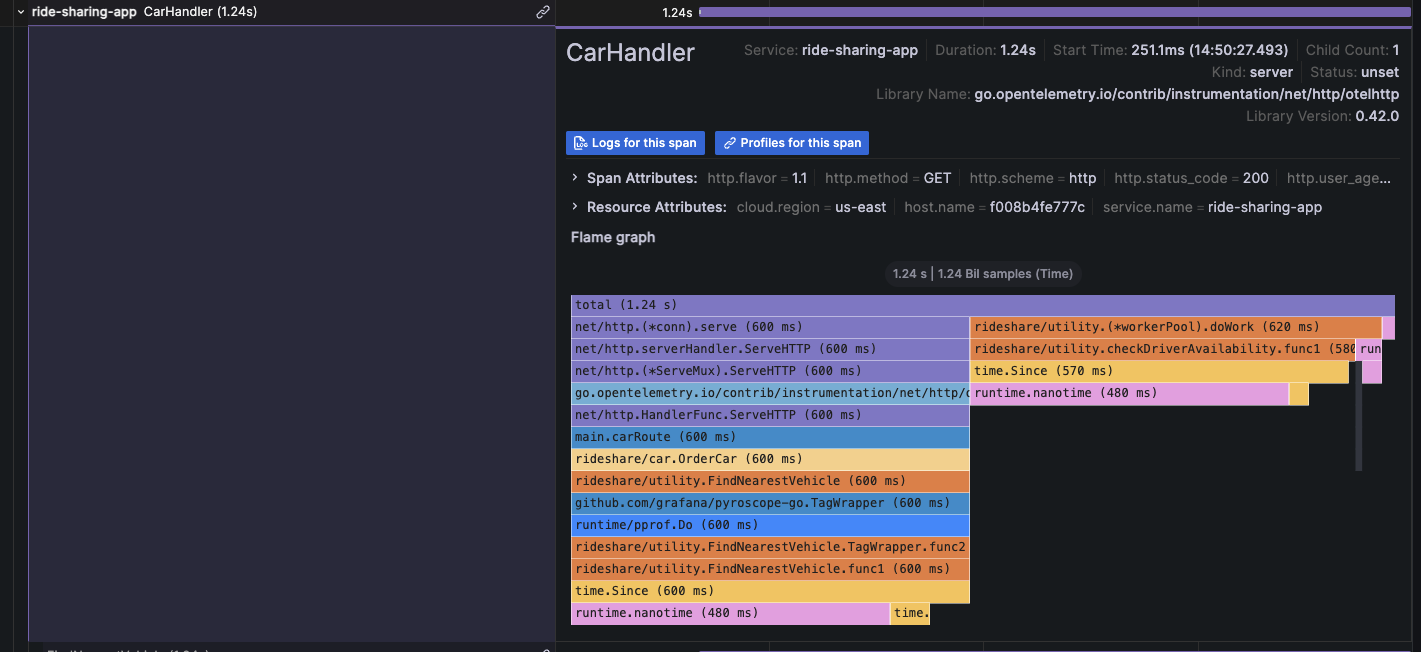
|
||||
|
||||
For more information, refer to the [Traces to profile section][configure-tempo-data-source] of the Tempo data source documentation.
|
||||
For more information, refer to the [Traces to profile section][configure-tempo-data-source] and [Link tracing and profiling with span profiles](https://grafana.com/docs/pyroscope/<PYROSCOPE_VERSION>/configure-client/trace-span-profiles/).
|
||||
|
||||
{{< youtube id="AG8VzfFMLxo" >}}
|
||||
|
||||
|
||||
16
docs/sources/datasources/pyroscope/profiling-and-tracing.md
Normal file
16
docs/sources/datasources/pyroscope/profiling-and-tracing.md
Normal file
@@ -0,0 +1,16 @@
|
||||
---
|
||||
title: How profiling and tracing work together
|
||||
menuTitle: How profiling and tracing work together
|
||||
description: Learn about how profiling and tracing work together.
|
||||
weight: 250
|
||||
keywords:
|
||||
- pyroscope data source
|
||||
- continuous profiling
|
||||
- tracing
|
||||
---
|
||||
|
||||
# How profiling and tracing work together
|
||||
|
||||
[//]: # 'Shared content for Trace to profiles in the Pyroscope data source'
|
||||
|
||||
{{< docs/shared source="grafana" lookup="datasources/pyroscope-profile-tracing-intro.md" version="<GRAFANA_VERSION>" >}}
|
||||
@@ -80,7 +80,7 @@ The following table describes the ways in which you can configure your trace to
|
||||
|
||||
| Setting name | Description |
|
||||
| ------------------------- | ------------------------------------------------------------------------------------------------------------------------------------------------------------------------------------------------------------------------------------------------------------------------------------------------------------ |
|
||||
| **Data source** | Defines the target data source. You can select only Loki or Splunk \[logs\] data sources. |
|
||||
| **Data source** | Defines the target data source. You can select Loki or any compatible log store. |
|
||||
| **Span start time shift** | Shifts the start time for the logs query, based on the span's start time. You can use time units, such as `5s`, `1m`, `3h`. To extend the time to the past, use a negative value. Default: `0`. |
|
||||
| **Span end time shift** | Shifts the end time for the logs query, based on the span's end time. You can use time units. Default: `0`. |
|
||||
| **Tags** | Defines the tags to use in the logs query. Default: `cluster`, `hostname`, `namespace`, `pod`, `service.name`, `service.namespace`. You can change the tag name for example to remove dots from the name if they are not allowed in the target data source. For example, map `http.status` to `http_status`. |
|
||||
@@ -259,7 +259,7 @@ datasources:
|
||||
queries:
|
||||
- name: 'Sample query'
|
||||
query: 'sum(rate(traces_spanmetrics_latency_bucket{$$__tags}[5m]))'
|
||||
traceToProfiles:
|
||||
tracesToProfiles:
|
||||
datasourceUid: 'grafana-pyroscope-datasource'
|
||||
tags: ['job', 'instance', 'pod', 'namespace']
|
||||
profileTypeId: 'process_cpu:cpu:nanoseconds:cpu:nanoseconds'
|
||||
|
||||
@@ -101,6 +101,10 @@ To query a particular trace:
|
||||
|
||||
## Query Loki for traces
|
||||
|
||||
{{< admonition type="caution" >}}
|
||||
Starting with Grafana v11.0, the Loki query tab will no longer be available.
|
||||
{{< /admonition >}}
|
||||
|
||||
To find traces to visualize, you can use the [Loki query editor]({{< relref "../../loki#loki-query-editor" >}}).
|
||||
For results, you must configure [derived fields]({{< relref "../../loki#configure-derived-fields" >}}) in the Loki data source that point to this data source.
|
||||
|
||||
|
||||
@@ -14,7 +14,20 @@ weight: 500
|
||||
|
||||
# Angular support deprecation
|
||||
|
||||
Angular plugin support is deprecated and will be removed in a future release. There are still many community plugins that rely on Grafana's Angular plugin support to work. The same is true for many internal (private) plugins that have been developed by Grafana users over the years. Grafana version 9 has a server configuration option that is global to the entire instance and controls whether Angular plugin support is available or not. By default, Angular support is still enabled, but that will change soon once we complete the migration of all Angular code in the core product.
|
||||
Angular plugin support is deprecated and will be removed in a future release.
|
||||
There are legacy core Grafana visualizations and external plugins that rely on Grafana's Angular plugin support to work. The same is likely true for [private plugins](https://grafana.com/legal/plugins/) that have been developed by Grafana users for use on their own instances over the years.
|
||||
From Grafana v9 and onwards, there is a [server configuration option](https://github.com/grafana/grafana/blob/d61bcdf4ca5e69489e0067c56fbe7f0bfdf84ee4/conf/defaults.ini#L362) that's global to the entire instance and controls whether Angular plugin support is available or not.
|
||||
In Grafana 11, we will change the default value for the configuration to remove support.
|
||||
|
||||
Warning messages are displayed if a dashboard depends on an a panel visualization or data source which requires AngularJS as shown in the following video:
|
||||
|
||||
{{< youtube id="XlEVs6g8dC8" >}}
|
||||
|
||||
To avoid disruption:
|
||||
|
||||
- Ensure that you are running the latest version of plugins by following this guide on [updating]({{< relref "../../administration/plugin-management/#update-a-plugin" >}}). Many panels and data sources have migrated from AngularJS.
|
||||
- If you are using legacy Core Grafana visualizations such as Graph or Table-old, migrate to their replacements using the provided [automatic migrations]({{< relref "./angular-plugins/#automatic-migration-of-plugins" >}}).
|
||||
- Review the [list of current Angular plugins]({{< relref "./angular-plugins/" >}}) to discover which Core and external plugins are impacted, and whether an update or alternative is required.
|
||||
|
||||
## Why are we deprecating Angular support?
|
||||
|
||||
@@ -22,17 +35,24 @@ AngularJS is an old frontend framework whose active development stopped many yea
|
||||
|
||||
## When will Angular plugins stop working?
|
||||
|
||||
Our goal is to transfer all the remaining Angular code to the core of Grafana before Grafana 10 is released in Summer 2023. Once this is done, the option "[angular_support_enabled](https://github.com/grafana/grafana/blob/d61bcdf4ca5e69489e0067c56fbe7f0bfdf84ee4/conf/defaults.ini#L362)" will be disabled by default for new Grafana Cloud users, resulting in the inability to use Angular plugins. In case you still rely on AngularJS-based plugins developed internally or by the community, you will need to enable this option to continue using them. Following the release of Grafana 10 we will be migrating Grafana Cloud users where possible and disabling Angular support when appropriate, we will also be introducing new features to help all users identify how they are impacted and to warn of the use of deprecated plugins within the Grafana UI.
|
||||
In Grafana 11, which will be released in preview in April 2024 and generally available in May, we will change the default behavior of the [angular_support_enabled](https://github.com/grafana/grafana/blob/d61bcdf4ca5e69489e0067c56fbe7f0bfdf84ee4/conf/defaults.ini#L362) configuration parameter to turn off support for AngularJS based plugins. In case you still rely on [AngularJS-based plugins]({{< relref "./angular-plugins/" >}}) developed internally or by the community, you will need to enable this option to continue using them.
|
||||
|
||||
New Grafana Cloud users will be unable to request for support to be added to their instance.
|
||||
|
||||
## When will we remove Angular support completely?
|
||||
|
||||
Our plan is to completely remove support for Angular plugins in version 11, which will be released in 2024. This means that all plugins that depend on Angular will stop working and the temporary option introduced in version 10 to enable Angular will be removed.
|
||||
Our current plan is to completely remove any remaining support for Angular plugins in version 12. Including the removal of the [angular_support_enabled](https://github.com/grafana/grafana/blob/d61bcdf4ca5e69489e0067c56fbe7f0bfdf84ee4/conf/defaults.ini#L362) configuration parameter.
|
||||
|
||||
## A dashboard I use is displaying a warning, what do I need to do?
|
||||
|
||||
A dashboard displays warnings when one or more panel visualizations or data sources in the dashboard have a dependency on Angular.
|
||||
Contact your system administrator to advise them of the issue or follow the preceding guidance on avoiding disruption.
|
||||
|
||||
## How do I migrate an Angular plugin to React?
|
||||
|
||||
Depending on if it’s a data source plugin, panel plugin, or app plugin the process will differ.
|
||||
|
||||
For panels, the rendering logic could in some cases be easily preserved but all options need to be redone to use the declarative options framework. For data source plugins the query editor and config options will likely need a total rewrite.
|
||||
For panels, the rendering logic could in some cases be easily preserved, but all options need to be redone to use the declarative options framework. For data source plugins the query editor and config options will likely need a total rewrite.
|
||||
|
||||
## How do I encourage a community plugin to migrate?
|
||||
|
||||
|
||||
@@ -48,7 +48,7 @@ Additionally, warning icons and messages will be displayed when browsing the cat
|
||||
|
||||
## Automatic migration of plugins
|
||||
|
||||
Certain legacy Grafana panel plugins automatically update to their React-based replacements when Angular support is disabled. This migration is usually available within the panel options, as shown in the screenshot below for World Map. Automatic migration can also be tested by appending `&__feature.autoMigrateOldPanels=true` to the dashboard URL in your browser.
|
||||
Certain legacy Grafana panel plugins automatically update to their React-based replacements when Angular support is disabled. This migration is usually available within the panel options, as shown in the screenshot below for World Map. Automatic migration can be triggered by setting the feature toggle `autoMigrateOldPanels` to `true`.
|
||||
|
||||
Automatic migration is supported for the plugins shown in the following table. Each of the target plugins are included in Grafana as Core plugins which don't require installation.
|
||||
|
||||
@@ -111,7 +111,7 @@ This table lists plugins which we have detected as having a dependency on Angula
|
||||
| blackmirror1-statusbygroup-panel | Status By Group Panel | Migrate - Browse included visualizations and plugins catalog for potential alternatives. |
|
||||
| novalabs-annotations-panel | Annotation Panel | Migrate - Browse included visualizations and plugins catalog for potential alternatives. |
|
||||
| jasonlashua-prtg-datasource | PRTG | Migrate - Browse included data sources and plugins catalog for potential alternatives. |
|
||||
| ryantxu-annolist-panel | Annotation List | Migrate - Consider [annotations list]({{< relref "../../panels-visualizations/visualizations/annotation-list" >}}) (core). |
|
||||
| ryantxu-annolist-panel | Annotation List | Migrate - Consider [annotations list]({{< relref "../../panels-visualizations/visualizations/annotations" >}}) (core). |
|
||||
| cloudflare-app | Cloudflare Grafana App | Migrate - Consider using the [Cloudflare Dashboard](https://dash.cloudflare.com/?to=/:account/:zone/analytics/dns) or [DNS Analytics API](https://developers.cloudflare.com/api/operations/dns-analytics-table). |
|
||||
| smartmakers-trafficlight-panel | TrafficLight | Migrate - Consider [Traffic Light](https://grafana.com/grafana/plugins/heywesty-trafficlight-panel/) as a potential alternative. |
|
||||
| zuburqan-parity-report-panel | Parity Report | Migrate - Browse included visualizations and plugins catalog for potential alternatives. |
|
||||
@@ -201,7 +201,6 @@ This table lists plugins which we have detected as having a dependency on Angula
|
||||
| stagemonitor-elasticsearch-app | stagemonitor Elasticsearch | Migrate - Browse included data sources and plugins catalog for potential alternatives. |
|
||||
| tdengine-datasource | TDengine Datasource | Update - Note the minimum version for React is 3.3.0. We recommend the latest. |
|
||||
| vertica-grafana-datasource | Vertica | Update - Note the minimum version for React is 2.0.0. We recommend the latest. |
|
||||
| vonage-status-panel | Status Panel | Wait - Updated version may become available, or browse included visualizations and plugins catalog for potential alternatives. |
|
||||
| voxter-app | Voxter VoIP Platform Metrics | Migrate - Browse included data sources and plugins catalog for potential alternatives. |
|
||||
| graph | Graph (old) | Migrate - Note that this is replaced by [Time Series]({{< relref "../../panels-visualizations/visualizations/time-series" >}}) (core) - This plugin should migrate when Angular is disabled. Also consider Bar Chart or Histogram if appropriate. |
|
||||
| table-old | Table (old) | Migrate - Note that this is replaced by [Table]({{< relref "../../panels-visualizations/visualizations/table" >}}) (core) - This plugin should migrate when AngularJS is disabled. |
|
||||
|
||||
@@ -383,12 +383,12 @@ Content-Type: application/json
|
||||
HTTP/1.1 200 OK
|
||||
Content-Type: application/json; charset=UTF-8
|
||||
|
||||
```
|
||||
|
||||
#### Status codes
|
||||
|
||||
| Code | Description |
|
||||
| ---- | ---------------------------------------------------------------------------------- |
|
||||
```
|
||||
|
||||
#### Status codes
|
||||
|
||||
| Code | Description |
|
||||
| ---- | ---------------------------------------------------------------------------------- |
|
||||
| 200 | Role is deleted. |
|
||||
| 400 | Bad request (invalid json, missing content-type, missing or invalid fields, etc.). |
|
||||
| 403 | Access denied |
|
||||
@@ -498,13 +498,13 @@ For more information, refer to [Create role validation errors]({{< ref "#create-
|
||||
```http
|
||||
HTTP/1.1 200 OK
|
||||
Content-Type: application/json; charset=UTF-8
|
||||
|
||||
```
|
||||
|
||||
#### Status codes
|
||||
|
||||
| Code | Description |
|
||||
| ---- | -------------------------------------------------------------------- |
|
||||
|
||||
```
|
||||
|
||||
#### Status codes
|
||||
|
||||
| Code | Description |
|
||||
| ---- | -------------------------------------------------------------------- |
|
||||
| 200 | Set of assigned permissions is returned. |
|
||||
| 403 | Access denied. |
|
||||
| 500 | Unexpected error. Refer to body and/or server logs for more details. |
|
||||
@@ -532,7 +532,7 @@ Accept: application/json
|
||||
```http
|
||||
POST /api/access-control/users/1/roles
|
||||
Accept: application/json
|
||||
Content-Type: application/json
|
||||
Content-Type: application/json
|
||||
|
||||
{
|
||||
"global": false,
|
||||
|
||||
@@ -66,7 +66,7 @@ Content-Type: application/json
|
||||
**Required permissions**
|
||||
|
||||
See note in the [introduction](#user-api) for an explanation.
|
||||
|
||||
|
||||
| Action | Scope |
|
||||
| ---------- | --------------- |
|
||||
| users:read | global.users:\* |
|
||||
|
||||
@@ -141,6 +141,7 @@ It extends [BaseDimensionConfig](#basedimensionconfig).
|
||||
|
||||
| Property | Type | Required | Default | Description |
|
||||
|---------------------|-----------------|----------|---------|--------------------------------------------------------------------------------------------------------------------------------------|
|
||||
| `infinitePan` | boolean | **Yes** | `true` | Enable infinite pan |
|
||||
| `inlineEditing` | boolean | **Yes** | `true` | Enable inline editing |
|
||||
| `panZoom` | boolean | **Yes** | `true` | Enable pan and zoom |
|
||||
| `root` | [object](#root) | **Yes** | | The root element of canvas (frame), where all canvas elements are nested<br/>TODO: Figure out how to define a default value for this |
|
||||
|
||||
72
docs/sources/explore/explore-metrics.md
Normal file
72
docs/sources/explore/explore-metrics.md
Normal file
@@ -0,0 +1,72 @@
|
||||
---
|
||||
labels:
|
||||
products:
|
||||
- cloud
|
||||
- enterprise
|
||||
- oss
|
||||
title: Explore Metrics
|
||||
aliases:
|
||||
description: This topic describes the Explore Metrics feature
|
||||
weight: 200
|
||||
---
|
||||
|
||||
# Grafana Explore Metrics
|
||||
|
||||
Grafana Explore Metrics is a query-less experience for browsing **Prometheus-compatible** metrics. Quickly find related metrics with just a few simple clicks, without needing to write PromQL queries to retrieve metrics.
|
||||
|
||||
{{% admonition type="caution" %}}
|
||||
Explore Metrics is currently in [public preview](/docs/release-life-cycle/). Grafana Labs offers limited support, and breaking changes might occur prior to the feature being made generally available.
|
||||
{{% /admonition %}}
|
||||
|
||||
With Explore Metrics, you can:
|
||||
|
||||
- easily slice and dice metrics based on their labels, so you can immediately see anomalies and identify issues
|
||||
- see the right visualization for your metric based on its type (gauge vs. counter, for example) without building it yourself
|
||||
- surface other metrics relevant to the current metric
|
||||
- “explore in a drawer” - expand a drawer over a dashboard with more content so you don’t lose your place
|
||||
- view a history of user steps when navigating through metrics and their filters
|
||||
<!-- - easily pivot to other related telemetry, including logs or traces -->
|
||||
|
||||
You can access Explore Metrics either as a standalone experience or as part of Grafana dashboards.
|
||||
|
||||
## Standalone experience
|
||||
|
||||
To access Explore Metrics as a standalone experience:
|
||||
|
||||
1. Click the arrow next to **Explore** in the Grafana left-side menu and click **Metrics**. You are taken to an overview page that shows recent metrics, bookmarks, and the option to select a new metric exploration.
|
||||
1. To get started with a new exploration, click **+ New metric exploration**.
|
||||
1. Select **Prometheus** or any Prometheus-compatible data source available in the drop-down menu under **Data source**.
|
||||
1. Click **+ Add label** to select a label-value pair from the drop-down menu. You can add multiple label-value pairs. A label type will appear above the selected label with a drop-down list of options from which to choose. For example, if you select the label `container` a drop-down list of available containers appears.
|
||||
1. You can also search for metrics using keywords under **Search metrics** in the search bar.
|
||||
1. Use the time picker to select a date and time range from the drop-down menu or use an absolute time range.
|
||||
1. Click the down arrow next to the **Refresh** icon to set a refresh rate from the drop-down menu. The default is `Off`.
|
||||
1. Click the **Settings** icon and toggle **Always keep selected metric graph in-view** to keep your main graph always in view on the Breakdown drill-down tab.
|
||||
|
||||
The **History** button in the upper left corner tracks every step navigating through metric exploration.
|
||||
|
||||

|
||||
|
||||
### Metrics exploration
|
||||
|
||||
To further explore a metric, click **Select** in the upper right corner of the metric visualization.
|
||||
|
||||

|
||||
|
||||
- The **Overview** tab provides a description for each metric, as well as the metric `type` and `unit` associated with the metric. It also provides a list of labels associated with the metric. Click on any label to view drill-down visualizations.
|
||||
- The **Breakdown** tab depicts time series visualizations for each of the label-value pairs for the selected metric. You can further drill down on each label and click **Add to filter** to add the label/value pair into your filters. You can also change the **View** from grid to rows.
|
||||
- The **Related metrics** tab depicts related metrics with relevant key words. You can repeat the drill down process for any related metric. Toggle **SHow previews** to preview visualizations.
|
||||
|
||||
Once you have gathered your metrics exploration data you can:
|
||||
|
||||
- Click the **Explore** icon on the right side to open the graph in Explore, where you can modify the query or add the graph to a dashboard or incident.
|
||||
- Click the **Share** icon on the right side to copy the metric drill down URL to the clipboard so it can be shared.
|
||||
- Click the **Star** icon on the right side to bookmark and save the metrics exploration.
|
||||
|
||||
## Dashboard experience
|
||||
|
||||
To access Explore Metrics via a dashboard:
|
||||
|
||||
1. Navigate to your dashboard.
|
||||
1. Select a time series panel.
|
||||
1. Click the panel menu in the upper right and select **Explore Metrics**. If there are multiple metrics, click on the one you want to explore.
|
||||
1. You will see a slide out drawer with the Metrics Experience, starting with the drill down. You can access the standalone experience by clicking **Open** in the upper right.
|
||||
@@ -32,7 +32,7 @@ and the bar height represents the frequency (such as count) of values that fell
|
||||
This _histogram_ shows the value distribution of a couple of time series. You can easily see that
|
||||
most values land between 240-300 with a peak between 260-280.
|
||||
|
||||

|
||||

|
||||
|
||||
Here is an example showing height distribution of people.
|
||||
|
||||
@@ -48,7 +48,7 @@ A _heatmap_ is like a histogram, but over time, where each time slice represents
|
||||
|
||||
In this example, you can clearly see what values are more common and how they trend over time.
|
||||
|
||||

|
||||

|
||||
|
||||
For more information about heatmap visualization options, refer to [Heatmap][heatmap].
|
||||
|
||||
|
||||
@@ -29,7 +29,7 @@ In [Introduction to time series][time-series-databases], the concept of _labels_
|
||||
|
||||
With time series data, the data often contain more than a single series, and is a set of multiple time series. Many Grafana data sources support this type of data.
|
||||
|
||||
{{< figure src="/static/img/docs/example_graph_multi_dim.png" class="docs-image--no-shadow" max-width="850px" >}}
|
||||
{{< figure src="/static/img/docs/example_graph_multi_dim.png" class="docs-image--no-shadow" max-width="850px" alt="Temperature by location" >}}
|
||||
|
||||
The common case is issuing a single query for a measurement with one or more additional properties as dimensions. For example, querying a temperature measurement along with a location property. In this case, multiple series are returned back from that single query and each series has unique location as a dimension.
|
||||
|
||||
|
||||
@@ -32,7 +32,7 @@ Temperature data like this is one example of what we call a _time series_ — a
|
||||
|
||||
Tables are useful when you want to identify individual measurements, but they make it difficult to see the big picture. A more common visualization for time series is the _graph_, which instead places each measurement along a time axis. Visual representations like the graph make it easier to discover patterns and features of the data that otherwise would be difficult to see.
|
||||
|
||||
{{< figure src="/static/img/docs/example_graph.png" class="docs-image--no-shadow" max-width="850px" >}}
|
||||
{{< figure src="/static/img/docs/example_graph.png" class="docs-image--no-shadow" max-width="850px" alt="Temperature data displayed on dashboard" >}}
|
||||
|
||||
Temperature data like the one in the example, is far from the only example of a time series. Other examples of time series are:
|
||||
|
||||
|
||||
@@ -77,7 +77,7 @@ Congratulations, you have created your first dashboard and it's displaying resul
|
||||
|
||||
#### Next steps
|
||||
|
||||
Continue to experiment with what you have built, try the [explore workflow]({{< relref "../explore" >}}) or another visualization feature. Refer to [Data sources]({{< relref "../datasources" >}}) for a list of supported data sources and instructions on how to [add a data source]({{< relref "../administration/data-source-management#add-a-data-source" >}}). The following topics will be of interest to you:
|
||||
Continue to experiment with what you have built, try the [explore workflow]({{< relref "../explore" >}}) or another visualization feature. Refer to [Data sources]({{< relref "../datasources" >}}) for a list of supported data sources and instructions on how to [add a data source]({{< relref "../datasources#add-a-data-source" >}}). The following topics will be of interest to you:
|
||||
|
||||
- [Panels and visualizations]({{< relref "../panels-visualizations" >}})
|
||||
- [Dashboards]({{< relref "../dashboards" >}})
|
||||
|
||||
@@ -38,7 +38,7 @@ Windows users might need to make additional adjustments. Look for special instru
|
||||
|
||||
You can have more than one InfluxDB data source defined in Grafana.
|
||||
|
||||
1. Follow the general instructions to [add a data source]({{< relref "../administration/data-source-management#add-a-data-source" >}}).
|
||||
1. Follow the general instructions to [add a data source]({{< relref "../datasources#add-a-data-source" >}}).
|
||||
1. Decide if you will use InfluxQL or Flux as your query language.
|
||||
- [Configure the data source]({{< relref "../datasources/influxdb#configure-the-data-source" >}}) for your chosen query language.
|
||||
Each query language has its own unique data source settings.
|
||||
|
||||
@@ -30,8 +30,13 @@ Panels can be dragged, dropped, and resized to rearrange them on the dashboard.
|
||||
|
||||
Before you add a panel, ensure that you have configured a data source.
|
||||
|
||||
- For more information about adding and managing data sources as an administrator, refer to [Data source management][].
|
||||
- For details about using specific data sources, refer to [Data sources][].
|
||||
- For details about using data sources, refer to [Data sources][].
|
||||
|
||||
- For more information about managing data sources as an administrator, refer to [Data source management][].
|
||||
|
||||
{{% admonition type="note" %}}
|
||||
[Data source management](https://grafana.com/docs/grafana/<GRAFANA_VERSION>/administration/data-source-management/) is only available in [Grafana Enterprise](https://grafana.com/docs/grafana/<GRAFANA_VERSION>/introduction/grafana-enterprise/) and [Grafana Cloud](https://grafana.com/docs/grafana-cloud/).
|
||||
{{% /admonition %}}
|
||||
|
||||
This section includes the following sub topics:
|
||||
|
||||
|
||||
@@ -76,6 +76,8 @@ These variables allow you to include the current time range in the data link URL
|
||||
| `__from` | For more information, refer to [Global variables][]. |
|
||||
| `__to` | For more information, refer to [Global variables][]. |
|
||||
|
||||
When you create data links using time range variables like `__url_time_range` in the URL, you have to form the query parameter syntax yourself; that is, you must format the URL by appending query parameters using the question mark (`?`) and ampersand (`&`) syntax. These characters aren't automatically generated.
|
||||
|
||||
### Series variables
|
||||
|
||||
Series-specific variables are available under `__series` namespace:
|
||||
@@ -107,6 +109,8 @@ Value-specific variables are available under `__value` namespace:
|
||||
|
||||
Using value-specific variables in data links can show different results depending on the set option of Tooltip mode.
|
||||
|
||||
When you create data links using time range variables like `__value.time` in the URL, you have to form the query parameter syntax yourself; that is, you must add the question mark (`?`) and ampersand (`&`). These characters aren't automatically generated.
|
||||
|
||||
### Data variables
|
||||
|
||||
To access values and labels from other fields use:
|
||||
|
||||
@@ -30,7 +30,7 @@ Legends are supported for the following visualizations:
|
||||
- [Trend][trend]
|
||||
<!-- - xy chart -->
|
||||
|
||||
[Geomaps][] and [heatmaps][] also have legends, but they only provide the the choice to display or not display a legend and don't support other legend options.
|
||||
[Geomaps][] and [heatmaps][] also have legends, but they only provide the choice to display or not display a legend and don't support other legend options.
|
||||
|
||||
## Legend options
|
||||
|
||||
|
||||
@@ -21,13 +21,61 @@ weight: 110
|
||||
|
||||
# Configure field overrides
|
||||
|
||||
Overrides allow you to customize visualization settings for specific fields or series. This is accomplished by adding an override rule that targets a particular set of fields and that can each define multiple options.
|
||||
Overrides allow you to customize visualization settings for specific fields or series. When you add an override rule, it targets a particular set of fields and lets you define multiple options for how that field is displayed.
|
||||
|
||||
For example, you set the unit for all fields that include the text 'bytes' by adding an override using the `Fields with name matching regex` matcher and then add the Unit option to the override rule.
|
||||
For example, you can override the default unit measurement for all fields that include the text "bytes" by adding an override using the **Fields with name matching regex** matcher and then the **Standard options > Unit** setting to the override rule:
|
||||
|
||||
## Example 1: Format temperature
|
||||

|
||||
|
||||
Let’s assume that our result set is a data frame that consists of two fields: time and temperature.
|
||||
After you've set them, your overrides appear in both the **All** and **Overrides** tabs of the panel editor pane:
|
||||
|
||||

|
||||
|
||||
## Supported visualizations
|
||||
|
||||
You can configure field overrides for the following visualizations:
|
||||
|
||||
| | | |
|
||||
| -------------------------- | ---------------------- | -------------------------------- |
|
||||
| [Bar chart][bar chart] | [Geomap][geomap] | [State timeline][state timeline] |
|
||||
| [Bar gauge][bar gauge] | [Heatmap][heatmap] | [Status history][status history] |
|
||||
| [Candlestick][candlestick] | [Histogram][histogram] | [Table][table] |
|
||||
| [Canvas][canvas] | [Pie chart][pie chart] | [Time series][time series] |
|
||||
| [Gauge][gauge] | [Stat][stat] | [Trend][trend] |
|
||||
|
||||
<!--Also xy chart-->
|
||||
|
||||
## Override rules
|
||||
|
||||
You can choose from five types of override rules, which are described in the following sections.
|
||||
|
||||
### Fields with name
|
||||
|
||||
Select a field from the list of all available fields. Properties you add to this type of rule are only applied to this single field.
|
||||
|
||||
### Fields with name matching regex
|
||||
|
||||
Specify fields to override with a regular expression. Properties you add to this type of rule are applied to all fields where the field name matches the regular expression. This override doesn't rename the field; to do this, use the [Rename by regex transformation][].
|
||||
|
||||
### Fields with type
|
||||
|
||||
Select fields by type, such as string, numeric, or time. Properties you add to this type of rule are applied to all fields that match the selected type.
|
||||
|
||||
### Fields returned by query
|
||||
|
||||
Select all fields returned by a specific query, such as A, B, or C. Properties you add to this type of rule are applied to all fields returned by the selected query.
|
||||
|
||||
### Fields with values
|
||||
|
||||
Select all fields returned by your defined reducer condition, such as **Min**, **Max**, **Count**, **Total**. Properties you add to this type of rule are applied to all fields returned by the selected condition.
|
||||
|
||||
## Examples
|
||||
|
||||
The following examples demonstrate how you can use override rules to alter the display of fields in visualizations.
|
||||
|
||||
### Example 1: Format temperature
|
||||
|
||||
The following result set is a data frame that consists of two fields: time and temperature.
|
||||
|
||||
| time | temperature |
|
||||
| :-----------------: | :---------: |
|
||||
@@ -35,7 +83,14 @@ Let’s assume that our result set is a data frame that consists of two fields:
|
||||
| 2020-01-02 03:05:00 | 47.0 |
|
||||
| 2020-01-02 03:06:00 | 48.0 |
|
||||
|
||||
Each field (column) of this structure can have field options applied that alter the way its values are displayed. This means that you can, for example, set the Unit to Temperature > Celsius, resulting in the following table:
|
||||
You can apply field options to each field (column) of this structure to alter the way its values are displayed. For example, you can set the following override rule:
|
||||
|
||||
- Rule: **Fields with type**
|
||||
- Field: temperature
|
||||
- Override property: **Standard options > Unit**
|
||||
- Selection: **Temperature > Celsius**
|
||||
|
||||
This results in the following table:
|
||||
|
||||
| time | temperature |
|
||||
| :-----------------: | :---------: |
|
||||
@@ -43,7 +98,7 @@ Each field (column) of this structure can have field options applied that alter
|
||||
| 2020-01-02 03:05:00 | 47.0 °C |
|
||||
| 2020-01-02 03:06:00 | 48.0 °C |
|
||||
|
||||
In addition, the decimal place is not required, so we can remove it. You can change the Decimals from `auto` to zero (`0`), resulting in the following table:
|
||||
In addition, the decimal place isn't required, so you can remove it by adding another override property that changes the **Standard options > Decimals** setting from **auto** to `0`. That results in the following table:
|
||||
|
||||
| time | temperature |
|
||||
| :-----------------: | :---------: |
|
||||
@@ -51,9 +106,9 @@ In addition, the decimal place is not required, so we can remove it. You can cha
|
||||
| 2020-01-02 03:05:00 | 47 °C |
|
||||
| 2020-01-02 03:06:00 | 48 °C |
|
||||
|
||||
## Example 2: Format temperature and humidity
|
||||
### Example 2: Format temperature and humidity
|
||||
|
||||
Let’s assume that our result set is a data frame that consists of four fields: time, high temp, low temp, and humidity.
|
||||
The following result set is a data frame that consists of four fields: time, high temp, low temp, and humidity.
|
||||
|
||||
| time | high temp | low temp | humidity |
|
||||
| ------------------- | --------- | -------- | -------- |
|
||||
@@ -61,7 +116,16 @@ Let’s assume that our result set is a data frame that consists of four fields:
|
||||
| 2020-01-02 03:05:00 | 47.0 | 34.0 | 68 |
|
||||
| 2020-01-02 03:06:00 | 48.0 | 31.0 | 68 |
|
||||
|
||||
Let's add the Celsius unit and get rid of the decimal place. This results in the following table:
|
||||
Use the following override rule and properties to add the **Celsius** unit option and remove the decimal place:
|
||||
|
||||
- Rule: **Fields with type**
|
||||
- Field: temperature
|
||||
- Override property: **Standard options > Unit**
|
||||
- Selection: **Temperature > Celsius**
|
||||
- Override property: **Standard options > Decimals**
|
||||
-Change setting from **auto** to `0`
|
||||
|
||||
This results in the following table:
|
||||
|
||||
| time | high temp | low temp | humidity |
|
||||
| ------------------- | --------- | -------- | -------- |
|
||||
@@ -69,7 +133,7 @@ Let's add the Celsius unit and get rid of the decimal place. This results in the
|
||||
| 2020-01-02 03:05:00 | 47 °C | 34 °C | 68 °C |
|
||||
| 2020-01-02 03:06:00 | 48 °C | 31 °C | 68 °C |
|
||||
|
||||
The temperature fields look good, but the humidity must now be changed. We can fix this by applying a field option override to the humidity field and change the unit to Misc > percent (0-100).
|
||||
The temperature fields are displaying correctly, but the humidity has incorrect units. You can fix this by applying a **Misc > Percent (0-100)** override to the humidity field. This results in the following table:
|
||||
|
||||
| time | high temp | low temp | humidity |
|
||||
| ------------------- | --------- | -------- | -------- |
|
||||
@@ -79,47 +143,86 @@ The temperature fields look good, but the humidity must now be changed. We can f
|
||||
|
||||
## Add a field override
|
||||
|
||||
A field override rule can customize the visualization settings for a specific field or series.
|
||||
To add a field override, follow these steps:
|
||||
|
||||
1. Edit the panel to which you want to add an override.
|
||||
1. In the panel options side pane, click **Add field override** at the bottom of the pane.
|
||||
|
||||
1. Select which fields an override rule will be applied to:
|
||||
- **Fields with name:** Select a field from the list of all available fields. Properties you add to a rule with this selector are only applied to this single field.
|
||||
- **Fields with name matching regex:** Specify fields to override with a regular expression. Properties you add to a rule with this selector are applied to all fields where the field name match the regex. This override doesn't rename the field; to do this, use the [Rename by regex transformation]({{< relref "../query-transform-data/transform-data/#rename-by-regex" >}}).
|
||||
- **Fields with type:** Select fields by type, such as string, numeric, and so on. Properties you add to a rule with this selector are applied to all fields that match the selected type.
|
||||
- **Fields returned by query:** Select all fields returned by a specific query, such as A, B, or C. Properties you add to a rule with this selector are applied to all fields returned by the selected query.
|
||||
1. Navigate to the panel to which you want to add the data link.
|
||||
1. Hover over any part of the panel to display the menu icon in the upper-right corner.
|
||||
1. Click the menu icon and select **Edit** to open the panel editor.
|
||||
1. At the bottom of the panel editor pane, click **Add field override**.
|
||||
1. Select the fields to which the override will be applied:
|
||||
- **Fields with name**
|
||||
- **Fields with name matching regex**
|
||||
- **Fields with type**
|
||||
- **Fields returned by query**
|
||||
- **Fields with values**
|
||||
1. Click **Add override property**.
|
||||
1. Select the field option that you want to apply.
|
||||
1. Enter options by adding values in the fields. To return options to default values, delete the white text in the fields.
|
||||
1. Continue to add overrides to this field by clicking **Add override property**, or you can click **Add override** and select a different field to add overrides to.
|
||||
1. When finished, click **Save** to save all panel edits to the dashboard.
|
||||
|
||||
## Delete a field override
|
||||
|
||||
Delete a field override when you no longer need it. When you delete an override, the appearance of value defaults to its original format. This change impacts dashboards and dashboard users that rely on an affected panel.
|
||||
|
||||
1. Edit the panel that contains the override you want to delete.
|
||||
1. In panel options side pane, scroll down until you see the overrides.
|
||||
1. Click the override you want to delete and then click the associated trash icon.
|
||||
|
||||
## View field overrides
|
||||
|
||||
You can view field overrides in the panel display options.
|
||||
|
||||
1. Edit the panel that contains the overrides you want to view.
|
||||
1. In panel options side pane, scroll down until you see the overrides.
|
||||
|
||||
> The override settings that appear on the **All** tab are the same as the settings that appear on the **Overrides** tab.
|
||||
1. Continue to add overrides to this field by clicking **Add override property**.
|
||||
1. Add as many overrides as you need.
|
||||
1. When you're finished, click **Save** to save all panel edits to the dashboard.
|
||||
|
||||
## Edit a field override
|
||||
|
||||
Edit a field override when you want to make changes to an override setting. The change you make takes effect immediately.
|
||||
To edit a field override, follow these steps:
|
||||
|
||||
1. Edit the panel that contains the overrides you want to edit.
|
||||
1. In panel options side pane, scroll down until you see the overrides.
|
||||
1. Locate the override that you want to change.
|
||||
1. Perform any of the following:
|
||||
1. Navigate to the panel to which you want to add the data link.
|
||||
1. Hover over any part of the panel to display the menu icon in the upper-right corner.
|
||||
1. Click the menu icon and select **Edit** to open the panel editor.
|
||||
1. In the panel editor pane, click the **Overrides** tab.
|
||||
1. Locate the override you want to change.
|
||||
1. Perform any of the following tasks:
|
||||
- Edit settings on existing overrides or field selection parameters.
|
||||
- Delete existing override properties by clicking the **X** next to the property.
|
||||
- Add an override properties by clicking **Add override property**.
|
||||
- Delete an override entirely by clicking the trash icon at the top-right corner.
|
||||
|
||||
The changes you make take effect immediately.
|
||||
|
||||
{{% docs/reference %}}
|
||||
[bar chart]: "/docs/grafana/ -> /docs/grafana/<GRAFANA VERSION>/panels-visualizations/visualizations/bar-chart"
|
||||
[bar chart]: "/docs/grafana-cloud/ -> /docs/grafana-cloud/visualizations/panels-visualizations/visualizations/bar-chart"
|
||||
|
||||
[bar gauge]: "/docs/grafana/ -> /docs/grafana/<GRAFANA VERSION>/panels-visualizations/visualizations/bar-gauge"
|
||||
[bar gauge]: "/docs/grafana-cloud/ -> /docs/grafana-cloud/visualizations/panels-visualizations/visualizations/bar-gauge"
|
||||
|
||||
[candlestick]: "/docs/grafana/ -> /docs/grafana/<GRAFANA VERSION>/panels-visualizations/visualizations/candlestick"
|
||||
[candlestick]: "/docs/grafana-cloud/ -> /docs/grafana-cloud/visualizations/panels-visualizations/visualizations/candlestick"
|
||||
|
||||
[canvas]: "/docs/grafana/ -> /docs/grafana/<GRAFANA VERSION>/panels-visualizations/visualizations/canvas"
|
||||
[canvas]: "/docs/grafana-cloud/ -> /docs/grafana-cloud/visualizations/panels-visualizations/visualizations/canvas"
|
||||
|
||||
[gauge]: "/docs/grafana/ -> /docs/grafana/<GRAFANA VERSION>/panels-visualizations/visualizations/gauge"
|
||||
[gauge]: "/docs/grafana-cloud/ -> /docs/grafana-cloud/visualizations/panels-visualizations/visualizations/gauge"
|
||||
|
||||
[geomap]: "/docs/grafana/ -> /docs/grafana/<GRAFANA VERSION>/panels-visualizations/visualizations/geomap"
|
||||
[geomap]: "/docs/grafana-cloud/ -> /docs/grafana-cloud/visualizations/panels-visualizations/visualizations/geomap"
|
||||
|
||||
[heatmap]: "/docs/grafana/ -> /docs/grafana/<GRAFANA VERSION>/panels-visualizations/visualizations/heatmap"
|
||||
[heatmap]: "/docs/grafana-cloud/ -> /docs/grafana-cloud/visualizations/panels-visualizations/visualizations/heatmap"
|
||||
|
||||
[histogram]: "/docs/grafana/ -> /docs/grafana/<GRAFANA VERSION>/panels-visualizations/visualizations/histogram"
|
||||
[histogram]: "/docs/grafana-cloud/ -> /docs/grafana-cloud/visualizations/panels-visualizations/visualizations/histogram"
|
||||
|
||||
[pie chart]: "/docs/grafana/ -> /docs/grafana/<GRAFANA VERSION>/panels-visualizations/visualizations/pie-chart"
|
||||
[pie chart]: "/docs/grafana-cloud/ -> /docs/grafana-cloud/visualizations/panels-visualizations/visualizations/pie-chart"
|
||||
|
||||
[stat]: "/docs/grafana/ -> /docs/grafana/<GRAFANA VERSION>/panels-visualizations/visualizations/stat"
|
||||
[stat]: "/docs/grafana-cloud/ -> /docs/grafana-cloud/visualizations/panels-visualizations/visualizations/stat"
|
||||
|
||||
[state timeline]: "/docs/grafana/ -> /docs/grafana/<GRAFANA VERSION>/panels-visualizations/visualizations/state-timeline"
|
||||
[state timeline]: "/docs/grafana-cloud/ -> /docs/grafana-cloud/visualizations/panels-visualizations/visualizations/state-timeline"
|
||||
|
||||
[status history]: "/docs/grafana/ -> /docs/grafana/<GRAFANA VERSION>/panels-visualizations/visualizations/status-history"
|
||||
[status history]: "/docs/grafana-cloud/ -> /docs/grafana-cloud/visualizations/panels-visualizations/visualizations/status-history"
|
||||
|
||||
[table]: "/docs/grafana/ -> /docs/grafana/<GRAFANA VERSION>/panels-visualizations/visualizations/table"
|
||||
[table]: "/docs/grafana-cloud/ -> /docs/grafana-cloud/visualizations/panels-visualizations/visualizations/table"
|
||||
|
||||
[time series]: "/docs/grafana/ -> /docs/grafana/<GRAFANA VERSION>/panels-visualizations/visualizations/time-series"
|
||||
[time series]: "/docs/grafana-cloud/ -> /docs/grafana-cloud/visualizations/panels-visualizations/visualizations/time-series"
|
||||
|
||||
[trend]: "/docs/grafana/ -> /docs/grafana/<GRAFANA VERSION>/panels-visualizations/visualizations/trend"
|
||||
[trend]: "/docs/grafana-cloud/ -> /docs/grafana-cloud/visualizations/panels-visualizations/visualizations/trend"
|
||||
|
||||
[Rename by regex transformation]: "/docs/grafana/ -> /docs/grafana/<GRAFANA_VERSION>/panels-visualizations/query-transform-data/transform-data#rename-by-regex"
|
||||
[Rename by regex transformation]: "/docs/grafana-cloud -> /docs/grafana-cloud/visualizations/panels-visualizations/query-transform-data/transform-data#rename-by-regex"
|
||||
{{% /docs/reference %}}
|
||||
|
||||
@@ -25,111 +25,66 @@ weight: 50
|
||||
|
||||
# Configure panel options
|
||||
|
||||
A Grafana panel is a visual representation of data that you can customize by defining a data source query, transforming and formatting data, and configuring visualization settings.
|
||||
There are settings common to all visualizations, which you set in the **Panel options** section of the panel editor pane. The following sections describe these options as well as how to set them.
|
||||
|
||||
A panel editor includes a query builder and a series of options that you can use to transform data and add information to your panels.
|
||||
## Panel options
|
||||
|
||||
This topic describes how to:
|
||||
Set the following options to provide basic information about a panel and define basic display elements:
|
||||
|
||||
- Open a panel for editing
|
||||
- Add a panel title and description
|
||||
- View a panel JSON model
|
||||
- Configure repeating rows and panels
|
||||
| Option | Description |
|
||||
| ---------------------- | ------------------------------------------------------------------------------------------------------------------------------------------------------------------------------------------------------------------------------------------------------------------------------------------------------- |
|
||||
| Title | Text entered in this field appears at the top of your panel in the panel editor and in the dashboard. You can use [variables you have defined][] in the **Title** field, but not [global variables][]. |
|
||||
| Description | Text entered in this field appears in a tooltip in the upper-left corner of the panel. Add a description to a panel to share with users any important information about it, such as its purpose. You can use [variables you have defined][] in the **Description** field, but not [global variables][]. |
|
||||
| Transparent background | Toggle this switch on and off to control whether or not the panel has the same background color as the dashboard. |
|
||||
| Panel links | Add [links to the panel][] to create shortcuts to other dashboards, panels, and external websites. Access panel links by clicking the icon next to the panel title. |
|
||||
| Repeat options | Set whether to repeat the panel for each value in the selected variable. For more information, refer to [Configure repeating panels](#configure-repeating-panels). |
|
||||
|
||||
## Edit a panel
|
||||
|
||||
After you add a panel to a dashboard, you can open it at any time to change or update queries, add data transformation, and change visualization settings.
|
||||
|
||||
1. Open the dashboard that contains the panel you want to edit.
|
||||
|
||||
1. Hover over any part of the panel to display the actions menu on the top right corner.
|
||||
|
||||
1. Click the menu and select **Edit**.
|
||||
|
||||

|
||||
|
||||
To use a keyboard shortcut to open the panel, hover over the panel and press `e`.
|
||||
|
||||
The panel opens in edit mode.
|
||||
|
||||
## Add a title and description to a panel
|
||||
|
||||
You can use generative AI to create panel titles and descriptions with the [Grafana LLM plugin][], which is currently in public preview. To enable this, refer to the [Set up generative AI features for dashboards documentation][]. Alternatively, you can take the following steps to create them yourself.
|
||||
|
||||
Add a title and description to a panel to share with users any important information about the visualization. For example, use the description to document the purpose of the visualization.
|
||||
|
||||
1. [Edit a panel](#edit-a-panel).
|
||||
|
||||
1. In the panel display options pane, locate the **Panel options** section.
|
||||
|
||||
1. Enter a **Title**.
|
||||
|
||||
Text entered in this field appears at the top of your panel in the panel editor and in the dashboard.
|
||||
|
||||
1. Write a description of the panel and the data you are displaying.
|
||||
|
||||
Text entered in this field appears in a tooltip in the upper-left corner of the panel.
|
||||
|
||||
You can use [variables you have defined][] in the **Title** and **Description** field, but not [global variables][].
|
||||
|
||||

|
||||
|
||||
## View a panel JSON model
|
||||
|
||||
Explore and export panel, panel data, and data frame JSON models.
|
||||
|
||||
1. Open the dashboard that contains the panel.
|
||||
|
||||
1. Hover over any part of the panel to display the actions menu on the top right corner.
|
||||
1. Click the menu and select **Inspect > Panel JSON**.
|
||||
1. In the **Select source** field, select one of the following options:
|
||||
|
||||
- **Panel JSON:** Displays a JSON object representing the panel.
|
||||
- **Panel data:** Displays a JSON object representing the data that was passed to the panel.
|
||||
- **DataFrame structure:** Displays the data structure of the panel, including any transformations, field configurations, and override configurations that have been applied.
|
||||
|
||||
1. To explore the JSON, click `>` to expand or collapse portions of the JSON model.
|
||||
You can use generative AI to populate the **Title** and **Description** fields with the [Grafana LLM plugin][], which is currently in public preview. To enable this, refer to [Set up generative AI features for dashboards][].
|
||||
|
||||
## Configure repeating panels
|
||||
|
||||
You can configure Grafana to dynamically add panels or rows to a dashboard. A dynamic panel is a panel that the system creates based on the value of a variable. Variables dynamically change your queries across all panels in a dashboard. For more information about repeating rows, refer to [Configure repeating rows][].
|
||||
|
||||
{{% admonition type="note" %}}
|
||||
Repeating panels require variables to have one or more items selected; you can't repeat a panel zero times to hide it.
|
||||
{{% /admonition %}}
|
||||
|
||||
To see an example of repeating panels, refer to [this dashboard with repeating panels](https://play.grafana.org/d/testdata-repeating/testdata-repeating-panels?orgId=1).
|
||||
|
||||
**Before you begin:**
|
||||
|
||||
- Ensure that the query includes a multi-value variable.
|
||||
|
||||
**To configure repeating panels:**
|
||||
To configure repeating panels, follow these steps:
|
||||
|
||||
1. [Edit the panel](#edit-a-panel) you want to repeat.
|
||||
1. Navigate to the panel you want to update.
|
||||
1. Hover over any part of the panel to display the menu on the top right corner.
|
||||
1. Click the menu and select **Edit**.
|
||||
1. Open the **Panel options** section of the panel editor pane.
|
||||
1. Under **Repeat options**, select a variable in the **Repeat by variable** drop-down list.
|
||||
1. Under **Repeat direction**, choose one of the following:
|
||||
|
||||
1. On the display options pane, click **Panel options > Repeat options**.
|
||||
|
||||
1. Select a `direction`.
|
||||
|
||||
- Choose `horizontal` to arrange panels side-by-side. Grafana adjusts the width of a repeated panel. Currently, you can't mix other panels on a row with a repeated panel.
|
||||
- Choose `vertical` to arrange panels in a column. The width of repeated panels is the same as the original, repeated panel.
|
||||
- **Horizontal** - Arrange panels side-by-side. Grafana adjusts the width of a repeated panel. You can't mix other panels on a row with a repeated panel.
|
||||
- **Vertical** - Arrange panels in a column. The width of repeated panels is the same as the original, repeated panel.
|
||||
|
||||
1. If you selected **Horizontal** in the previous step, select a value in the **Max per row** drop-down list to control the maximum number of panels that can be in a row.
|
||||
1. Click **Save**.
|
||||
1. To propagate changes to all panels, reload the dashboard.
|
||||
|
||||
You can stop a panel from repeating by selecting **Disable repeating** in the **Repeat by variable** drop-down list.
|
||||
|
||||
{{% docs/reference %}}
|
||||
[variables you have defined]: "/docs/grafana/ -> /docs/grafana/<GRAFANA VERSION>/dashboards/variables"
|
||||
[variables you have defined]: "/docs/grafana-cloud/ -> /docs/grafana/<GRAFANA VERSION>/dashboards/variables"
|
||||
[variables you have defined]: "/docs/grafana/ -> /docs/grafana/<GRAFANA_VERSION>/dashboards/variables"
|
||||
[variables you have defined]: "/docs/grafana-cloud/ -> /docs/grafana-cloud/visualizations/dashboards/variables"
|
||||
|
||||
[global variables]: "/docs/grafana/ -> /docs/grafana/<GRAFANA VERSION>/dashboards/variables/add-template-variables#global-variables"
|
||||
[global variables]: "/docs/grafana-cloud/ -> /docs/grafana/<GRAFANA VERSION>/dashboards/variables/add-template-variables#global-variables"
|
||||
[global variables]: "/docs/grafana/ -> /docs/grafana/<GRAFANA_VERSION>/dashboards/variables/add-template-variables#global-variables"
|
||||
[global variables]: "/docs/grafana-cloud/ -> /docs/grafana-cloud/visualizations/dashboards/variables/add-template-variables#global-variables"
|
||||
|
||||
[Configure repeating rows]: "/docs/grafana/ -> /docs/grafana/<GRAFANA VERSION>/dashboards/build-dashboards/create-dashboard#configure-repeating-rows"
|
||||
[Configure repeating rows]: "/docs/grafana-cloud/ -> /docs/grafana/<GRAFANA VERSION>/dashboards/build-dashboards/create-dashboard#configure-repeating-rows"
|
||||
[Configure repeating rows]: "/docs/grafana/ -> /docs/grafana/<GRAFANA_VERSION>/dashboards/build-dashboards/create-dashboard#configure-repeating-rows"
|
||||
[Configure repeating rows]: "/docs/grafana-cloud/ -> /docs/grafana-cloud/visualizations/dashboards/build-dashboards/create-dashboard#configure-repeating-rows"
|
||||
|
||||
[Grafana LLM plugin]: "/docs/grafana/ -> /docs/grafana-cloud/alerting-and-irm/machine-learning/llm-plugin"
|
||||
[Grafana LLM plugin]: "/docs/grafana-cloud/ -> /docs/grafana-cloud/alerting-and-irm/machine-learning/llm-plugin"
|
||||
[Grafana LLM plugin]: "/docs/grafana/ -> /docs/grafana-cloud/alerting-and-irm/machine-learning/configure/llm-plugin"
|
||||
[Grafana LLM plugin]: "/docs/grafana-cloud/ -> /docs/grafana-cloud/alerting-and-irm/machine-learning/configure/llm-plugin"
|
||||
|
||||
[Set up generative AI features for dashboards documentation]: "/docs/grafana/ -> /docs/grafana/<GRAFANA VERSION>/dashboards/manage-dashboards#set-up-generative-ai-features-for-dashboards"
|
||||
[Set up generative AI features for dashboards documentation]: "/docs/grafana-cloud/ -> /docs/grafana-cloud/visualizations/dashboards/manage-dashboards#set-up-generative-ai-features-for-dashboards"
|
||||
[Set up generative AI features for dashboards]: "/docs/grafana/ -> /docs/grafana/<GRAFANA_VERSION>/dashboards/manage-dashboards#set-up-generative-ai-features-for-dashboards"
|
||||
[Set up generative AI features for dashboards]: "/docs/grafana-cloud/ -> /docs/grafana-cloud/visualizations/dashboards/manage-dashboards#set-up-generative-ai-features-for-dashboards"
|
||||
|
||||
[links to the panel]: "/docs/grafana/ -> /docs/grafana/<GRAFANA_VERSION>/dashboards/build-dashboards/manage-dashboard-links#panel-links"
|
||||
[links to the panel]: "/docs/grafana-cloud/ -> /docs/grafana-cloud/visualizations/dashboards/build-dashboards/manage-dashboard-links#panel-links"
|
||||
{{% /docs/reference %}}
|
||||
|
||||
@@ -25,87 +25,98 @@ weight: 60
|
||||
|
||||
# Configure standard options
|
||||
|
||||
The data model used in Grafana, namely the [data frame](https://grafana.com/developers/plugin-tools/introduction/data-frames), is a columnar-oriented table structure that unifies both time series and table query results. Each column within this structure is called a _field_. A field can represent a single time series or table column.
|
||||
**Standard options** in the panel editor pane let you change how field data is displayed in your visualizations. Options that you apply don't change the data, they just change how Grafana _displays_ the data.
|
||||
|
||||
Field options allow you to change how the data is displayed in your visualizations. Options and overrides that you apply do not change the data, they change how Grafana displays the data. When you change an option, it is applied to all fields, meaning all series or columns. For example, if you change the unit to percentage, then all fields with numeric values are displayed in percentages.
|
||||
When you set a standard option, the change is applied to all fields or series. For example, if you set the **Unit** option to **Percentage**, all fields with numeric values are displayed as percentages.
|
||||
|
||||
For a complete list of field formatting options, refer to [Standard options definitions](#standard-options-definitions).
|
||||
For more granular control over the display of fields, refer to [Configure overrides][].
|
||||
|
||||
> You can apply standard options to most built-in Grafana panels. Some older panels and community panels that have not updated to the new panel and data model will be missing either all or some of these field options.
|
||||
## Supported visualizations
|
||||
|
||||
1. Open a dashboard. Hover over any part of the panel to display the actions menu on the top right corner.
|
||||
1. Click the menu and select **Edit**.
|
||||
1. In the panel display options pane, locate the **Standard options** section.
|
||||
1. Select the standard options you want to apply.
|
||||
You can configure standard options for the following visualizations:
|
||||
|
||||
For more information about standard options, refer to [Standard options definitions](#standard-options-definitions).
|
||||
| | | |
|
||||
| -------------------------- | -------------------------------- | -------------------------------- |
|
||||
| [Bar chart][bar chart] | [Geomap][geomap] | [Status history][status history] |
|
||||
| [Bar gauge][bar gauge] | [Histogram][histogram] | [Table][table] |
|
||||
| [Candlestick][candlestick] | [Pie chart][pie chart] | [Time series][time series] |
|
||||
| [Canvas][canvas] | [Stat][stat] | [Trend][trend] |
|
||||
| [Gauge][gauge] | [State timeline][state timeline] | <!-- xychart --> |
|
||||
|
||||
1. To preview your change, click outside of the field option box you are editing or press **Enter**.
|
||||
|
||||
## Standard options definitions
|
||||
## Standard options
|
||||
|
||||
This section explains all available standard options.
|
||||
|
||||
You can apply standard options to most built-in Grafana panels. Some older panels and community panels that have not updated to the new panel and data model will be missing either all or some of these field options.
|
||||
|
||||
Most field options will not affect the visualization until you click outside of the field option box you are editing or press Enter.
|
||||
To set these options, expand the **Standard options** section in the panel editor pane. Most field options won't affect the visualization until you click outside of the field option box you're editing or press Enter.
|
||||
|
||||
{{% admonition type="note" %}}
|
||||
We are constantly working to add and expand options for all visualization, so all options might not be available for all visualizations.
|
||||
Not all of the options listed apply to all visualizations with standard options.
|
||||
{{% /admonition %}}
|
||||
|
||||
### Unit
|
||||
|
||||
Lets you choose what unit a field should use. Click in the **Unit** field, then drill down until you find the unit you want. The unit you select is applied to all fields except time.
|
||||
This option lets you choose which unit a field should use. Click in the **Unit** field, then drill down until you find the unit you want. The unit you select is applied to all fields except time.
|
||||
|
||||
#### Custom units
|
||||
|
||||
You can use the unit dropdown to also specify custom units, custom prefix or suffix and date time formats.
|
||||
You can also use the **Unit** drop-down to specify custom units, custom prefixes or suffixes, and date time formats.
|
||||
|
||||
To select a custom unit enter the unit and select the last `Custom: xxx` option in the dropdown.
|
||||
To set a custom unit, enter the unit you want to use and then select it in the drop-down. It'll be the last option listed. For example, if you enter a unit called "Hearts", the drop-down will then include the option **Custom unit: Hearts**.
|
||||
|
||||
- `suffix:<suffix>` for custom unit that should go after value.
|
||||
- `prefix:<prefix>` for custom unit that should go before value.
|
||||
- `time:<format>` For custom date time formats type for example `time:YYYY-MM-DD`. See [formats](https://momentjs.com/docs/#/displaying/) for the format syntax and options.
|
||||
- `si:<base scale><unit characters>` for custom SI units. For example: `si: mF`. This one is a bit more advanced as you can specify both a unit and the
|
||||
source data scale. So if your source data is represented as milli (thousands of) something prefix the unit with that
|
||||
SI scale character.
|
||||
- `count:<unit>` for a custom count unit.
|
||||
- `currency:<unit>` for custom a currency unit.
|
||||
You can further define a custom unit with specific syntax. For example, to set a custom currency unit called "Gems", enter `currency:Gems` in the field. The drop-down will include the option **Custom unit: currency:Gems**:
|
||||
|
||||
You can also paste a native emoji in the unit picker and pick it as a custom unit:
|
||||

|
||||
|
||||
{{< figure src="/static/img/docs/v66/custom_unit_burger2.png" max-width="600px" caption="Custom unit emoji" >}}
|
||||
The following table lists the special syntax options for custom units:
|
||||
|
||||
| Custom unit | Description |
|
||||
| ---------------------------------- | -------------------------------------------------------------------------------------------------------------------------------------------------------------------------------------------------------------- |
|
||||
| `suffix:<suffix>` | Custom unit that should go after value. |
|
||||
| `prefix:<prefix>` | Custom unit that should go before value. |
|
||||
| `time:<format>` | Custom date time formats type, such as `time:YYYY-MM-DD`. Refer to [formats](https://momentjs.com/docs/#/displaying/) for the format syntax and options. |
|
||||
| `si:<base scale><unit characters>` | Custom SI units, such as `si: mF`. You can specify both a unit and the source data scale. For example, if your source data is represented as milli-something, prefix the unit with the `m` SI scale character. |
|
||||
| `count:<unit>` | Custom count unit. |
|
||||
| `currency:<unit>` | Custom currency unit. |
|
||||
|
||||
You can also paste a native emoji in the **Unit** drop-down and select it as a custom unit:
|
||||
|
||||

|
||||
|
||||

|
||||
|
||||
#### Control unit scaling
|
||||
|
||||
By default, Grafana automatically scales the unit based on the magnitude of the value. For example, if you have values of 0.14kW and 3000kW, Grafana displays them as 140W and 3MW, respectively. You can use custom units to control this behavior by setting a prefix, suffix, or custom SI unit.
|
||||
|
||||
#### String units
|
||||
|
||||
Grafana can sometimes be too aggressive in parsing strings and displaying them as numbers. To configure Grafana to show the original string value, create a field override and add a unit property with the `String` unit.
|
||||
Sometimes Grafana is too aggressive in interpreting strings and displaying them as numbers. To configure Grafana to show the original string value, select **Misc > String** in the **Unit** drop-down.
|
||||
|
||||
### Min
|
||||
|
||||
Lets you set the minimum value used in percentage threshold calculations. Leave blank to automatically calculate the minimum.
|
||||
Set the minimum value used in percentage threshold calculations. Leave this field empty to automatically calculate the minimum.
|
||||
|
||||
### Max
|
||||
|
||||
Lets you set the maximum value used in percentage threshold calculations. Leave blank to automatically calculate the maximum.
|
||||
Set the maximum value used in percentage threshold calculations. Leave this field empty to automatically calculate the maximum.
|
||||
|
||||
### Field min/max
|
||||
|
||||
By default the calculated min and max will be based on the minimum and maximum, in all series and fields. Turning field min/max on, will calculate the min or max on each field individually, based on the minimum or maximum value of the field.
|
||||
By default, the calculated **Min** and **Max** are based on the minimum and maximum of all series and fields. When you enable **Field min/max**, Grafana calculates the min or max of each field individually, based on the minimum or maximum value of the field.
|
||||
|
||||
### Decimals
|
||||
|
||||
Specify the number of decimals Grafana includes in the rendered value. If you leave this field blank, Grafana automatically truncates the number of decimals based on the value. For example 1.1234 will display as 1.12 and 100.456 will display as 100.
|
||||
Specify the number of decimals Grafana includes in the rendered value. If you leave this field empty, Grafana automatically truncates the number of decimals based on the value. For example 1.1234 displays as 1.12 and 100.456 displays as 100.
|
||||
|
||||
To display all decimals, set the unit to `String`.
|
||||
To display all decimals, set the unit to **String**.
|
||||
|
||||
### Display name
|
||||
|
||||
Lets you set the display title of all fields. You can use [variables][] in the field title.
|
||||
Set the display title of all fields. You can use [variables][] in the field title.
|
||||
|
||||
When multiple stats, fields, or series are shown, this field controls the title in each stat. You can use expressions like `${__field.name}` to use only the series name or the field name in title.
|
||||
When multiple stats, fields, or series are displayed, this field controls the title in each stat. You can use expressions like `${__field.name}` to use only the series name or the field name in the title.
|
||||
|
||||
Given a field with a name of Temp, and labels of {"Loc"="PBI", "Sensor"="3"}
|
||||
The following table shows examples of the different field names generated using various expressions. In this example, there's a field with a name of "Temp" and labels of {"Loc"="PBI", "Sensor"="3"}:
|
||||
|
||||
| Expression syntax | Example | Renders to | Explanation |
|
||||
| ---------------------------- | ----------------------- | ------------------------------ | ------------------------------------------------------------------------------------------------------------------------------------------------------------------------------------------------------------------ |
|
||||
@@ -115,45 +126,79 @@ Given a field with a name of Temp, and labels of {"Loc"="PBI", "Sensor"="3"}
|
||||
| `${__field.labels.X}` | `${__field.labels.Loc}` | `PBI` | Displays the value of the specified label key. |
|
||||
| `${__field.labels.__values}` | Same as Syntax | `PBI, 3` | Displays the values of the labels separated by a comma (without label keys). |
|
||||
|
||||
If the value is an empty string after rendering the expression for a particular field, then the default display method is used.
|
||||
If the value is an empty string after rendering the expression for a particular field, then the default display method is applied.
|
||||
|
||||
### Color scheme
|
||||
|
||||
The color options and their effect on the visualization depends on the visualization you are working with. Some visualizations have different color options.
|
||||
The **Color scheme** options let you set single or multiple colors for your entire visualization.
|
||||
|
||||
You can specify a single color, or select a continuous (gradient) color schemes, based on a value.
|
||||
Continuous color interpolates a color using the percentage of a value relative to min and max.
|
||||
The color options and their effect on a visualization depend on the visualization you're working with and some visualizations have different color options.
|
||||
|
||||
Select one of the following palettes:
|
||||
Select one of the following schemes:
|
||||
|
||||
<div class="clearfix"></div>
|
||||
|
||||
| Color mode | Description |
|
||||
| ------------------------------------ | -------------------------------------------------------------------------------------------------------------------------------------------------------- |
|
||||
| **Single color** | Specify a single color, useful in an override rule |
|
||||
| **Shades of a color** | Selects shades of a single color, useful in an override rule |
|
||||
| **From thresholds** | Informs Grafana to take the color from the matching threshold |
|
||||
| **Classic palette** | Grafana will assign color by looking up a color in a palette by series index. Useful for Graphs and pie charts and other categorical data visualizations |
|
||||
| **Classic palette (by series name)** | Grafana will assign color based on the name of the series. Useful when the series names to be visualized depend on the available data. |
|
||||
| **Green-Yellow-Red (by value)** | Continuous color scheme |
|
||||
| **Red-Yellow-Green (by value)** | Continuous color scheme |
|
||||
| **Blue-Yellow-Red (by value)** | Continuous color scheme |
|
||||
| **Yellow-Red (by value)** | Continuous color scheme |
|
||||
| **Blue-Purple (by value)** | Continuous color scheme |
|
||||
| **Yellow-Blue (by value)** | Continuous color scheme |
|
||||
| **Blues (by value)** | Continuous color scheme (panel background to blue) |
|
||||
| **Reds (by value)** | Continuous color scheme (panel background color to red) |
|
||||
| **Greens (by value)** | Continuous color scheme (panel background color to green) |
|
||||
| **Purples (by value)** | Continuous color scheme (panel background color to purple) |
|
||||
|
||||
{{< figure src="/static/img/docs/v73/color_scheme_dropdown.png" max-width="350px" caption="Color scheme" >}}
|
||||
| Color scheme | Description |
|
||||
| ------------------------------------- | ----------------------------------------------------------------------------------------------------------------------------------------------------------------------------------------------------------------------------------------------------------------------------------------------------------------------------------------------------------------------------------------------------------- |
|
||||
| Single color | Specifies a single color. |
|
||||
| Shades of a color | Grafana selects shades of a single color. |
|
||||
| From thresholds (by value) | The color is taken from the matching [threshold][]. For some visualizations, you also need to choose if the color is set by the **Last**, **Min**, or **Max** value of the field or series. |
|
||||
| Classic palette | Grafana automatically assigns a color for each field or series based on its order. If the order of a field changes in your query, the color also changes. Useful for graphs, pie charts, and other categorical data visualizations. |
|
||||
| Classic palette (by series name) | Grafana automatically assigns colors based on the name of the series. Useful when the series names to be visualized can change based on the available data. |
|
||||
| Multiple continuous colors (by value) | Grafana automatically assigns colors based on the percentage of a value relative to the min and the max of the field or series. For some visualizations, you also need to choose if the color is set by the **Last**, **Min**, or **Max** value of the field or series. Select from: **Green-Yellow-Red**, **Red-Yellow-Green**, **Blue-Yellow-Red**, **Yellow-Red**, **Blue-Purple**, and **Yellow-Blue**. |
|
||||
| Single continuous color (by value) | Grafana automatically assigns shades of one color based on the percentage of a value relative to the min and the max of the field or series. For some visualizations, you also need to choose if the color is set by the **Last**, **Min**, or **Max** value of the field or series. Select from: **Blues**, **Reds**, **Greens**, and **Purples**. |
|
||||
|
||||
### No value
|
||||
|
||||
Enter what Grafana should display if the field value is empty or null. The default value is a hyphen (-).
|
||||
|
||||
{{% docs/reference %}}
|
||||
[Configure overrides]: "/docs/grafana/ -> /docs/grafana/<GRAFANA VERSION>/panels-visualizations/configure-overrides"
|
||||
[Configure overrides]: "/docs/grafana-cloud/ -> /docs/grafana-cloud/visualizations/panels-visualizations/configure-overrides"
|
||||
|
||||
[bar chart]: "/docs/grafana/ -> /docs/grafana/<GRAFANA VERSION>/panels-visualizations/visualizations/bar-chart"
|
||||
[bar chart]: "/docs/grafana-cloud/ -> /docs/grafana-cloud/visualizations/panels-visualizations/visualizations/bar-chart"
|
||||
|
||||
[bar gauge]: "/docs/grafana/ -> /docs/grafana/<GRAFANA VERSION>/panels-visualizations/visualizations/bar-gauge"
|
||||
[bar gauge]: "/docs/grafana-cloud/ -> /docs/grafana-cloud/visualizations/panels-visualizations/visualizations/bar-gauge"
|
||||
|
||||
[candlestick]: "/docs/grafana/ -> /docs/grafana/<GRAFANA VERSION>/panels-visualizations/visualizations/candlestick"
|
||||
[candlestick]: "/docs/grafana-cloud/ -> /docs/grafana-cloud/visualizations/panels-visualizations/visualizations/candlestick"
|
||||
|
||||
[canvas]: "/docs/grafana/ -> /docs/grafana/<GRAFANA VERSION>/panels-visualizations/visualizations/canvas"
|
||||
[canvas]: "/docs/grafana-cloud/ -> /docs/grafana-cloud/visualizations/panels-visualizations/visualizations/canvas"
|
||||
|
||||
[gauge]: "/docs/grafana/ -> /docs/grafana/<GRAFANA VERSION>/panels-visualizations/visualizations/gauge"
|
||||
[gauge]: "/docs/grafana-cloud/ -> /docs/grafana-cloud/visualizations/panels-visualizations/visualizations/gauge"
|
||||
|
||||
[geomap]: "/docs/grafana/ -> /docs/grafana/<GRAFANA VERSION>/panels-visualizations/visualizations/geomap"
|
||||
[geomap]: "/docs/grafana-cloud/ -> /docs/grafana-cloud/visualizations/panels-visualizations/visualizations/geomap"
|
||||
|
||||
[histogram]: "/docs/grafana/ -> /docs/grafana/<GRAFANA VERSION>/panels-visualizations/visualizations/histogram"
|
||||
[histogram]: "/docs/grafana-cloud/ -> /docs/grafana-cloud/visualizations/panels-visualizations/visualizations/histogram"
|
||||
|
||||
[pie chart]: "/docs/grafana/ -> /docs/grafana/<GRAFANA VERSION>/panels-visualizations/visualizations/pie-chart"
|
||||
[pie chart]: "/docs/grafana-cloud/ -> /docs/grafana-cloud/visualizations/panels-visualizations/visualizations/pie-chart"
|
||||
|
||||
[stat]: "/docs/grafana/ -> /docs/grafana/<GRAFANA VERSION>/panels-visualizations/visualizations/stat"
|
||||
[stat]: "/docs/grafana-cloud/ -> /docs/grafana-cloud/visualizations/panels-visualizations/visualizations/stat"
|
||||
|
||||
[state timeline]: "/docs/grafana/ -> /docs/grafana/<GRAFANA VERSION>/panels-visualizations/visualizations/state-timeline"
|
||||
[state timeline]: "/docs/grafana-cloud/ -> /docs/grafana-cloud/visualizations/panels-visualizations/visualizations/state-timeline"
|
||||
|
||||
[status history]: "/docs/grafana/ -> /docs/grafana/<GRAFANA VERSION>/panels-visualizations/visualizations/status-history"
|
||||
[status history]: "/docs/grafana-cloud/ -> /docs/grafana-cloud/visualizations/panels-visualizations/visualizations/status-history"
|
||||
|
||||
[table]: "/docs/grafana/ -> /docs/grafana/<GRAFANA VERSION>/panels-visualizations/visualizations/table"
|
||||
[table]: "/docs/grafana-cloud/ -> /docs/grafana-cloud/visualizations/panels-visualizations/visualizations/table"
|
||||
|
||||
[time series]: "/docs/grafana/ -> /docs/grafana/<GRAFANA VERSION>/panels-visualizations/visualizations/time-series"
|
||||
[time series]: "/docs/grafana-cloud/ -> /docs/grafana-cloud/visualizations/panels-visualizations/visualizations/time-series"
|
||||
|
||||
[trend]: "/docs/grafana/ -> /docs/grafana/<GRAFANA VERSION>/panels-visualizations/visualizations/trend"
|
||||
[trend]: "/docs/grafana-cloud/ -> /docs/grafana-cloud/visualizations/panels-visualizations/visualizations/trend"
|
||||
|
||||
[variables]: "/docs/grafana/ -> /docs/grafana/<GRAFANA VERSION>/dashboards/variables"
|
||||
[variables]: "/docs/grafana-cloud/ -> /docs/grafana/<GRAFANA VERSION>/dashboards/variables"
|
||||
[variables]: "/docs/grafana-cloud/ -> /docs/grafana-cloud/visualizations/dashboards/variables"
|
||||
|
||||
[threshold]: "/docs/grafana/ -> /docs/grafana/<GRAFANA VERSION>/panels-visualizations/configure-thresholds"
|
||||
[threshold]: "/docs/grafana-cloud/ -> /docs/grafana-cloud/visualizations/panels-visualizations/configure-thresholds"
|
||||
{{% /docs/reference %}}
|
||||
|
||||
@@ -38,6 +38,8 @@ You can also use thresholds to:
|
||||
- Color markers in a geomap
|
||||
- Color cell text or background in a table
|
||||
|
||||
{{< docs/play title="Threshold example" url="https://play.grafana.org/d/000000167/" >}}
|
||||
|
||||
## Supported visualizations
|
||||
|
||||
You can set thresholds in the following visualizations:
|
||||
|
||||
116
docs/sources/panels-visualizations/configure-tooltips/index.md
Normal file
116
docs/sources/panels-visualizations/configure-tooltips/index.md
Normal file
@@ -0,0 +1,116 @@
|
||||
---
|
||||
aliases:
|
||||
keywords:
|
||||
- grafana
|
||||
- tooltips
|
||||
- documentation
|
||||
labels:
|
||||
products:
|
||||
- cloud
|
||||
- enterprise
|
||||
- oss
|
||||
menuTitle: Configure tooltips
|
||||
title: Configure tooltips
|
||||
description: Configure tooltips for your visualizations
|
||||
weight: 75
|
||||
---
|
||||
|
||||
# Configure tooltips
|
||||
|
||||
{{< docs/public-preview product="The new tooltip experience" featureFlag="`newVizTooltips`" >}}
|
||||
|
||||
When you hover your cursor over a visualization, Grafana can display tooltips that contain more information about a data point, like the exact time of a result. You can customize tooltips to control how many series they include and the order of those values. You can also copy the content from tooltips to use elsewhere. Learn more about configuring tooltips in [Tooltip options](#tooltip-options).
|
||||
|
||||
## Supported visualizations
|
||||
|
||||
You can configure tooltips for the following visualizations:
|
||||
|
||||
| | |
|
||||
| -------------------------- | -------------------------------- |
|
||||
| [Bar chart][bar chart] | [State timeline][state timeline] |
|
||||
| [Candlestick][candlestick] | [Status history][status history] |
|
||||
| [Heatmap][heatmap] | [Time series][time series] |
|
||||
| [Pie chart][pie chart] | [Trend][trend] |
|
||||
|
||||
<!--Also xy chart -->
|
||||
|
||||
Some visualizations, for example [candlestick][] and [flame graph][], have tooltips, but they aren't configurable. These visualizations don't have a **Tooltip** section in the panel editor pane. [Geomaps][geomaps] provide you the option to have tooltips triggered upon click or hover under the **Map controls** options in the panel editor pane.
|
||||
|
||||
<!-- if we add documentation for treemap, some info will need to be added in the paragraph above -->
|
||||
|
||||
## Tooltip options
|
||||
|
||||
You can find the following options under the **Tooltip** section in the panel edit pane.
|
||||
|
||||
{{% admonition type="note" %}}
|
||||
Not all of the options listed apply to all visualizations with tooltips.
|
||||
{{% /admonition %}}
|
||||
|
||||
### Tooltip mode
|
||||
|
||||
Choose how tooltips behave with the following options:
|
||||
|
||||
- **Single** - The tooltip only the single series that you're hovering over in the visualization.
|
||||
- **All** - The tooltip shows all series in the visualization. Grafana highlights the series that you are hovering over in bold in the series list in the tooltip.
|
||||
- **Hidden** - Tooltips aren't displayed when you interact with the visualization.
|
||||
|
||||
You can use a [field override][] to hide individual series from the tooltip.
|
||||
|
||||
### Values sort order
|
||||
|
||||
When you set the **Tooltip mode** to **All**, the **Values sort order** option is displayed. This option controls the order in which values are listed in a tooltip. Choose from the following:
|
||||
|
||||
- **None** - Grafana automatically sorts the values displayed in a tooltip.
|
||||
- **Ascending** - Values in the tooltip are listed from smallest to largest.
|
||||
- **Descending** - Values in the tooltip are listed from largest to smallest.
|
||||
|
||||
### Hover proximity
|
||||
|
||||
Set the hover proximity (in pixels) to control how close the cursor must be to a data point to trigger the tooltip to display.
|
||||
|
||||

|
||||
|
||||
### Show histogram (Y axis)
|
||||
|
||||
For the heatmap visualization only, when you set the **Tooltip mode** to **Single**, the **Show histogram (Y axis)** option is displayed. This option controls whether or not the tooltip includes a histogram representing the y-axis.
|
||||
|
||||
### Show color scale
|
||||
|
||||
For the heatmap visualization only, when you set the **Tooltip mode** to **Single**, the **Show color scale** option is displayed. This option controls whether or not the tooltip includes the color scale that's also represented in the legend. When the color scale is included in the tooltip, it shows the hovered value on the scale:
|
||||
|
||||

|
||||
|
||||
{{% docs/reference %}}
|
||||
[bar chart]: "/docs/grafana/ -> /docs/grafana/<GRAFANA VERSION>/panels-visualizations/visualizations/bar-chart"
|
||||
[bar chart]: "/docs/grafana-cloud/ -> /docs/grafana-cloud/visualizations/panels-visualizations/visualizations/bar-chart"
|
||||
|
||||
[candlestick]: "/docs/grafana/ -> /docs/grafana/<GRAFANA VERSION>/panels-visualizations/visualizations/candlestick"
|
||||
[candlestick]: "/docs/grafana-cloud/ -> /docs/grafana-cloud/visualizations/panels-visualizations/visualizations/candlestick"
|
||||
|
||||
[flame graph]: "/docs/grafana/ -> /docs/grafana/<GRAFANA VERSION>/panels-visualizations/visualizations/flame-graph"
|
||||
[flame graph]: "/docs/grafana-cloud/ -> /docs/grafana-cloud/visualizations/panels-visualizations/visualizations/flame-graph"
|
||||
|
||||
[geomaps]: "/docs/grafana/ -> /docs/grafana/<GRAFANA VERSION>/panels-visualizations/visualizations/geomap#tooltip"
|
||||
[geomaps]: "/docs/grafana-cloud/ -> /docs/grafana-cloud/visualizations/panels-visualizations/visualizations/geomap#tooltip"
|
||||
|
||||
[heatmap]: "/docs/grafana/ -> /docs/grafana/<GRAFANA VERSION>/panels-visualizations/visualizations/heatmap"
|
||||
[heatmap]: "/docs/grafana-cloud/ -> /docs/grafana-cloud/visualizations/panels-visualizations/visualizations/heatmap"
|
||||
|
||||
[pie chart]: "/docs/grafana/ -> /docs/grafana/<GRAFANA VERSION>/panels-visualizations/visualizations/pie-chart"
|
||||
[pie chart]: "/docs/grafana-cloud/ -> /docs/grafana-cloud/visualizations/panels-visualizations/visualizations/pie-chart"
|
||||
|
||||
[state timeline]: "/docs/grafana/ -> /docs/grafana/<GRAFANA VERSION>/panels-visualizations/visualizations/state-timeline"
|
||||
[state timeline]: "/docs/grafana-cloud/ -> /docs/grafana-cloud/visualizations/panels-visualizations/visualizations/state-timeline"
|
||||
|
||||
[status history]: "/docs/grafana/ -> /docs/grafana/<GRAFANA VERSION>/panels-visualizations/visualizations/status-history"
|
||||
[status history]: "/docs/grafana-cloud/ -> /docs/grafana-cloud/visualizations/panels-visualizations/visualizations/status-history"
|
||||
|
||||
[time series]: "/docs/grafana/ -> /docs/grafana/<GRAFANA VERSION>/panels-visualizations/visualizations/time-series"
|
||||
[time series]: "/docs/grafana-cloud/ -> /docs/grafana-cloud/visualizations/panels-visualizations/visualizations/time-series"
|
||||
|
||||
[trend]: "/docs/grafana/ -> /docs/grafana/<GRAFANA VERSION>/panels-visualizations/visualizations/trend"
|
||||
[trend]: "/docs/grafana-cloud/ -> /docs/grafana-cloud/visualizations/panels-visualizations/visualizations/trend"
|
||||
|
||||
[field override]: "/docs/grafana/ -> /docs/grafana/<GRAFANA VERSION>/panels-visualizations/configure-overrides"
|
||||
[field override]: "/docs/grafana-cloud/ -> /docs/grafana-cloud/visualizations/panels-visualizations/configure-overrides"
|
||||
{{% /docs/reference %}}
|
||||
@@ -190,6 +190,8 @@ Panel data source query options include:
|
||||
| This week so far | `now/w` |
|
||||
| Last 2 years | `now-2y/y` |
|
||||
|
||||
{{< docs/play title="Time range override" url="https://play.grafana.org/d/000000041/" >}}
|
||||
|
||||
- **Time shift:** Overrides the time range for individual panels by shifting its start and end relative to the time picker.
|
||||
For example, you can shift the time range for the panel to be two hours earlier than the dashboard time picker.
|
||||
|
||||
|
||||
@@ -101,7 +101,9 @@ You can disable or hide one or more transformations by clicking on the eye icon
|
||||
|
||||
If your panel uses more than one query, you can filter these and apply the selected transformation to only one of the queries. To do this, click the filter icon on the top right of the transformation row. This opens a drop-down with a list of queries used on the panel. From here, you can select the query you want to transform.
|
||||
|
||||
Note that the filter icon is always displayed if your panel has more than one query, but it may not work if previous transformations for merging the queries' outputs are applied. This is because one transformation takes the output of the previous one.
|
||||
You can also filter by annotations (which includes exemplars) to apply transformations to them. When you do so, the list of fields changes to reflect those in the annotation or exemplar tooltip.
|
||||
|
||||
The filter icon is always displayed if your panel has more than one query or source of data (that is, panel or annotation data) but it may not work if previous transformations for merging the queries’ outputs are applied. This is because one transformation takes the output of the previous one.
|
||||
|
||||
## Delete a transformation
|
||||
|
||||
@@ -1114,15 +1116,17 @@ This flexible transformation simplifies the process of consolidating and summari
|
||||
|
||||
Use this transformation to rename parts of the query results using a regular expression and replacement pattern.
|
||||
|
||||
You can specify a regular expression, which is only applied to matches, along with a replacement pattern that support back references. For example, let's imagine you're visualizing CPU usage per host and you want to remove the domain name. You could set the regex to '([^.]+)..+' and the replacement pattern to '$1', 'web-01.example.com' would become 'web-01'.
|
||||
You can specify a regular expression, which is only applied to matches, along with a replacement pattern that support back references. For example, let's imagine you're visualizing CPU usage per host and you want to remove the domain name. You could set the regex to '/^([^.]+).\*/' and the replacement pattern to '$1', 'web-01.example.com' would become 'web-01'.
|
||||
|
||||
In the following example, we are stripping the prefix from event types. In the before image, you can see everything is prefixed with 'system.'
|
||||
> **Note:** The Rename by regex transformation was improved in Grafana v9.0.0 to allow global patterns of the form '/<stringToReplace>/g'. Depending on the regex match used, this may cause some transformations to behave slightly differently. You can guarantee the same behavior as before by wrapping the match string in forward slashes '(/)', e.g. '(._)' would become '/(._)/'.
|
||||
|
||||
{{< figure src="/static/img/docs/transformations/rename-by-regex-before-7-3.png" class="docs-image--no-shadow" max-width= "1100px" alt="A bar chart with long series names" >}}
|
||||
In the following example, we are stripping the 'A-' prefix from field names. In the before image, you can see everything is prefixed with 'A-':
|
||||
|
||||
{{< figure src="/media/docs/grafana/panels-visualizations/screenshot-rename-by-regex-before-v11.0.png" class="docs-image--no-shadow" max-width= "1100px" alt="A time series with full series names" >}}
|
||||
|
||||
With the transformation applied, you can see we are left with just the remainder of the string.
|
||||
|
||||
{{< figure src="/static/img/docs/transformations/rename-by-regex-after-7-3.png" class="docs-image--no-shadow" max-width= "1100px" alt="A bar chart with shortened series names" >}}
|
||||
{{< figure src="/media/docs/grafana/panels-visualizations/screenshot-rename-by-regex-after-v11.0.png" class="docs-image--no-shadow" max-width= "1100px" alt="A time series with shortened series names" >}}
|
||||
|
||||
This transformation lets you to tailor your data to meet your visualization needs, making your dashboards more informative and user-friendly.
|
||||
|
||||
|
||||
@@ -20,6 +20,8 @@ weight: 10
|
||||
|
||||
Grafana offers a variety of visualizations to support different use cases. This section of the documentation highlights the built-in visualizations, their options and typical usage.
|
||||
|
||||
{{< youtube id="JwF6FgeotaU" >}}
|
||||
|
||||
{{% admonition type="note" %}}
|
||||
If you are unsure which visualization to pick, Grafana can provide visualization suggestions based on the panel query. When you select a visualization, Grafana will show a preview with that visualization applied.
|
||||
{{% /admonition %}}
|
||||
@@ -33,6 +35,8 @@ If you are unsure which visualization to pick, Grafana can provide visualization
|
||||
- [Heatmap][] visualizes data in two dimensions, used typically for the magnitude of a phenomenon.
|
||||
- [Pie chart][] is typically used where proportionality is important.
|
||||
- [Candlestick][] is typically for financial data where the focus is price/data movement.
|
||||
- [Gauge][] is the traditional rounded visual showing how far a single metric is from a threshold.
|
||||
- [Trend][] for datasets that have a sequential, numeric x that is not time.
|
||||
- Stats & numbers
|
||||
- [Stat][] for big stats and optional sparkline.
|
||||
- [Bar gauge][] is a horizontal or vertical bar gauge.
|
||||
@@ -42,15 +46,23 @@ If you are unsure which visualization to pick, Grafana can provide visualization
|
||||
- [Node graph][] for directed graphs or networks.
|
||||
- [Traces][] is the main visualization for traces.
|
||||
- [Flame graph][] is the main visualization for profiling.
|
||||
- [Canvas][] allows you to explicitly place elements within static and dynamic layouts.
|
||||
- [Geomap][] helps you visualize geospatial data.
|
||||
- [Datagrid][] allows you to create and manipulate data, and act as data source for other panels.
|
||||
- Widgets
|
||||
- [Dashboard list][] can list dashboards.
|
||||
- [Alert list][] can list alerts.
|
||||
- [Annotations list][] can list available annotations.
|
||||
- [Text][] can show markdown and html.
|
||||
- [News][] can show RSS feeds.
|
||||
|
||||
The following video shows you how to create gauge, time series line graph, stats, logs, and node graph visualizations:
|
||||
|
||||
{{< youtube id="yNRnLyVntUw" >}}
|
||||
|
||||
## Get more
|
||||
|
||||
You can add more visualization types by installing panel [panel plugins](https://grafana.com/grafana/plugins/?type=panel).
|
||||
You can add more visualization types by installing [panel plugins](https://grafana.com/grafana/plugins/?type=panel).
|
||||
|
||||
## Examples
|
||||
|
||||
@@ -122,6 +134,12 @@ A state timeline shows discrete state changes over time. When used with time ser
|
||||
[Flame graph]: "/docs/grafana/ -> /docs/grafana/<GRAFANA VERSION>/panels-visualizations/visualizations/flame-graph"
|
||||
[Flame graph]: "/docs/grafana-cloud/ -> /docs/grafana/<GRAFANA VERSION>/panels-visualizations/visualizations/flame-graph"
|
||||
|
||||
[Canvas]: "/docs/grafana/ -> /docs/grafana/<GRAFANA VERSION>/panels-visualizations/visualizations/canvas"
|
||||
[Canvas]: "/docs/grafana-cloud/ -> /docs/grafana/<GRAFANA VERSION>/panels-visualizations/visualizations/canvas"
|
||||
|
||||
[Geomap]: "/docs/grafana/ -> /docs/grafana/<GRAFANA VERSION>/panels-visualizations/visualizations/geomap"
|
||||
[Geomap]: "/docs/grafana-cloud/ -> /docs/grafana/<GRAFANA VERSION>/panels-visualizations/visualizations/geomap"
|
||||
|
||||
[Status history]: "/docs/grafana/ -> /docs/grafana/<GRAFANA VERSION>/panels-visualizations/visualizations/status-history"
|
||||
[Status history]: "/docs/grafana-cloud/ -> /docs/grafana/<GRAFANA VERSION>/panels-visualizations/visualizations/status-history"
|
||||
|
||||
@@ -168,5 +186,14 @@ A state timeline shows discrete state changes over time. When used with time ser
|
||||
[Table]: "/docs/grafana-cloud/ -> /docs/grafana/<GRAFANA VERSION>/panels-visualizations/visualizations/table"
|
||||
|
||||
[Time series]: "/docs/grafana/ -> /docs/grafana/<GRAFANA VERSION>/panels-visualizations/visualizations/time-series"
|
||||
[Time series]: "/docs/grafana-cloud/ -> /docs/grafana/<GRAFANA VERSION>/panels-visualizations/visualizations/time-series"
|
||||
[Time series]: "/docs/grafana-cloud/ -> /docs/grafana-cloud/visualizations/panels-visualizations/visualizations/time-series"
|
||||
|
||||
[Trend]: "/docs/grafana/ -> /docs/grafana/<GRAFANA VERSION>/panels-visualizations/visualizations/trend"
|
||||
[Trend]: "/docs/grafana-cloud/ -> /docs/grafana-cloud/visualizations/panels-visualizations/visualizations/trend"
|
||||
|
||||
[Annotations list]: "/docs/grafana/ -> /docs/grafana/<GRAFANA VERSION>/panels-visualizations/visualizations/annotations"
|
||||
[Annotations list]: "/docs/grafana-cloud/ -> /docs/grafana-cloud/visualizations/panels-visualizations/visualizations/annotations"
|
||||
|
||||
[Datagrid]: "/docs/grafana/ -> /docs/grafana/<GRAFANA VERSION>/panels-visualizations/visualizations/datagrid"
|
||||
[Datagrid]: "/docs/grafana-cloud/ -> /docs/grafana-cloud/visualizations/panels-visualizations/visualizations/datagrid"
|
||||
{{% /docs/reference %}}
|
||||
|
||||
@@ -24,6 +24,8 @@ Bar charts allow you to graph categorical data.
|
||||
|
||||
{{< figure src="/static/img/docs/bar-chart-panel/barchart_small_example.png" max-width="1000px" caption="Bar chart" >}}
|
||||
|
||||
{{< docs/play title="Grafana Bar Charts and Pie Charts" url="https://play.grafana.org/d/ktMs4D6Mk/" >}}
|
||||
|
||||
## Supported data formats
|
||||
|
||||
Only one data frame is supported and it must have at least one string field that will be used as the category for an X or Y axis and one or more numerical fields.
|
||||
|
||||
@@ -23,7 +23,9 @@ Bar gauges simplify your data by reducing every field to a single value. You cho
|
||||
|
||||
This panel can show one or more bar gauges depending on how many series, rows, or columns your query returns.
|
||||
|
||||
{{< figure src="/static/img/docs/v66/bar_gauge_cover.png" max-width="1025px" caption="Stat panel" >}}
|
||||
{{< figure src="/static/img/docs/v66/bar_gauge_cover.png" max-width="1025px" alt="Bar gauge panel" >}}
|
||||
|
||||
{{< docs/play title="Bar Gauge" url="https://play.grafana.org/d/vmie2cmWz/" >}}
|
||||
|
||||
## Value options
|
||||
|
||||
|
||||
@@ -21,12 +21,55 @@ weight: 100
|
||||
|
||||
# Candlestick
|
||||
|
||||
The candlestick visualization allows you to visualize data that includes a number of consistent dimensions focused on price movement. The candlestick visualization includes an Open-High-Low-Close (OHLC) mode, as well as support for additional dimensions based on time series data.
|
||||
|
||||
{{< figure src="/static/img/docs/candlestick-panel/candlestick-panel-8-3.png" max-width="1200px" caption="Candlestick visualization" >}}
|
||||
The candlestick visualization allows you to visualize data that includes a number of consistent dimensions focused on price movements, such as stock prices. The candlestick visualization includes an [Open-High-Low-Close (OHLC) mode](#open-high-low-close), as well as support for additional dimensions based on time series data.
|
||||
|
||||
Candlestick visualizations build upon the foundation of the [time series visualization][] and include many common configuration settings.
|
||||
|
||||
You can use a candlestick if you want to visualize, at a glance, how a price moved over time, whether it went up, down, or stayed the same, and how much it fluctuated:
|
||||
|
||||
{{< figure src="/static/img/docs/candlestick-panel/candlestick-panel-8-3.png" max-width="1065px" alt="A candlestick visualization" >}}
|
||||
|
||||
Each candlestick is represented as a rectangle, referred to as the _candlestick body_. The candlestick body displays the opening and closing prices during a time period. Green candlesticks represent when the price appreciated while the red candlesticks represent when the price depreciated. The lines sticking out the candlestick body are referred to as _wicks_ or _shadows_, which represent the highest and lowest prices during the time period.
|
||||
|
||||
Use a candlestick when you need to:
|
||||
|
||||
- Monitor and identify trends in price movements of specific assets such as stocks, currencies, or commodities.
|
||||
- Analyze any volatility in the stock market.
|
||||
- Provide data analysis to help with trading decisions.
|
||||
|
||||
## Configure a candlestick
|
||||
|
||||
Once you’ve created a [dashboard](https://grafana.com/docs/grafana/<GRAFANA_VERSION>/dashboards/build-dashboards/create-dashboard/), the following video shows you how to configure a candlestick visualization:
|
||||
|
||||
{{< youtube id="IOFKBgbf3aM" >}}
|
||||
|
||||
{{< docs/play title="Candlestick" url="https://play.grafana.org/d/candlestick/candlestick" >}}
|
||||
|
||||
## Supported data formats
|
||||
|
||||
The candlestick visualization works best with price movement data for an asset. The data must include:
|
||||
|
||||
- **Timestamps** - The time at which each price movement occurred.
|
||||
- **Opening price** - The price of the asset at the beginning of the time period.
|
||||
- **Closing price** - The price of the asset at the end of the time period.
|
||||
- **Highest price** - The highest price the asset reached during the time period.
|
||||
- **Lowest price** - The lowest price the asset reached during the time period.
|
||||
|
||||
### Example
|
||||
|
||||
| Timestamps | Open | High | Low | Close |
|
||||
| ------------------- | ----- | ----- | ----- | ----- |
|
||||
| 2024-03-13 10:05:00 | 0.200 | 0.205 | 0.201 | 0.203 |
|
||||
| 2024-03-14 10:10:10 | 0.204 | 0.205 | 0.201 | 0.200 |
|
||||
| 2024-03-15 10:15:10 | 0.204 | 0.205 | 0.201 | 0.200 |
|
||||
| 2024-03-16 10:20:11 | 0.203 | 0.203 | 0.202 | 0.203 |
|
||||
| 2024-03-17 10:25:11 | 0.203 | 0.203 | 0.202 | 0.203 |
|
||||
| 2024-03-18 10:30:12 | 0.202 | 0.202 | 0.201 | 0.201 |
|
||||
|
||||
The data is converted as follows:
|
||||
|
||||
{{< figure src="/static/img/docs/candlestick-panel/candlestick.png" max-width="1065px" alt="A candlestick visualization showing the price movements of specific asset." >}}
|
||||
|
||||
## Mode
|
||||
|
||||
The mode options allow you to toggle which dimensions are used for the visualization.
|
||||
@@ -63,21 +106,13 @@ The candlestick visualization will attempt to map fields from your data to the a
|
||||
The candlestick visualization legend doesn't display these values.
|
||||
{{% /admonition %}}
|
||||
|
||||
To properly map these dimensions, the query results table from your data must include _at least_ the following columns:
|
||||
|
||||
- timestamp
|
||||
- open
|
||||
- high
|
||||
- low
|
||||
- close
|
||||
|
||||
If your data can't be mapped to these dimensions for some reason (for example, because the column names aren't the same), you can map them manually using the **Open**, **High**, **Low**, and **Close** fields under the **Candlestick** options in the panel editor:
|
||||
|
||||

|
||||
|
||||
## Additional fields
|
||||
|
||||
The candlestick visualization is based on the time series visualization. It can visualize additional data dimensions beyond open, high, low, close, and volume The **Include** and **Ignore** options allow it to visualize other included data such as simple moving averages, Bollinger bands and more, using the same styles and configurations available in the [time series][] visualization.
|
||||
The candlestick visualization is based on the time series visualization. It can visualize additional data dimensions beyond open, high, low, close, and volume The **Include** and **Ignore** options allow it to visualize other included data such as simple moving averages, Bollinger bands and more, using the same styles and configurations available in the [time series][time series visualization] visualization.
|
||||
|
||||
{{% docs/reference %}}
|
||||
[time series visualization]: "/docs/grafana/ -> /docs/grafana/<GRAFANA VERSION>/panels-visualizations/visualizations/time-series"
|
||||
|
||||
@@ -95,6 +95,16 @@ You can enable panning and zooming in a canvas. This allows you to both create a
|
||||
|
||||
{{< video-embed src="/media/docs/grafana/2024-01-05-Canvas-Pan-&-Zoom-Enablement-Video.mp4" max-width="750px" caption="Canvas pan and zoom enablement video" >}}
|
||||
|
||||
#### Infinite panning
|
||||
|
||||
You can enable infinite panning in a canvas when pan and zoom is enabled. This allows you to pan and zoom the canvas and uncover larger designs.
|
||||
|
||||
{{% admonition type="note" %}}
|
||||
Infinite panning is an experimental feature that may not work as expected in all scenarios. For example, elements that are not top-left constrained may experience unexpected movement when panning.
|
||||
{{% /admonition %}}
|
||||
|
||||
<!-- TODO: Add gif -->
|
||||
|
||||
### Context menu
|
||||
|
||||
The context menu lets you perform common tasks quickly and efficiently. Supported functionality includes opening / closing the inline editor, duplicating an element, deleting an element, and more.
|
||||
|
||||
@@ -19,23 +19,69 @@ weight: 100
|
||||
|
||||
# Flame graph
|
||||
|
||||
Flame graphs let you visualize profiling data. Using this visualization, the profile can be represented as a flame graph, table, or both
|
||||
Flame graphs let you visualize [profiling](https://grafana.com/docs/pyroscope/latest/introduction/profiling/) data. Using this visualization, a [profile](https://grafana.com/docs/pyroscope/latest/view-and-analyze-profile-data/profiling-types/) can be represented as a [flame graph](#flame-graph-mode), [top table](#top-table-mode), or both.
|
||||
|
||||

|
||||
For example, if you want to understand which parts of a program consume the most resources, such as CPU time, memory, or I/O operations, you can use a flame graph to visualize and analyze where potential performance issues are:
|
||||
|
||||
## Flame graph mode
|
||||
{{< figure src="/static/img/docs/flame-graph-panel/flame-graph-dark-mode.png" max-width="1025px" alt="A flame graph visualization for a system profile with both flame graph and top table mode." >}}
|
||||
|
||||
You can use a flame graph visualization if you need to:
|
||||
|
||||
- Identify any performance hotspots to find where code optimizations may be needed.
|
||||
- Diagnose the root cause of any performance degradation.
|
||||
- Analyze the behavior of complex systems, including distributed systems or microservices architectures.
|
||||
|
||||
To learn more about how Grafana Pyroscope visualizes flame graphs, refer to [Flame graphs: Visualizing performance data](https://grafana.com/docs/pyroscope/latest/view-and-analyze-profile-data/flamegraphs/).
|
||||
|
||||
## Configure a flame graph visualization
|
||||
|
||||
Once you’ve created a [dashboard](https://grafana.com/docs/grafana/<GRAFANA_VERSION>/dashboards/build-dashboards/create-dashboard/), the following video shows you how to configure a flame graph visualization:
|
||||
|
||||
{{< youtube id="VEvK0JkPlOY" >}}
|
||||
|
||||
## Supported data formats
|
||||
|
||||
To render a flame graph, you must format the data frame data using a _nested set model_.
|
||||
|
||||
A nested set model ensures each item of a flame graph is encoded by its nesting level as an integer value, its metadata, and by its order in the data frame. This means that the order of items is significant and needs to be correct. The ordering is a depth-first traversal of the items in the flame graph which recreates the graph without needing variable-length values in the data frame like in a children's array.
|
||||
|
||||
Required fields:
|
||||
|
||||
| Field name | Type | Description |
|
||||
| ---------- | ------ | --------------------------------------------------------------------------------------------------------------------------- |
|
||||
| level | number | The nesting level of the item. In other words how many items are between this item and the top item of the flame graph. |
|
||||
| value | number | The absolute or cumulative value of the item. This translates to the width of the item in the graph. |
|
||||
| label | string | Label to be shown for the particular item. |
|
||||
| self | number | Self value, which is usually the cumulative value of the item minus the sum of cumulative values of its immediate children. |
|
||||
|
||||
### Example
|
||||
|
||||
The following table is an example of the type of data you need for a flame graph visualization and how it should be formatted:
|
||||
|
||||
| level | value | self | label |
|
||||
| ----- | -------- | ------ | ----------------------------------------- |
|
||||
| 0 | 16.5 Bil | 16.5 K | total |
|
||||
| 1 | 4.10 Bil | 4.10 k | test/pkg/agent.(\*Target).start.func1 |
|
||||
| 2 | 4.10 Bil | 4.10 K | test/pkg/agent.(\*Target).start.func1 |
|
||||
| 3 | 3.67 Bil | 3.67 K | test/pkg/distributor.(\*Distributor).Push |
|
||||
| 4 | 1.13 Bil | 1.13 K | compress/gzip.(\*Writer).Write |
|
||||
| 5 | 1.06 Bil | 1.06 K | compress/flat.(\*compressor).write |
|
||||
|
||||
## Modes
|
||||
|
||||
### Flame graph mode
|
||||
|
||||
A flame graph takes advantage of the hierarchical nature of profiling data. It condenses data into a format that allows you to easily see which code paths are consuming the most system resources, such as CPU time, allocated objects, or space when measuring memory. Each block in the flame graph represents a function call in a stack and its width represents its value.
|
||||
|
||||

|
||||
|
||||
Grayed-out sections are a set of functions that represent a relatively small value and they are collapsed together into one section for performance reasons.
|
||||
|
||||
{{< figure src="/media/docs/grafana/panels-visualizations/flamegraph/screenshot-flamegraph-10.1-tooltip.png" max-width="500px" caption="Hover tooltip" >}}
|
||||
{{< figure src="/static/img/docs/flame-graph-panel/flame-graph-mode-dark.png" max-width="650px" alt="A flame graph visualization for a system profile with flame graph mode." >}}
|
||||
|
||||
You can hover over a specific function to view a tooltip that shows you additional data about that function, like the function's value, percentage of total value, and the number of samples with that function.
|
||||
|
||||
### Drop-down actions
|
||||
{{< figure src="/media/docs/grafana/panels-visualizations/flamegraph/screenshot-flamegraph-10.1-tooltip.png" max-width="650px" alt="A flame graph visualization with a hover tooltip." >}}
|
||||
|
||||
#### Drop-down actions
|
||||
|
||||
You can click a function to show a drop-down menu with additional actions:
|
||||
|
||||
@@ -43,29 +89,37 @@ You can click a function to show a drop-down menu with additional actions:
|
||||
- Copy function name
|
||||
- Sandwich view
|
||||
|
||||
{{< figure src="/media/docs/grafana/panels-visualizations/flamegraph/screenshot-flamegraph-10.1-dropdown.png" max-width="500px" caption="Dropdown actions" >}}
|
||||
{{< figure src="/media/docs/grafana/panels-visualizations/flamegraph/screenshot-flamegraph-10.1-dropdown.png" max-width="650px" alt="A flame graph visualization with drop-down actions." >}}
|
||||
|
||||
#### Focus block
|
||||
##### Focus block
|
||||
|
||||
When you click **Focus block**, the block, or function, is set to 100% of the flame graph's width and all its child functions are shown with their widths updated relative to the width of the parent function. This makes it easier to drill down into smaller parts of the flame graph.
|
||||
|
||||
{{< figure src="/media/docs/grafana/panels-visualizations/flamegraph/screenshot-flamegraph-10.1-focus.png" max-width="500px" caption="Focus block" >}}
|
||||
{{< figure src="/media/docs/grafana/panels-visualizations/flamegraph/screenshot-flamegraph-10.1-focus.png" max-width="650px" alt="A flame graph visualization with focus block action selected." >}}
|
||||
|
||||
#### Copy function name
|
||||
##### Copy function name
|
||||
|
||||
When you click **Copy function name**, the full name of the function that the block represents is copied.
|
||||
|
||||
#### Sandwich view
|
||||
##### Sandwich view
|
||||
|
||||
The sandwich view allows you to show the context of the clicked function. It shows all the function's callers on the top and all the callees at the bottom. This shows the aggregated context of the function so if the function exists in multiple places in the flame graph, all the contexts are shown and aggregated in the sandwich view.
|
||||
|
||||
{{< figure src="/media/docs/grafana/panels-visualizations/flamegraph/screenshot-flamegraph-10.1-sandwich.png" max-width="500px" caption="Sandwich view">}}
|
||||
{{< figure src="/media/docs/grafana/panels-visualizations/flamegraph/screenshot-flamegraph-10.1-sandwich.png" max-width="650px" alt="A flame graph visualization with sandwich view selected.">}}
|
||||
|
||||
### Status bar
|
||||
#### Status bar
|
||||
|
||||
The status bar shows metadata about the flame graph and currently applied modifications, like what part of the graph is in focus or what function is shown in sandwich view. Click the **X** in the status bar pill to remove that modification.
|
||||
|
||||

|
||||
{{< figure src="/media/docs/grafana/panels-visualizations/flamegraph/screenshot-flamegraph-10.1-status.png" max-width="1025px" alt="A flame graph visualization's status bar.">}}
|
||||
|
||||
### Top table mode
|
||||
|
||||
The top table shows the functions from the profile in table format. The table has three columns: symbols, self, and total. The table is sorted by self time by default, but can be reordered by total time or symbol name by clicking the column headers. Each row represents aggregated values for the given function if the function appears in multiple places in the profile.
|
||||
|
||||
{{< figure src="/media/docs/grafana/panels-visualizations/flamegraph/screenshot-flamegraph-10.1-table.png" max-width="650px" alt="Table view">}}
|
||||
|
||||
There are also action buttons on the left-most side of each row. The first button searches for the function name while second button shows the sandwich view of the function.
|
||||
|
||||
## Toolbar
|
||||
|
||||
@@ -73,7 +127,7 @@ The status bar shows metadata about the flame graph and currently applied modifi
|
||||
|
||||
You can use the search field to find functions with a particular name. All the functions in the flame graph that match the search will remain colored while the rest of the functions are grayed-out.
|
||||
|
||||

|
||||
{{< figure src="/static/img/docs/flame-graph-panel/flame-graph-search-dark.png" max-width="1025px" alt="Searching for a function name in a flame graph visualization.">}}
|
||||
|
||||
### Color schema picker
|
||||
|
||||
@@ -88,26 +142,3 @@ Align text either to the left or to the right to show more important parts of th
|
||||
### Visualization picker
|
||||
|
||||
You can choose to show only the flame graph, only table, or both at the same time
|
||||
|
||||
## Top table mode
|
||||
|
||||
The top table shows the functions from the profile in table format. The table has three columns: symbols, self, and total. The table is sorted by self time by default, but can be reordered by total time or symbol name by clicking the column headers. Each row represents aggregated values for the given function if the function appears in multiple places in the profile.
|
||||
|
||||

|
||||
|
||||
There are also action buttons on the left for each row. The first button searches for the function name while second button shows the sandwich view of the function.
|
||||
|
||||
## Data API
|
||||
|
||||
In order to render the flame graph, you must format the data frame data using a [nested set model](https://en.wikipedia.org/wiki/Nested_set_model).
|
||||
|
||||
A nested set model ensures each item of the flame graph is encoded just by its nesting level as an integer value, its metadata, and by its order in the data frame. This means that the order of items is significant and needs to be correct. The ordering is a depth-first traversal of the items in the flame graph which recreates the graph without needing variable-length values in the data frame like in a children's array.
|
||||
|
||||
Required fields:
|
||||
|
||||
| Field name | Type | Description |
|
||||
| ---------- | ------ | -------------------------------------------------------------------------------------------------------------------------- |
|
||||
| level | number | The nesting level of the item. In other words how many items are between this item and the top item of the flame graph. |
|
||||
| value | number | The absolute or cumulative value of the item. This translates to the width of the item in the graph. |
|
||||
| label | string | Label to be shown for the particular item. |
|
||||
| self | number | Self value which is usually the cumulative value of the item minus the sum of cumulative values of its immediate children. |
|
||||
|
||||
@@ -23,6 +23,8 @@ Gauges are single-value visualizations that can repeat a gauge for every series,
|
||||
|
||||
{{< figure src="/static/img/docs/v66/gauge_panel_cover.png" max-width="1025px" alt="A gauge visualization">}}
|
||||
|
||||
{{< docs/play title="Grafana Gauge Visualization" url="https://play.grafana.org/d/KIhkVD6Gk/" >}}
|
||||
|
||||
## Value options
|
||||
|
||||
Use the following options to refine how your visualization displays the value:
|
||||
|
||||
@@ -44,6 +44,10 @@ Geomaps allow you to view and customize the world map using geospatial data. You
|
||||
|
||||
{{< figure src="/static/img/docs/geomap-panel/geomap-example-8-1-0.png" max-width="1200px" caption="Geomap panel" >}}
|
||||
|
||||
The following video provides beginner steps for creating geomap visualizations. You'll learn the data requirements and caveats, special customizations, preconfigured displays and much more:
|
||||
|
||||
{{< youtube id="HwM8AFQ7EUs" >}}
|
||||
|
||||
## Map View
|
||||
|
||||
The map view controls the initial view of the map when the dashboard loads.
|
||||
|
||||
@@ -19,14 +19,52 @@ weight: 100
|
||||
|
||||
# Heatmap
|
||||
|
||||
Heatmaps allow you to view histograms over time. For more information about histograms, refer to [Introduction to histograms and heatmaps][].
|
||||
Heatmaps allow you to view [histograms](https://grafana.com/docs/grafana/latest/panels-visualizations/visualizations/histogram/) over time. While histograms display the data distribution that falls in a specific value range, heatmaps allow you to identify patterns in the histogram data distribution over time. For more information about heatmaps, refer to [Introduction to histograms and heatmaps](https://grafana.com/docs/grafana/latest/fundamentals/intro-histograms/).
|
||||
|
||||

|
||||
For example, if you want to understand the temperature changes for the past few years, you can use a heatmap visualization to identify trends in your data:
|
||||
|
||||
## Calculate from data
|
||||
{{< figure src="/static/img/docs/heatmap-panel/temperature_heatmap.png" max-width="1025px" alt="A heatmap visualization showing the random walk distribution over time" >}}
|
||||
|
||||
This setting determines if the data is already a calculated heatmap (from the data source/transformer), or one that should be
|
||||
calculated in the panel.
|
||||
You can use a heatmap visualization if you need to:
|
||||
|
||||
- Visualize a large density of your data distribution.
|
||||
- Condense large amounts of data through various color schemes that are easier to interpret.
|
||||
- Identify any outliers in your data distribution.
|
||||
- Provide statistical analysis to see how values or trends change over time.
|
||||
|
||||
## Configure a heatmap visualization
|
||||
|
||||
Once you’ve created a [dashboard](https://grafana.com/docs/grafana/<GRAFANA_VERSION>/dashboards/build-dashboards/create-dashboard/), the following video shows you how to configure a heatmap visualization:
|
||||
|
||||
{{< youtube id="SGWBzQ54koE" >}}
|
||||
|
||||
## Supported data formats
|
||||
|
||||
Heatmaps support time series data.
|
||||
|
||||
### Example
|
||||
|
||||
The table below is a simplified output of random walk distribution over time:
|
||||
|
||||
| Time | Walking (km) |
|
||||
| ------------------- | ------------ |
|
||||
| 2023-06-25 21:13:09 | 10 |
|
||||
| 2023-08-25 21:13:10 | 8 |
|
||||
| 2023-08-30 21:13:10 | 10 |
|
||||
| 2023-10-08 21:13:11 | 12 |
|
||||
| 2023-12-25 21:13:11 | 14 |
|
||||
| 2024-01-05 21:13:12 | 13 |
|
||||
| 2024-02-22 21:13:13 | 10 |
|
||||
|
||||
The data is converted as follows:
|
||||
|
||||
{{< figure src="/static/img/docs/heatmap-panel/heatmap.png" max-width="1025px" alt="A heatmap visualization showing the random walk distribution over time" >}}
|
||||
|
||||
## Heatmap options
|
||||
|
||||
### Calculate from data
|
||||
|
||||
This setting determines if the data is already a calculated heatmap (from the data source/transformer), or one that should be calculated in the panel.
|
||||
|
||||
### X Bucket
|
||||
|
||||
|
||||
@@ -21,17 +21,67 @@ weight: 100
|
||||
|
||||
# Histogram
|
||||
|
||||
Histograms calculate the distribution of values and present them as a bar chart. The Y-axis and the height of each bar represent the count of values that fall into each bracket while the X-axis represents the value range.
|
||||
Histograms calculate the distribution of values and present them as a bar chart. Each bar represents a bucket; the y-axis and the height of each bar represent the count of values that fall into each bucket, and the x-axis represents the value range.
|
||||
|
||||
{{< figure src="/static/img/docs/histogram-panel/histogram-example-v8-0.png" max-width="625px" caption="Bar chart example" >}}
|
||||
For example, if you want to understand the distribution of people's heights, you can use a histogram visualization to identify patterns or insights in the data distribution:
|
||||
|
||||
{{< figure src="/static/img/docs/histogram-panel/histogram-example-v8-0.png" max-width="1025px" alt="A histogram visualization showing the distribution of people's heights" >}}
|
||||
|
||||
You can use a histogram visualization if you need to:
|
||||
|
||||
- Visualize and analyze data distributions over a specific time range to see how frequently certain values occur.
|
||||
- Identify any outliers in your data distribution.
|
||||
- Provide statistical analysis to help with decision-making
|
||||
|
||||
## Configure a histogram visualization
|
||||
|
||||
Once you’ve created a [dashboard](https://grafana.com/docs/grafana/<GRAFANA_VERSION>/dashboards/build-dashboards/create-dashboard/), the following video shows you how to configure a histogram visualization:
|
||||
|
||||
{{< youtube id="QfJ480j9-KM" >}}
|
||||
|
||||
## Supported data formats
|
||||
|
||||
Histograms support time series and any table results with one or more numerical fields.
|
||||
|
||||
## Display options
|
||||
### Examples
|
||||
|
||||
Use the following options to refine your visualization.
|
||||
The following tables are examples of the type of data you need for a histogram visualization and how it should be formatted.
|
||||
|
||||
#### Time-series table
|
||||
|
||||
| Time | Walking (km) |
|
||||
| ------------------- | ------------ |
|
||||
| 2024-03-25 21:13:09 | 37.2 |
|
||||
| 2024-03-25 21:13:10 | 37.1 |
|
||||
| 2024-03-25 21:13:10 | 37.0 |
|
||||
| 2024-03-25 21:13:11 | 37.2 |
|
||||
| 2024-03-25 21:13:11 | 36.9 |
|
||||
| 2024-03-25 21:13:12 | 36.7 |
|
||||
| 2024-03-25 21:13:13 | 36.3 |
|
||||
|
||||
The data is converted as follows:
|
||||
|
||||
{{< figure src="/static/img/docs/histogram-panel/histogram-example-time-series.png" max-width="1025px" alt="A histogram visualization showing the random walk distribution." >}}
|
||||
|
||||
#### Basic numerical table
|
||||
|
||||
| Gender | Height (kg) | Weight (lbs) |
|
||||
| ------ | ----------- | ------------ |
|
||||
| Male | 73.8 | 242 |
|
||||
| Male | 68.8 | 162 |
|
||||
| Male | 74.1 | 213 |
|
||||
| Male | 71.7 | 220 |
|
||||
| Male | 69.9 | 206 |
|
||||
| Male | 67.3 | 152 |
|
||||
| Male | 68.8 | 184 |
|
||||
|
||||
The data is converted as follows:
|
||||
|
||||
{{< figure src="/static/img/docs/histogram-panel/histogram-example-height-weight.png" max-width="1025px" alt="A histogram visualization showing the male height and weight distribution" >}}
|
||||
|
||||
## Histogram options
|
||||
|
||||
Use the following options to refine your histogram visualization.
|
||||
|
||||
### Bucket size
|
||||
|
||||
|
||||
@@ -24,12 +24,18 @@ weight: 100
|
||||
|
||||
The logs visualization shows log lines from data sources that support logs, such as Elastic, Influx, and Loki. Typically you would use this visualization next to a graph visualization to display the log output of a related process.
|
||||
|
||||
<img class="screenshot" src="/static/img/docs/v64/logs-panel.png">
|
||||
{{< figure src="/static/img/docs/v64/logs-panel.png" max-width="1025px" alt="Logs panel" >}}
|
||||
|
||||
{{< docs/play title="Logs Panel" url="https://play.grafana.org/d/6NmftOxZz/" >}}
|
||||
|
||||
The logs visualization shows the result of queries that were entered in the Query tab. The results of multiple queries are merged and sorted by time. You can scroll inside the panel if the data source returns more lines than can be displayed at any one time.
|
||||
|
||||
To limit the number of lines rendered, you can use the **Max data points** setting in the **Query options**. If it is not set, then the data source will usually enforce a default limit.
|
||||
|
||||
The following video provides a walkthrough of creating a logs visualization. You'll also learn how to customize some settings and log visualization caveats:
|
||||
|
||||
{{< youtube id="jSSi_x-fD_8" >}}
|
||||
|
||||
## Log level
|
||||
|
||||
For logs where a **level** label is specified, we use the value of the label to determine the log level and update color accordingly. If the log doesn't have a level label specified, we try to find out if its content matches any of the supported expressions (see below for more information). The log level is always determined by the first match. In case Grafana is not able to determine a log level, it will be visualized with **unknown** log level. See [supported log levels and mappings of log level abbreviation and expressions][].
|
||||
@@ -52,6 +58,7 @@ Use these settings to refine your visualization:
|
||||
- **Wrap lines -** Toggle line wrapping.
|
||||
- **Prettify JSON -** Set this to `true` to pretty print all JSON logs. This setting does not affect logs in any format other than JSON.
|
||||
- **Enable log details -** Toggle option to see the log details view for each log row. The default setting is true.
|
||||
- **Deduplication -** Hides log messages that are duplicates of others shown according to criteria such as exact match, or those that only differ by numbers such as IPs or latencies.
|
||||
- **Order -** Display results in descending or ascending time order. The default is **Descending**, showing the newest logs first. Set to **Ascending** to show the oldest log lines first.
|
||||
|
||||
{{% docs/reference %}}
|
||||
|
||||
@@ -21,6 +21,8 @@ weight: 100
|
||||
|
||||
Pie charts display reduced series, or values in a series, from one or more queries, as they relate to each other, in the form of slices of a pie. The arc length, area and central angle of a slice are all proportional to the slices value, as it relates to the sum of all values. This type of chart is best used when you want a quick comparison of a small set of values in an aesthetically pleasing form.
|
||||
|
||||
{{< docs/play title="Grafana Bar Charts and Pie Charts" url="https://play.grafana.org/d/ktMs4D6Mk/" >}}
|
||||
|
||||
## Value options
|
||||
|
||||
Use the following options to refine the value in your visualization.
|
||||
|
||||
@@ -21,24 +21,76 @@ weight: 100
|
||||
|
||||
# Stat
|
||||
|
||||
Stats show one large stat value with an optional graph sparkline. You can control the background or value color using thresholds or overrides.
|
||||
|
||||
{{< figure src="/static/img/docs/v66/stat_panel_dark3.png" max-width="1025px" caption="Stat visualization" >}}
|
||||
|
||||
{{% admonition type="note" %}}
|
||||
This visualization replaces the Singlestat visualization, which was deprecated in Grafana 7.0 and removed in Grafana 8.0.
|
||||
{{% /admonition %}}
|
||||
|
||||
A stat visualization displays your data in single values of interest—such as the latest or current value of a series—with an optional graph sparkline. A graph sparkline, which is only available in stat visualizations, is a small time-series graph shown in the background of each value in the visualization.
|
||||
|
||||
For example, if you're monitoring the utilization of various services, you can use a stat visualization to show their latest usage:
|
||||
|
||||
{{< figure src="/static/img/docs/v66/stat_panel_dark3.png" max-width="1025px" alt="A stat panel showing latest usage of various services" >}}
|
||||
|
||||
Use a stat visualization when you need to:
|
||||
|
||||
- Monitor key metrics at a glance, such as the latest health of your application, number of high priority bugs in your application, or total number of sales.
|
||||
- Display aggregated data, such as the average response time of your services.
|
||||
- Highlight values above your normal thresholds to quickly identify if any metrics are outside your expected range.
|
||||
|
||||
{{< docs/play title="Stat Visualizations in Grafana" url="https://play.grafana.org/d/Zb3f4veGk/" >}}
|
||||
|
||||
## Configure a stat visualization
|
||||
|
||||
Once you've [created a dashboard](https://grafana.com/docs/grafana/<GRAFANA_VERSION>/dashboards/build-dashboards/create-dashboard/), the following video shows you how to configure a stat visualization:
|
||||
|
||||
{{< youtube id="yNRnLyVntUw" start="1048" >}}
|
||||
|
||||
Alternatively, refer to this blog post on [how to easily retrieve values from a range in Grafana using a stat visualization](https://grafana.com/blog/2023/10/18/how-to-easily-retrieve-values-from-a-range-in-grafana-using-a-stat-panel/).
|
||||
|
||||
## Supported data formats
|
||||
|
||||
The stat visualization supports a variety of formats for displaying data. Supported formats include:
|
||||
|
||||
- **Single values** - The most common format and can be numerical, strings, or boolean values.
|
||||
- **Time-series data** - [Calculation types][] can be applied to your time-series data to display single values over a specified time range.
|
||||
|
||||
### Examples
|
||||
|
||||
The following tables are examples of the type of data you need for a stat visualization and how it should be formatted.
|
||||
|
||||
#### Single numerical values
|
||||
|
||||
| Number of high priority bugs |
|
||||
| ---------------------------- |
|
||||
| 80 |
|
||||
| 52 |
|
||||
| 59 |
|
||||
| 40 |
|
||||
|
||||
The data is visualized as follows, with the last value displayed, along with a sparkline and [percentage change](#show-percent-change):
|
||||
|
||||
{{< figure src="/static/img/docs/stat-panel/stat_panel_single.png" max-width="1025px" alt="A stat panel showing the latest number of high priority bugs" >}}
|
||||
|
||||
#### Time-series data
|
||||
|
||||
| Time | Cellar | Living room | Porch | Bedroom | Guest room | Kitchen |
|
||||
| ------------------- | ------ | ----------- | ----- | ------- | ---------- | ------- |
|
||||
| 2024-03-20 06:34:40 | 12.3 | 18.3 | 18.8 | 15.9 | 9.29 | 9.61 |
|
||||
| 2024-03-20 06:41:40 | 16.8 | 17.1 | 21.5 | 14.1 | 10.5 | 17.5 |
|
||||
| 2024-03-20 06:48:40 | 16.7 | 18.0 | 21.0 | 9.51 | 13.6 | 20.1 |
|
||||
| 2024-03-20 06:55:40 | 14.3 | 18.7 | 16.5 | 9.11 | 14.8 | 12.5 |
|
||||
| 2024-03-20 07:02:40 | 12.8 | 15.2 | 21.1 | 15.6 | 7.98 | 13.0 |
|
||||
|
||||
The data is visualized as follows, with the mean value displayed for each room, along with the room name, sparkline, and unit of measurement:
|
||||
|
||||
{{< figure src="/static/img/docs/stat-panel/stat_panel_multiple.png" max-width="1025px" alt="A stat panel showing some statistics for each room in square meters" >}}
|
||||
|
||||
By default, a stat displays one of the following:
|
||||
|
||||
- Just the value for a single series or field.
|
||||
- Both the value and name for multiple series or fields.
|
||||
|
||||
You can use the **Text mode** to control how the text is displayed.
|
||||
|
||||
Example screenshot:
|
||||
|
||||
{{< figure src="/static/img/docs/v71/stat-panel-text-modes.png" max-width="1025px" caption="Stat visualization" >}}
|
||||
You can use the [**Text mode**](#text-mode) to control how the text is displayed.
|
||||
|
||||
## Automatic layout adjustment
|
||||
|
||||
|
||||
@@ -19,9 +19,72 @@ weight: 100
|
||||
|
||||
# State timeline
|
||||
|
||||
State timelines show discrete state changes over time. Each field or series is rendered as its unique horizontal band. State regions can either be rendered with or without values. This visualization works well with string or boolean states but can also be used with time series. When used with time series, the thresholds are used to turn the numerical values into discrete state regions.
|
||||
A state timeline visualization displays data in a way that shows state changes over time. In a state timeline, the data is presented as a series of bars or bands called _state regions_. State regions can be rendered with or without values, and the region length indicates the duration or frequency of a state within a given time range.
|
||||
|
||||
{{< figure src="/static/img/docs/v8/state_timeline_strings.png" max-width="1025px" caption="state timeline with string states" >}}
|
||||
For example, if you're monitoring the CPU usage of a server, you can use a state timeline to visualize the different states, such as “LOW,” “NORMAL,” “HIGH,” or “CRITICAL,” over time. Each state is represented by a different color and the lengths represent the duration of time that the server remained in that state:
|
||||
|
||||
{{< figure src="/static/img/docs/state-timeline-panel/state-timeline-panel.png" max-width="1025px" alt="A state timeline visualization showing CPU usage" >}}
|
||||
|
||||
The state timeline visualization is useful when you need to monitor and analyze changes in states or statuses of various entities over time. You can use one when you need to:
|
||||
|
||||
- Monitor the status of a server, application, or service to know when your infrastructure is experiencing issues over time.
|
||||
- Identify operational trends over time.
|
||||
- Spot any recurring issues with the health of your applications.
|
||||
|
||||
## Configure a state timeline
|
||||
|
||||
{{< youtube id="a9wZHM0mdxo" >}}
|
||||
|
||||
{{< docs/play title="Grafana State Timeline & Status History" url="https://play.grafana.org/d/qD-rVv6Mz/6-state-timeline-and-status-history?orgId=1s" >}}
|
||||
|
||||
## Supported data formats
|
||||
|
||||
The state timeline visualization works best if you have data capturing the various states of entities over time, formatted as a table. The data must include:
|
||||
|
||||
- **Timestamps** - Indicate when each state change occurred. This could also be the start time for the state change. You can also add an optional timestamp to indicate the end time for the state change.
|
||||
- **Entity name/identifier** - Represents the name of the entity you're trying to monitor.
|
||||
- **State value** - Represents the state value of the entity you're monitoring. These can be string, numerical, or boolean states.
|
||||
|
||||
Each state ends when the next state begins or when there is a `null` value.
|
||||
|
||||
### Examples
|
||||
|
||||
The following tables are examples of the type of data you need for a state timeline visualization and how it should be formatted.
|
||||
|
||||
#### Single time column with null values
|
||||
|
||||
| Timestamps | Server A | Server B |
|
||||
| ------------------- | -------- | -------- |
|
||||
| 2024-02-29 8:00:00 | Up | Up |
|
||||
| 2024-02-29 8:15:00 | null | Up |
|
||||
| 2024-02-29 8:30:00 | Down | null |
|
||||
| 2024-02-29 8:45:00 | | Up |
|
||||
| 2024-02-29 9:00:00 | Up | |
|
||||
| 2024-02-29 9:15:00 | Up | Down |
|
||||
| 2024-02-29 9:30:00 | Up | Down |
|
||||
| 2024-02-29 10:00:00 | Down | Down |
|
||||
| 2024-02-29 10:30:00 | Warning | Down |
|
||||
|
||||
The data is converted as follows, with the [null and empty values visualized as gaps](https://grafana.com/docs/grafana/latest/panels-visualizations/visualizations/state-timeline/#connect-null-values) in the state timeline:
|
||||
|
||||
{{< figure src="/static/img/docs/state-timeline-panel/state-timeline-with-null-values.png" max-width="1025px" alt="A state timeline visualization with null values showing the status of two servers" >}}
|
||||
|
||||
#### Two time columns without null values
|
||||
|
||||
| Start time | End time | Server A | Server B |
|
||||
| ------------------- | ------------------- | -------- | -------- |
|
||||
| 2024-02-29 8:00:00 | 2024-02-29 8:15:00 | Up | Up |
|
||||
| 2024-02-29 8:15:00 | 2024-02-29 8:30:00 | Up | Up |
|
||||
| 2024-02-29 8:45:00 | 2024-02-29 9:00:00 | Down | Up |
|
||||
| 2024-02-29 9:00:00 | 2024-02-29 9:15:00 | Down | Up |
|
||||
| 2024-02-29 9:30:00 | 2024-02-29 10:00:00 | Down | Down |
|
||||
| 2024-02-29 10:00:00 | 2024-02-29 10:30:00 | Warning | Down |
|
||||
|
||||
The data is converted as follows:
|
||||
|
||||
{{< figure src="/static/img/docs/state-timeline-panel/state-timeline-with-two-timestamps.png" max-width="1025px" alt="A state timeline visualization with two time columns showing the status of two servers" >}}
|
||||
|
||||
If your query results aren't in a table format like the preceding examples, especially for time-series data, you can apply specific [transformations](https://stackoverflow.com/questions/68887416/grafana-state-timeline-panel-with-values-states-supplied-by-label) to achieve this.
|
||||
|
||||
## State timeline options
|
||||
|
||||
|
||||
@@ -19,15 +19,72 @@ weight: 100
|
||||
|
||||
# Status history
|
||||
|
||||
Status histories show periodic states over time. Each field or series is rendered as a horizontal row. Boxes are rendered and centered around each value.
|
||||
A status history visualization displays data in a way that shows periodic states over time. In a status history, each field or series is rendered as a horizontal row, with multiple boxes showing the different statuses. This provides you with a centralized view for the status of a component or service.
|
||||
|
||||
{{< figure src="/static/img/docs/status-history-panel/status-history-example-v8-0.png" max-width="1025px" caption="Status history example" >}}
|
||||
For example, if you're monitoring the health status of different services, you can use a status history to visualize the different statuses, such as “OK,” “WARN,” or “BAD,” over time. Each status is represented by a different color:
|
||||
|
||||
## Supported data
|
||||
{{< figure src="/static/img/docs/status-history-panel/status-history-example-v8-0.png" max-width="1025px" alt="A status history panel showing the health status of different services" >}}
|
||||
|
||||
A status history works with string, boolean and numerical fields or time series. A time field is required. You can use value mappings to color strings or assign text values to numerical ranges.
|
||||
{{% admonition type="note" %}}
|
||||
A status history is similar to a [state timeline](https://grafana.com/docs/grafana/<GRAFANA_VERSION>/panels-visualizations/visualizations/state-timeline/), but has different [configuration options](#status-history-options). Unlike state timelines, status histories don't merge consecutive values.
|
||||
{{% /admonition %}}
|
||||
|
||||
## Display options
|
||||
Use a status history when you need to:
|
||||
|
||||
- Monitor the status of a server, application, or service to know when your infrastructure is experiencing issues over time.
|
||||
- Identify operational trends over time.
|
||||
- Spot any recurring issues with the health of your applications.
|
||||
|
||||
## Configure a status history
|
||||
|
||||
Once you've [created a dashboard](https://grafana.com/docs/grafana/<GRAFANA_VERSION>/dashboards/build-dashboards/create-dashboard/), you can use the following state timeline video as a reference for how to configure a status history:
|
||||
|
||||
{{< youtube id="a9wZHM0mdxo" >}}
|
||||
|
||||
{{< docs/play title="Grafana State Timeline & Status History" url="https://play.grafana.org/d/qD-rVv6Mz/6-state-timeline-and-status-history?orgId=1s" >}}
|
||||
|
||||
## Supported data formats
|
||||
|
||||
The status history visualization works best if you have data capturing the various status of entities over time, formatted as a table. The data must include:
|
||||
|
||||
- **Timestamps** - Indicate when each status change occurred. This could also be the start time for the status change. You can also add an optional timestamp to indicate the end time for the status change.
|
||||
- **Entity name/identifier** - Represents the name of the entity you're trying to monitor.
|
||||
- **Status value** - Represents the state value of the entity you're monitoring. These can be string, numerical, or boolean states.
|
||||
|
||||
### Examples
|
||||
|
||||
The following tables are examples of the type of data you need for a status history visualization and how it should be formatted.
|
||||
|
||||
#### Single time column with null values
|
||||
|
||||
| Timestamps | Backend_01 | Backend_02 |
|
||||
| ------------------ | ---------- | ---------- |
|
||||
| 2024-02-29 8:00:00 | OK | WARN |
|
||||
| 2024-02-29 8:15:00 | WARN | |
|
||||
| 2024-02-29 8:18:00 | | WARN |
|
||||
| 2024-02-29 8:30:00 | BAD | |
|
||||
| 2024-02-29 8:36:00 | | OK |
|
||||
| 2024-02-29 8:45:00 | OK | |
|
||||
|
||||
The data is converted as follows, with the null and empty values visualized as gaps in the status history:
|
||||
|
||||
{{< figure src="/static/img/docs/status-history-panel/status_history_with_null.png" max-width="1025px" alt="A status history panel with null values showing the status of two servers" >}}
|
||||
|
||||
#### Two time columns without null values
|
||||
|
||||
| Start time | End time | Backend_01 | Backend_02 |
|
||||
| ------------------ | ------------------ | ---------- | ---------- |
|
||||
| 2024-02-29 8:00:00 | 2024-02-29 8:15:00 | OK | OK |
|
||||
| 2024-02-29 8:15:00 | 2024-02-29 8:30:00 | OK | OK |
|
||||
| 2024-02-29 8:30:00 | 2024-02-29 8:45:00 | OK | OK |
|
||||
| 2024-02-29 8:45:00 | 2024-02-29 9:00:00 | BAD | WARN |
|
||||
| 2024-02-29 9:00:00 | 2024-02-29 9:15:00 | OK | WARN |
|
||||
|
||||
The data is converted as follows:
|
||||
|
||||
{{< figure src="/static/img/docs/status-history-panel/status_history.png" max-width="1025px" alt="A status history panel with two time columns showing the status of two servers" >}}
|
||||
|
||||
## Status history options
|
||||
|
||||
Use these options to refine the visualization.
|
||||
|
||||
@@ -53,13 +110,6 @@ To assign colors to boolean or string values, use the [Value mappings][].
|
||||
|
||||
{{< figure src="/static/img/docs/v8/value_mappings_side_editor.png" max-width="300px" caption="Value mappings side editor" >}}
|
||||
|
||||
## Time series data with thresholds
|
||||
|
||||
The visualization can be used with time series data as well. In this case, the thresholds are used to color the boxes. You can also
|
||||
use gradient color schemes to color values.
|
||||
|
||||
{{< figure src="/static/img/docs/v8/state_timeline_time_series.png" max-width="1025px" caption="state timeline with time series" >}}
|
||||
|
||||
## Legend options
|
||||
|
||||
When the legend option is enabled it can show either the value mappings or the threshold brackets. To show the value mappings in the legend, it's important that the `Color scheme` as referenced in [Color scheme][] is set to `Single color` or `Classic palette`. To see the threshold brackets in the legend set the `Color scheme` to `From thresholds`.
|
||||
|
||||
@@ -31,6 +31,12 @@ Tables are very flexible, supporting multiple modes for time series and for tabl
|
||||
|
||||
{{< figure src="/static/img/docs/tables/table_visualization.png" max-width="1200px" lightbox="true" caption="Table visualization" >}}
|
||||
|
||||
The following video provides a visual walkthrough of the options you can set in a table visualization. If you want to see a configuration in action, check out the video:
|
||||
|
||||
{{< youtube id="PCY7O8EJeJY" >}}
|
||||
|
||||
{{< docs/play title="Table Visualizations in Grafana" url="https://play.grafana.org/d/OhR1ID6Mk/" >}}
|
||||
|
||||
## Annotation and alert support
|
||||
|
||||
Annotations and alerts are not currently supported in tables.
|
||||
@@ -132,6 +138,10 @@ Additionally, labels displayed alongside of the gauges can be set to be colored
|
||||
|
||||
{{< figure src="/static/img/docs/tables/hidden-mode.png" max-width="500px" caption="Hide Label" class="docs-image--no-shadow" >}}
|
||||
|
||||
### Data links
|
||||
|
||||
If you've configured data links, when the cell type is **Auto** mode, the cell text becomes clickable. If you change the cell type to **Data links**, the cell text reflects the titles of the configured data links. To control the application of data link text more granularly use a **Cell option > Cell type > Data links** field override.
|
||||
|
||||
### JSON view
|
||||
|
||||
Shows value formatted as code. If a value is an object the JSON view allowing browsing the JSON object will appear on hover.
|
||||
|
||||
@@ -23,10 +23,24 @@ weight: 100
|
||||
|
||||
Text visualizations enable you to directly include text or HTML in your dashboards. This can be used to add contextual information and descriptions or embed complex HTML.
|
||||
|
||||
For example, if you want to display important links to your dashboard, you can use a text visualization to add these links:
|
||||
|
||||
{{< figure src="/static/img/docs/text-panel/text-panel.png" max-width="1025px" alt="A text panel showing important links" >}}
|
||||
|
||||
Use a text visualization when you need to:
|
||||
|
||||
- Add important links or useful annotations.
|
||||
- Provide instructions or guidance on how to interpret different panels, configure settings, or take specific actions based on the displayed data.
|
||||
- Announce any scheduled maintenance or downtime that might impact your dashboards.
|
||||
|
||||
## Mode
|
||||
|
||||
**Mode** determines how embedded content appears.
|
||||
|
||||
{{< admonition type="note" >}}
|
||||
To allow embedding of iframes and other websites, you need set `allow_embedding = true` in your Grafana `config.ini` or environment variables (depending on your employment).
|
||||
{{< /admonition >}}
|
||||
|
||||
### Markdown
|
||||
|
||||
This option formats the content as [markdown](https://en.wikipedia.org/wiki/Markdown).
|
||||
|
||||
@@ -38,12 +38,18 @@ weight: 10
|
||||
|
||||
{{< figure src="/static/img/docs/time-series-panel/time_series_small_example.png" max-width="1200px" caption="Time series" >}}
|
||||
|
||||
Time series visualizations are the default and primary way to visualize time series data as a graph. They can render series as lines, points, or bars. They're versatile enough to display almost any time-series data. [This public demo dashboard](https://play.grafana.org/d/000000016/1-time-series-graphs?orgId=1) contains many different examples of how a time series visualization can be configured and styled.
|
||||
Time series visualizations are the default and primary way to visualize time series data as a graph. They can render series as lines, points, or bars. They're versatile enough to display almost any time-series data.
|
||||
|
||||
{{% admonition type="note" %}}
|
||||
You can migrate from the old Graph visualization to the new time series visualization. To migrate, open the panel and click the **Migrate** button in the side pane.
|
||||
{{% /admonition %}}
|
||||
|
||||
The following video guides you through the creation steps and common customizations of time series visualizations and is great for beginners:
|
||||
|
||||
{{< youtube id="RKtW87cPxsw" >}}
|
||||
|
||||
{{< docs/play title="Time Series Visualizations in Grafana" url="https://play.grafana.org/d/000000016/" >}}
|
||||
|
||||
## Tooltip options
|
||||
|
||||
Tooltip options control the information overlay that appears when you hover over data points in the graph.
|
||||
|
||||
@@ -23,7 +23,7 @@ After you add custom options, [uncomment](#remove-comments-in-the-ini-files) the
|
||||
|
||||
The default settings for a Grafana instance are stored in the `$WORKING_DIR/conf/defaults.ini` file. _Do not_ change this file.
|
||||
|
||||
Depending on your OS, your custom configuration file is either the `$WORKING_DIR/conf/defaults.ini` file or the `/usr/local/etc/grafana/grafana.ini` file. The custom configuration file path can be overridden using the `--config` parameter.
|
||||
Depending on your OS, your custom configuration file is either the `$WORKING_DIR/conf/custom.ini` file or the `/usr/local/etc/grafana/grafana.ini` file. The custom configuration file path can be overridden using the `--config` parameter.
|
||||
|
||||
### Linux
|
||||
|
||||
@@ -388,6 +388,10 @@ Set to `true` to log the sql calls and execution times.
|
||||
For Postgres, use use any [valid libpq `sslmode`](https://www.postgresql.org/docs/current/libpq-ssl.html#LIBPQ-SSL-SSLMODE-STATEMENTS), e.g.`disable`, `require`, `verify-full`, etc.
|
||||
For MySQL, use either `true`, `false`, or `skip-verify`.
|
||||
|
||||
### ssl_sni
|
||||
|
||||
For Postgres, set to `0` to disable [Server Name Indication](https://www.postgresql.org/docs/current/libpq-connect.html#LIBPQ-CONNECT-SSLSNI). This is enabled by default on SSL-enabled connections.
|
||||
|
||||
### isolation_level
|
||||
|
||||
Only the MySQL driver supports isolation levels in Grafana. In case the value is empty, the driver's default isolation level is applied. Available options are "READ-UNCOMMITTED", "READ-COMMITTED", "REPEATABLE-READ" or "SERIALIZABLE".
|
||||
@@ -2176,7 +2180,11 @@ Set to `true` if you want to test alpha panels that are not yet ready for genera
|
||||
|
||||
### disable_sanitize_html
|
||||
|
||||
If set to true Grafana will allow script tags in text panels. Not recommended as it enables XSS vulnerabilities. Default is false. This setting was introduced in Grafana v6.0.
|
||||
{{% admonition type="note" %}}
|
||||
This configuration is not available in Grafana Cloud instances.
|
||||
{{% /admonition %}}
|
||||
|
||||
If set to true Grafana will allow script tags in text panels. Not recommended as it enables XSS vulnerabilities. Default is false.
|
||||
|
||||
## [plugins]
|
||||
|
||||
|
||||
@@ -21,6 +21,10 @@ weight: 800
|
||||
|
||||
The Azure AD authentication allows you to use an Azure Active Directory tenant as an identity provider for Grafana. You can use Azure AD application roles to assign users and groups to Grafana roles from the Azure Portal.
|
||||
|
||||
{{% admonition type="note" %}}
|
||||
If Users use the same email address in Azure AD that they use with other authentication providers (such as Grafana.com), you need to do additional configuration to ensure that the users are matched correctly. Please refer to [Using the same email address to login with different identity providers]({{< relref "../../configure-authentication#using-the-same-email-address-to-login-with-different-identity-providers" >}}) for more information.
|
||||
{{% /admonition %}}
|
||||
|
||||
## Create the Azure AD application
|
||||
|
||||
To enable the Azure AD OAuth2, register your application with Azure AD.
|
||||
@@ -171,7 +175,7 @@ Ensure that you have followed the steps in [Create the Azure AD application](#cr
|
||||
Available in Public Preview in Grafana 10.4 behind the `ssoSettingsApi` feature toggle.
|
||||
{{% /admonition %}}
|
||||
|
||||
As a Grafana Admin, you can configure your Azure AD OAuth2 client from within Grafana using the GitLab UI. To do this, navigate to **Administration > Authentication > Azure AD** page and fill in the form. If you have a current configuration in the Grafana configuration file, the form will be pre-populated with those values. Otherwise the form will contain default values.
|
||||
As a Grafana Admin, you can configure your Azure AD OAuth2 client from within Grafana using the Grafana UI. To do this, navigate to the **Administration > Authentication > Azure AD** page and fill in the form. If you have a current configuration in the Grafana configuration file, the form will be pre-populated with those values. Otherwise the form will contain default values.
|
||||
|
||||
After you have filled in the form, click **Save** to save the configuration. If the save was successful, Grafana will apply the new configurations.
|
||||
|
||||
|
||||
@@ -30,11 +30,11 @@ The enhanced LDAP integration adds additional functionality on top of the [LDAP
|
||||
|
||||
## LDAP group synchronization for teams
|
||||
|
||||
{{< figure src="/static/img/docs/enterprise/team_members_ldap.png" class="docs-image--no-shadow docs-image--right" max-width= "600px" >}}
|
||||
|
||||
With enhanced LDAP integration, you can set up synchronization between LDAP groups and teams. This enables LDAP users that are members
|
||||
of certain LDAP groups to automatically be added or removed as members to certain teams in Grafana.
|
||||
|
||||

|
||||
|
||||
Grafana keeps track of all synchronized users in teams, and you can see which users have been synchronized from LDAP in the team members list, see `LDAP` label in screenshot.
|
||||
This mechanism allows Grafana to remove an existing synchronized user from a team when its LDAP group membership changes. This mechanism also allows you to manually add
|
||||
a user as member of a team, and it will not be removed when the user signs in. This gives you flexibility to combine LDAP group memberships and Grafana team memberships.
|
||||
|
||||
@@ -111,6 +111,14 @@ automatically signed up.
|
||||
You may specify a domain to be passed as `hd` query parameter accepted by Google's
|
||||
OAuth 2.0 authentication API. Refer to Google's OAuth [documentation](https://developers.google.com/identity/openid-connect/openid-connect#hd-param).
|
||||
|
||||
{{% admonition type="note" %}}
|
||||
The `hd` parameter retrieved from Google ID token is also used to determine the user's hosted domain. The Google Oauth `allowed_domains` configuration option is used to restrict access to users from a specific domain. If the `allowed_domains` configuration option is set, the `hd` parameter from the Google ID token must match the `allowed_domains` configuration option. If the `hd` parameter from the Google ID token does not match the `allowed_domains` configuration option, the user is denied access.
|
||||
|
||||
When an account does not belong to a Google Workspace, the `hd` claim is not be available.
|
||||
|
||||
This validation will be enabled by default with Grafana 11.0. To disable this validation, set the `validate_hd` configuration option to `false`. The `allowed_domains` configuration option will use the email claim to validate the domain.
|
||||
{{% /admonition %}}
|
||||
|
||||
#### PKCE
|
||||
|
||||
IETF's [RFC 7636](https://datatracker.ietf.org/doc/html/rfc7636)
|
||||
|
||||
@@ -60,6 +60,25 @@ api_key_max_seconds_to_live = -1
|
||||
|
||||
You can make Grafana accessible without any login required by enabling anonymous access in the configuration file. For more information, refer to [Anonymous authentication]({{< relref "../../configure-authentication#anonymous-authentication" >}}).
|
||||
|
||||
#### Anonymous devices
|
||||
|
||||
The anonymous devices feature enhances the management and monitoring of anonymous access within your Grafana instance. This feature is part of ongoing efforts to provide more control and transparency over anonymous usage.
|
||||
|
||||
Users can now view anonymous usage statistics, including the count of devices and users over the last 30 days.
|
||||
|
||||
- Go to **Administration -> Users** to access the anonymous devices tab.
|
||||
- A new stat for the usage stats page -> Usage & Stats page shows the active anonymous devices last 30 days.
|
||||
|
||||
The number of anonymous devices is not limited by default. The configuration option `device_limit` allows you to enforce a limit on the number of anonymous devices. This enables you to have greater control over the usage within your Grafana instance and keep the usage within the limits of your environment. Once the limit is reached, any new devices that try to access Grafana will be denied access.
|
||||
|
||||
#### Anonymous users
|
||||
|
||||
{{< admonition type="note" >}}
|
||||
Anonymous users are charged as active users in Grafana Enterprise
|
||||
{{< /admonition >}}
|
||||
|
||||
#### Configuration
|
||||
|
||||
Example:
|
||||
|
||||
```bash
|
||||
@@ -81,17 +100,6 @@ device_limit =
|
||||
|
||||
If you change your organization name in the Grafana UI this setting needs to be updated to match the new name.
|
||||
|
||||
#### Anonymous devices
|
||||
|
||||
The anonymous devices feature enhances the management and monitoring of anonymous access within your Grafana instance. This feature is part of ongoing efforts to provide more control and transparency over anonymous usage.
|
||||
|
||||
Users can now view anonymous usage statistics, including the count of devices and users over the last 30 days.
|
||||
|
||||
- Go to **Administration -> Users** to access the anonymous devices tab.
|
||||
- A new stat for the usage stats page -> Usage & Stats page shows the active anonymous devices last 30 days.
|
||||
|
||||
The number of anonymous devices is not limited by default. The configuration option `device_limit` allows you to enforce a limit on the number of anonymous devices. This enables you to have greater control over the usage within your Grafana instance and keep the usage within the limits of your environment. Once the limit is reached, any new devices that try to access Grafana will be denied access.
|
||||
|
||||
### Basic authentication
|
||||
|
||||
Basic auth is enabled by default and works with the built in Grafana user password authentication system and LDAP
|
||||
|
||||
@@ -151,19 +151,19 @@ Grafana has an LDAP debug view built-in which allows you to test your LDAP confi
|
||||
|
||||
Within this view, you'll be able to see which LDAP servers are currently reachable and test your current configuration.
|
||||
|
||||
{{< figure src="/static/img/docs/ldap_debug.png" class="docs-image--no-shadow" max-width="600px" >}}
|
||||
{{< figure src="/static/img/docs/ldap_debug.png" class="docs-image--no-shadow" max-width="600px" alt="LDAP testing" >}}
|
||||
|
||||
To use the debug view, complete the following steps:
|
||||
|
||||
1. Type the username of a user that exists within any of your LDAP server(s)
|
||||
1. Then, press "Run"
|
||||
1. If the user is found within any of your LDAP instances, the mapping information is displayed
|
||||
1. If the user is found within any of your LDAP instances, the mapping information is displayed.
|
||||
|
||||
{{< figure src="/static/img/docs/ldap_debug_mapping_testing.png" class="docs-image--no-shadow" max-width="600px" >}}
|
||||
{{< figure src="/static/img/docs/ldap_debug_mapping_testing.png" class="docs-image--no-shadow" max-width="600px" alt="LDAP mapping displayed" >}}
|
||||
|
||||
[Grafana Enterprise]({{< relref "../../../../introduction/grafana-enterprise" >}}) users with [enhanced LDAP integration]({{< relref "../enhanced-ldap" >}}) enabled can also see sync status in the debug view. This requires the `ldap.status:read` permission.
|
||||
|
||||
{{< figure src="/static/img/docs/ldap_sync_debug.png" class="docs-image--no-shadow" max-width="600px" >}}
|
||||
{{< figure src="/static/img/docs/ldap_sync_debug.png" class="docs-image--no-shadow" max-width="600px" alt="LDAP sync status" >}}
|
||||
|
||||
### Bind and bind password
|
||||
|
||||
|
||||
@@ -8,7 +8,6 @@ labels:
|
||||
products:
|
||||
- cloud
|
||||
- enterprise
|
||||
- oss
|
||||
title: Configure request security
|
||||
weight: 1100
|
||||
---
|
||||
|
||||
Some files were not shown because too many files have changed in this diff Show More
Reference in New Issue
Block a user